
RR&Co Computor Control: Discussion
Posted

Inactive Member
Post any questions arising from "First Steps with RR&Co"
[user=434]John Dew[/user] wrote:You seem to have given the contact indicators (maybe by default) the same address in each block…………I dont think that is a good idea. I am surprised you havent had problems…………….I would amend the contact indicator properties to give each one a unique address………….typically I give the contact indicator the number of the block it is associated with
I have just right clicked/Properties on the Blocks and the Contact Indicators. I couldn't find a box named "Address," but there was one caled "Name." If this is the Address box, then the Contact Indicators and the Blocks have different addresses.
For example:- The name of Block 12 is called "Block 12." The Contact Indicator in that Block is called "Western Track."
Max
Port Elderley
Port Elderley


Posted
Inactive Member
Max
Port Elderley
Port Elderley
Posted

Full Member
[user=434]John Dew[/user] wrote:You seem to have given the contact indicators (maybe by default) the same address in each block…………I dont think that is a good idea. I am surprised you havent had problems…………….I would amend the contact indicator properties to give each one a unique address………….typically I give the contact indicator the number of the block it is associated with
I have just right clicked/Properties on the Blocks and the Contact Indicators. I couldn't find a box named "Address," but there was one caled "Name." If this is the Address box, then the Contact Indicators and the Blocks have different addresses.
For example:- The name of Block 12 is called "Block 12." The Contact Indicator in that Block is called "Western Track."
Max i would of thought DR R was refering to the digital address rather than the name in general, i.e. the digital address number assigned to a contact indicator (CI). That error message is telling me that somewhere there is a CI called Block 12 and one called "western track" and they both have been assigned the same detector input on your LB101's not physically though just in the TC setup.
Fire your file over and i will have a poke around.
Now as to the problem with the schedules not running into blocks with stop/brake markers, you say you made some new scheds, try one of your old ones Max it should run into the block and respect the brake stop markers, if it is only your new scheds that don't work i suggest it is rules violation.
Regards
Pete.
ECOS2 with RR&Co Traincontroller and a load of other electronics so i can sit back and watch the trains go by.
Pete.
ECOS2 with RR&Co Traincontroller and a load of other electronics so i can sit back and watch the trains go by.
Posted

Full Member
Max i would of thought DR R was refering to the digital address rather than the name in general, i.e. the digital address number assigned to a contact indicator (CI). That error message is telling me that somewhere there is a CI called Block 12 and one called "western track" and they both have been assigned the same detector input on your LB101's not physically though just in the TC setup.
:oops::oops: Sorry Max……………..Pete's explanation is much clearer……..I have to learn to be much more precise………..it is the digital address where there should be no conflict………..my apologies
Good luck with the schedule…………you will soon have it sorted………….this happens all the time with me…………I just take a deep breath check for obvious errors and then click on the message icon on the switchboard toolbar……I think you can get it from Dr Railroad but I just use Dr Railroad for structural errors and find its quicker to use the message icon to track operational errors
Posted
Inactive Member
Where do I find the digital address?
Max
Port Elderley
Port Elderley
Posted
Full Member
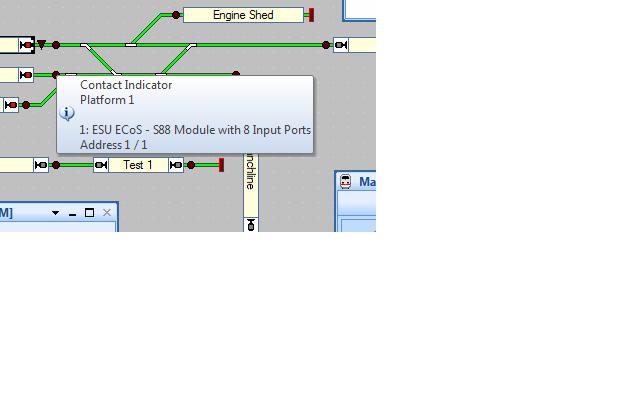
You would of assigned the digital address when you drew your layout and used the CI properties box which you get too when you double click on the CI in edit mode
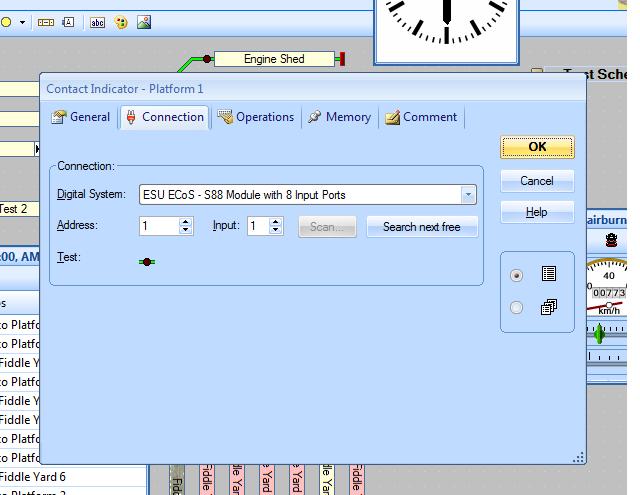
It seems to me Max your blocks have a single physical CI but some how they are duplicated under different names.
Pete
Regards
Pete.
ECOS2 with RR&Co Traincontroller and a load of other electronics so i can sit back and watch the trains go by.
Pete.
ECOS2 with RR&Co Traincontroller and a load of other electronics so i can sit back and watch the trains go by.
Posted
Inactive Member
I'm working on sending you the file. I'll have a look at what you put in the last post. Thanks.
Max
Port Elderley
Port Elderley
Posted
Inactive Member
I'm still looking for the address for the block. It will be the same as the CI because it is connected to the same LB 101.
Before I put in the CIs, the blocks used to work fine without them. I only put the CIs in because the tutorial said I had to. They don't seem to have made any difference to the way the blocks detect the locos.
:???:
Max
Port Elderley
Port Elderley
Posted
Full Member
Regards
Pete.
ECOS2 with RR&Co Traincontroller and a load of other electronics so i can sit back and watch the trains go by.
Pete.
ECOS2 with RR&Co Traincontroller and a load of other electronics so i can sit back and watch the trains go by.
Posted
Inactive Member
The Brake/Stop markers didn't, so more work to do there. I see you have just posted by my email. I'll have a look and see what you said. Cheers.
Max
Port Elderley
Port Elderley
Posted
Inactive Member
Max
Port Elderley
Port Elderley
Posted
Full Member
Blocks 2 and 3 are ok but the remainder all have the same problem delete the little extra bloks so all your blocks just look like this with the shortcut CI symbol in the middle.
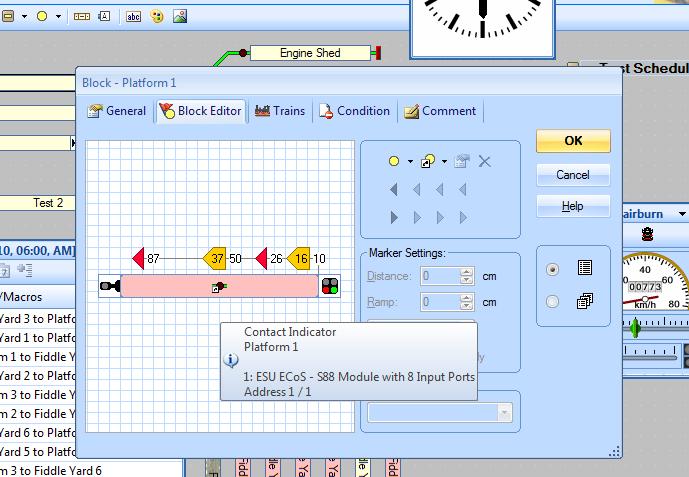
You will notice some of the phantom blocks sharing the same CI hence your error messages.
Once you have done the clean up have go with putting the brake and stop markers in and all should be fine.
Regards
Pete.
ECOS2 with RR&Co Traincontroller and a load of other electronics so i can sit back and watch the trains go by.
Pete.
ECOS2 with RR&Co Traincontroller and a load of other electronics so i can sit back and watch the trains go by.
Posted
Inactive Member
Max
Port Elderley
Port Elderley
Posted
Full Member
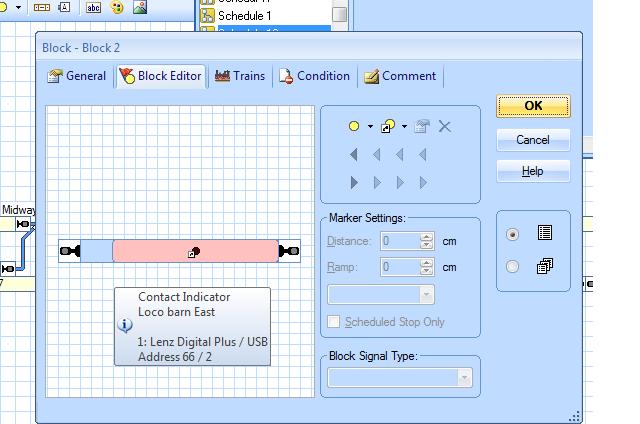
If you click on the block you will find that you can drag the blue edge to the right you will see it is still pink to the left this is the phamptom block underneath.
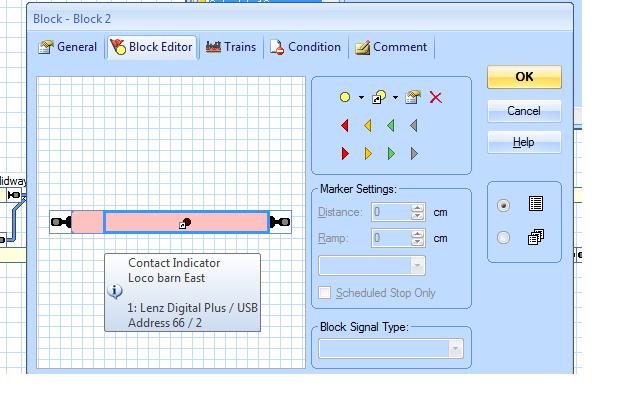
Select the phamton block and it will look like this without the shortcut CI delete it Max
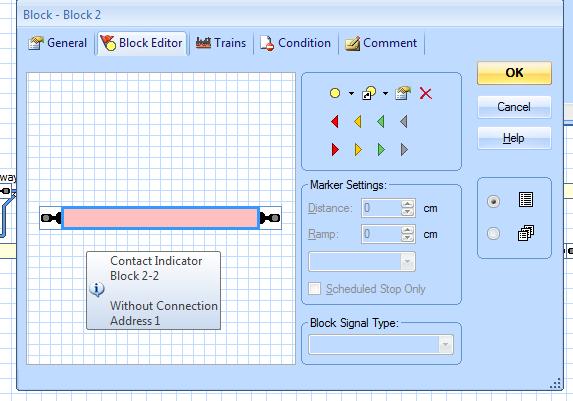
Then you should end up with this stretch the good block out and you are done no more error messages
Max i had exactly the same problem when i started it was only because i went to the get together did i get my head round blocks via a demonstration so you ain't losing the plot, the manual is diabolical re setting up blocks
Regards
Pete.
ECOS2 with RR&Co Traincontroller and a load of other electronics so i can sit back and watch the trains go by.
Pete.
ECOS2 with RR&Co Traincontroller and a load of other electronics so i can sit back and watch the trains go by.
Posted
Inactive Member
Max
Port Elderley
Port Elderley
Posted
Full Member
Righr. Thanks, Pete. I'll have a go at that. Can you see any problems with my brake/stop markers?
No max they looked fine i think you will find in block 3 when you delete your phampton blocks your stop.brake will go with them.
i think poor old TC was just getting confused. just pop them back in and they should work
 Last edit: by wogga
Regards
Pete.
ECOS2 with RR&Co Traincontroller and a load of other electronics so i can sit back and watch the trains go by.
Pete.
ECOS2 with RR&Co Traincontroller and a load of other electronics so i can sit back and watch the trains go by.
Posted
Full Member
Regards
Pete.
ECOS2 with RR&Co Traincontroller and a load of other electronics so i can sit back and watch the trains go by.
Pete.
ECOS2 with RR&Co Traincontroller and a load of other electronics so i can sit back and watch the trains go by.
Posted
Inactive Member
I have reduced the block speed to 60 km/h and that looks better. I reduced the stopping distance as well; which has taken the pressure off the buffer stops! I'm firing up the Lokprogrammer to add a bit of momentum (accel. time), which should help with the aesthetics as well.
I have another question. Is it possible to have more than one Switchbard with Schedules in it? It would look a bit tidier than having all the Schedules in the one folder.
Max
Port Elderley
Port Elderley
Posted
Full Member
Regards
Pete.
ECOS2 with RR&Co Traincontroller and a load of other electronics so i can sit back and watch the trains go by.
Pete.
ECOS2 with RR&Co Traincontroller and a load of other electronics so i can sit back and watch the trains go by.
Posted
Inactive Member
Max
Port Elderley
Port Elderley
1 guest and 0 members have just viewed this.