
RR&Co Computor Control: Discussion
Posted

Inactive Member
Post any questions arising from "First Steps with RR&Co"
No, John. That's next now I have the profiling worked out. We only got back from the conference yesterday and I wanted to finish that off first. I hope to have a crack at it tonight.I thought I did my Dr Railroad screen shot. I'll do another one tonight as well.
Max
Port Elderley
Port Elderley


Posted

Full Member
I thought I did my Dr Railroad screen shot. I'll do another one tonight as well.
You did one but it was before Matt explained howto clear the list
If you open Dr Railroad……..press the little Red X that will nuke everything including all the repeats (I think it prints the error messages every time you boot up)
Now open it again and it will show what Dr Railroad thinks are current errors………….your first post had some nasties and some you can ignore………….I wanted to look at the current list to make sure the nasties had gone
Regards
Posted
Inactive Member
Max
Port Elderley
Port Elderley
Posted

Full Member
I'm going to ask some questions later about my cabooses, which will be in the switching puzzle. They have decoders in them which operate the lights. It will be nice if lights on and off can become part of the sequence.
It's all good fun. :cheers
I look forward to that Max, i guess you have fitted function decoders? therefore they will have a decoder address?
My first thought is that you simply create a new car in Train/Train Set/ Create Car - put in its function decoder address then add its functions just like an engine. Then how to put them in a schedule along with the engine i dunno yet but you have got my undivided attention Max when you get to it.
It must be possible because i have videos of German carriages where the b****y doors open at the station:wow
 Last edit: by wogga
Regards
Pete.
ECOS2 with RR&Co Traincontroller and a load of other electronics so i can sit back and watch the trains go by.
Pete.
ECOS2 with RR&Co Traincontroller and a load of other electronics so i can sit back and watch the trains go by.
Posted
Full Member
Thats correct
My first thought is that you simply create a new car in Train/Train Set/ Create Car - put in its function decoder address then add its functions just like an engine. .
You can either create a train set ……….Train/TrainSet/Change Train Set………………..select the car and then select the engine……make sure the engine is facing the correct way! You can remove the car/loco using this menuThen how to put them in a schedule along with the engine i dunno yet but you have got my undivided attention Max when you get to it
or you can do it by physical operation
Assign the car to a block [Siding]
Back the loco from another block into [Siding] set the stop marker so they auto couple and as an operation at the end of the schedule : JOIN
Note to do this you have to adjust the rules for the coupling schedule
If you start a schedule from the siding block the entire train will be tracked by TC
Uncoupling and separating the car is the reverse just add SEPARATE LOCO ………..when you start the next schedule the loco will depart leaving the car in the block……and TC will reflect this
There are some more precise alternatives to SEPARATE LOCO which are worth looking at
HTH
Posted
Inactive Member
I didn't get anything done last night, as I was doing the thread on the NMRA convention. :pedal
The cabooses have motion decoders in them so the marker lights go from front to back with the forward/reverse button. I'm still a long way from that, but I thought it might create a bit of interest.
I'm hoping to have a go at the markers tonight. :cool wink
Max
Port Elderley
Port Elderley
Posted
Inactive Member
Max
Port Elderley
Port Elderley
Posted
Full Member

Regards
Pete.
ECOS2 with RR&Co Traincontroller and a load of other electronics so i can sit back and watch the trains go by.
Pete.
ECOS2 with RR&Co Traincontroller and a load of other electronics so i can sit back and watch the trains go by.
Posted
Inactive Member
Max
Port Elderley
Port Elderley
Posted
Inactive Member
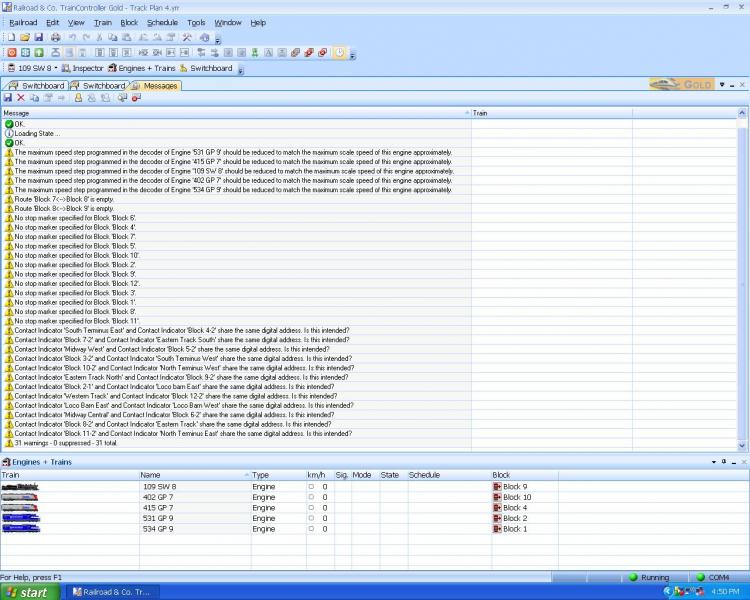
The stop markers are coming. The rest I don't understand.
Now, I have put a brake marker and a stop marker in block 3.
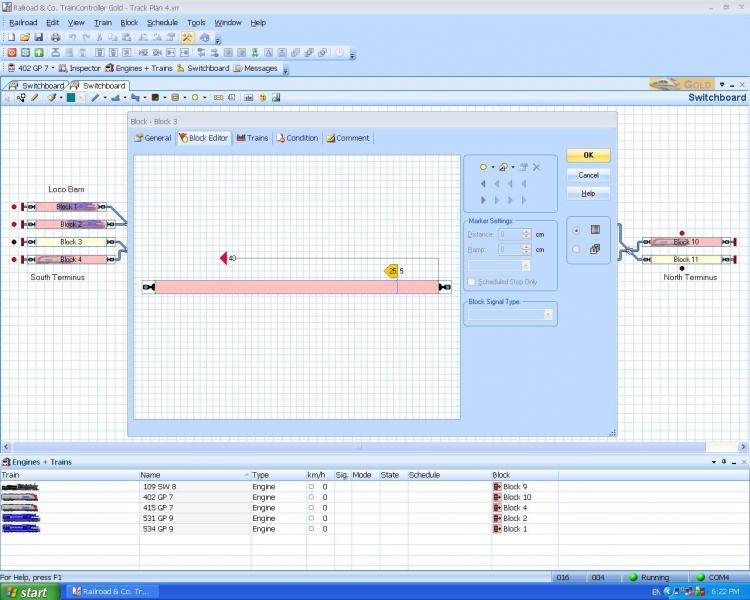
It doesn't look quite like the one in the tutorial. I ended up with several partitions in the block and the dot has disappeared. How do I test if it works? Do I need to make up a schedule and hit Start?
Max
Port Elderley
Port Elderley
Posted
Full Member
Dr Railroad
You can ignore the loco max speed messages………you can highlight them and then select the 7th icon at the top "Suppress Selected Messages" and you wont see them again……there will just be line at the bottom saying 7 messages suppressed…..you can resurrect them by clicking the next icon
All blocks should have stop markers and you are correcting that
You seem to have given the contact indicators (maybe by default) the same address in each block…………I dont think that is a good idea. I am surprised you havent had problems…………….I would amend the contact indicator properties to give each one a unique address………….typically I give the contact indicator the number of the block it is associated with
I will answer the stop marker query in a second post…….I am thinking of ways of making these posts esaier to access and reference
Posted
Full Member
It looks fine to me……I have never quite understood the partitions. The dot is the contact indicator…..if you highlight the block it should then be surrounded by a blue line…..now double click and you should see the properties for the contact indicatorThe stop markers are coming. The rest I don't understand.
Now, I have put a brake marker and a stop marker in block 3.
It doesn't look quite like the one in the tutorial. I ended up with several partitions in the block and the dot has disappeared. How do I test if it works? Do I need to make up a schedule and hit Start?
The sum of the distance and ramp of the brake marker should equal the stop marker distance so in this example if you want a braking ramp of 25 then the distance before the brake is activated should be 15 ie 25+15 = 40 the brake mark distance
How do I test if it works? Do I need to make up a schedule and hit Start?
Yes…………..make a simple two block schedule and check how it works………….try playing with head of train or tail of train
To access the properties of a stop marker highlight the icon and double click……its worth having a nose around eventually for your shunting routine you will have multi stop markers in a block activated by conditions or specific schedules
Have Fun
ps I am away again (for the last time) on Friday………but I will try and check in before I leave
Kind Regards
Posted
Full Member
Here is my block settings for platform one a terminus platform. In the block, loco's come in loco first, stop do a kadee shuffle over my uncoupling ramp to uncouple my coach, i then back a loco in from the TT to couple to the coach to depart. The arriving loco then backs out to the TT ready for the next loco. The actual length of the isolated track i.e. the block is 92cm.
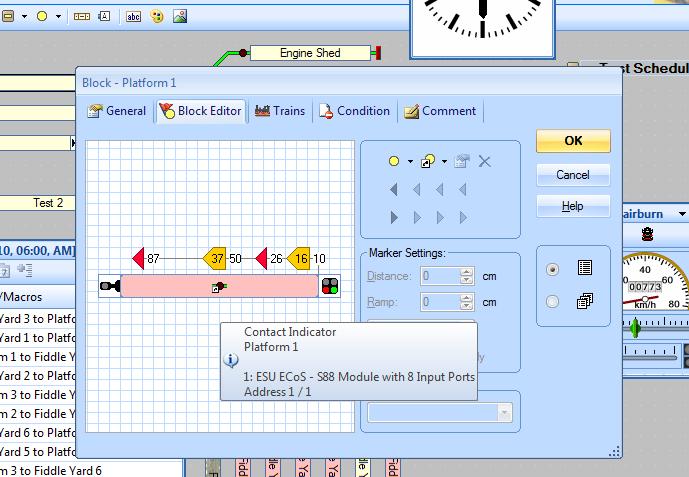
Right here we go then, the lefthand most stop marker is set to 87cm, this allows for the loco to stop before the buffers do the kadee shuffle and then move clear of the coach and stop before the buffers. its brake marker is 37 so that gives me 37cm of braking distance which starts after the loco has been in the block for 50cm. As JD says these add up to the distance of the stop marker 87cm. The stop marker at 26cm into the block is for loco to back in and connect to the coach it has a brake length of 16cm after the loco has been in the block for 10cm again these add up to the total legth to their associated stop marker.
I guess Max you can have any number of stop and brake markers in a block depending on your operations or train lengths you link each set of stop and brake markers to particular schedule, thats how the arriving train ignores the first set of markers. You can also have sets of stop and brake for trains operating in the other direction ideal for island platforms and the like where the block is operated in both directions.
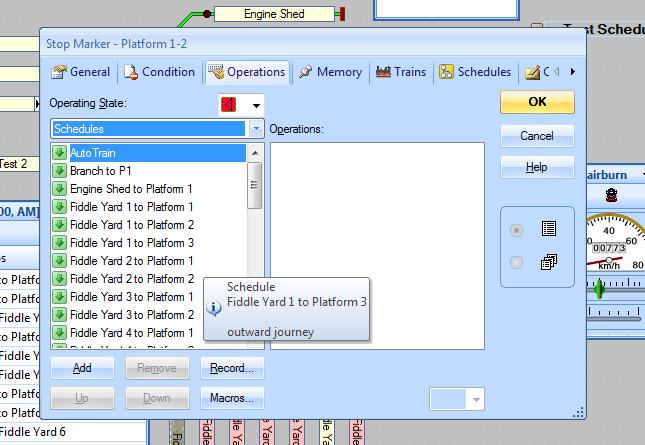
To associate a set of markers to a particular schedule just double click on the marker (stop and then the brake) and a familiar properties window appears where in the operations tab you can select the schedule you want them to work on. Or in typical TC whatever else you want to happen when the loco hits the stop marker because its the massive list of usual operations e.g. sound whistles, operate points or signals, get the burgers on etc. you know the drill by now Max with these property boxes.
Here endeth the lesson.
Pete
Last edit: by wogga
Regards
Pete.
ECOS2 with RR&Co Traincontroller and a load of other electronics so i can sit back and watch the trains go by.
Pete.
ECOS2 with RR&Co Traincontroller and a load of other electronics so i can sit back and watch the trains go by.
Posted
Full Member
Regards
Pete.
ECOS2 with RR&Co Traincontroller and a load of other electronics so i can sit back and watch the trains go by.
Pete.
ECOS2 with RR&Co Traincontroller and a load of other electronics so i can sit back and watch the trains go by.
Posted
Inactive Member
Max
Port Elderley
Port Elderley
Posted
Full Member
Great summary Pete…………..a picture is indeed worth a thousand words………………
The problem is this is now buried in this huge thread and a month (or less) from now will be difficult to find. I think you and Matt were musing about this in the summer. I have some ideas and I thought I would try and shape them into a coherent proposal for discussion when I return from this trip
Kind Regards
Posted
Inactive Member
Max
Port Elderley
Port Elderley
Posted
Full Member
Thanks for the good wishes guys
Great summary Pete…………..a picture is indeed worth a thousand words………………
The problem is this is now buried in this huge thread and a month (or less) from now will be difficult to find. I think you and Matt were musing about this in the summer. I have some ideas and I thought I would try and shape them into a coherent proposal for discussion when I return from this trip
Kind Regards
Count me in JD, we should ask the mods for a section then have new threads (chapterS) for the various sections e.g. Blocks, contact indicators, speed profiling etc. That should make it easier for newbies and oldies alike to refer to.
Can you cut and paste from JD's tute?
I had a mad thought while i was running through the show threads, perhaps we should of been there with a TC demo
Regards
Pete.
ECOS2 with RR&Co Traincontroller and a load of other electronics so i can sit back and watch the trains go by.
Pete.
ECOS2 with RR&Co Traincontroller and a load of other electronics so i can sit back and watch the trains go by.
Posted
Guest user
Posted
Full Member
Regards
Pete.
ECOS2 with RR&Co Traincontroller and a load of other electronics so i can sit back and watch the trains go by.
Pete.
ECOS2 with RR&Co Traincontroller and a load of other electronics so i can sit back and watch the trains go by.
1 guest and 0 members have just viewed this.