
RR&Co Computor Control: Discussion
Posted

Inactive Member
Post any questions arising from "First Steps with RR&Co"
The speed table doesn't look quite right :-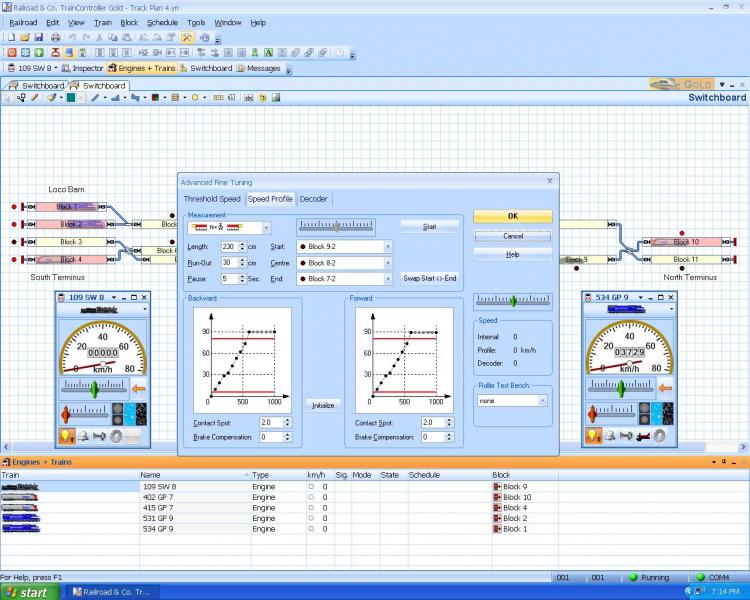
I think 230 might be a bit wrong. The loco started running into the double slips. I'll take 30 cm off and see if that helps.
Max
Port Elderley
Port Elderley


Posted
Guest user
Posted
Inactive Member

The runs get longer, the higher the throttle setting. It makes me think I need to switch off the momentum in the decoder.
Max
Port Elderley
Port Elderley
Posted
Inactive Member
Max
Port Elderley
Port Elderley
Posted

Full Member
Test track, if i had the room i would have a test length of 2 metres and runouts lengths either side of at least two metres each, what i find is when the loco is getting up to its top speed steps i run out of track. I will make a portable test track one day just for speed profiling or a nice size oval.
Speed curve: when i have used Lokpilots and have setup the speed curve with Lokprogrammer on the decoder cv's, TC's resulting speed curve matches it exactly after profiling
However with my other decoders Lenz and TCS i have a lot of work to do to change the CV's to get a good speed curve. I don't have the means of seeing the speed curve of 3rd party decoders.
Top speed and speed steps, to stop getting silly massages from DR R. Your loco top speed e.g. 70mph, when speed profiling all your 28 steps need to be in the curve up to the top speed, i am still working on that i think it is an adjustment of CV5 max speed.
Threshold speed, yep it is great if your loco starts to crawl at speed step one.
Decoder CV's: if you program your decoder correctly and you are 100% happy with its performance i.e. its start speed and speed steps v loco speed, TC won't change or effect it.
De acceleration, CV4 i set this to 1, i let TC control the deacceleration totally through braking and stop markers.
Pete
 Last edit: by wogga
Regards
Pete.
ECOS2 with RR&Co Traincontroller and a load of other electronics so i can sit back and watch the trains go by.
Pete.
ECOS2 with RR&Co Traincontroller and a load of other electronics so i can sit back and watch the trains go by.
Posted
Inactive Member
I always have a straight linear speed table in the decoders.
Did you know that you can manipulate the speed table with the mouse in TC? It solved a lot of problems once I realised that.
I've got 160 cm of middle block and a 30 cm block each end. It seems to be enough so far.
Welcome back. Sol and I are away from Thursday until next Wednesday, so you'll get some peace from me 'till then.
Max
Port Elderley
Port Elderley
Posted

Full Member
You can get that flat curve at the top if CV 5 doesnt match the properties max speed…………..and at the bottom if the loco doesnt run at the start speed
I am afraid I havent done anything with momentum on either my chips or TC…….thats something I have yet to work on:oops:
Can you bring up Dr Railroad a second time and post it so I can see what error messages are still there………there are some on your first list which will cause you anguish in the future if not corrected
To see the detail messages you need to have been operating ie running or having run a schedule…….try it next time……..it gives an insight into the way TC operates
Have fun with Sol
Posted
Inactive Member
Sol is good company. We've got two days travelling to get there and two days back, (approx. 3000 km round trip). Lots of MRR chat to be had.
Max
Port Elderley
Port Elderley
Posted
Inactive Member
I put the loco back onto the Lokprogrammer and changed the speed table, reducing the top speed to 80% which gave me scale 50 m.p.h., through the speed trap. When I went back to TC to profile to 80 km/h, it panned out at an exact 45 degree speed table which is an exact copy of the one in the decoder. Thanks, John. That was good advice. For the time being, I'll leave the momentum switched off.
My next project will include Kadee passive magnets for uncoupling, as I'm hoping to devise a shunting puzzle. This decision has generated two questions, viz:-
For uncoupling, Kadee requires that the couplers be stopped over the magnet, the loco has to move back about 1 mm and then can move forward again, pushing the vehicle by the opened coupler. Is that sequence possible? Or do the magnets need to be electro?
Regards Max
Last edit: by MaxSouthOz
Max
Port Elderley
Port Elderley
Posted
Guest user
Max. Kadee require back & forth irrespective of permanent or electromagnets. It is the latter that prevents un-wanted uncoupling.For uncoupling, Kadee requires that the couplers be stopped over the magnet, the loco has to move back about 1 mm and then can move forward again, pushing the vehicle by the opened coupler. Is that sequence possible? Or do the magnets need to be electro?
Regards Max
Posted
Inactive Member
Max
Port Elderley
Port Elderley
Posted
Guest user
what would be good if you can have a shunting puzzle that guests try and figure out. then when they give up you can say look it is easy you just click this start button, sit back and let TC sort it all out:mrgreen:
Posted
Inactive Member
I like your idea . . . :twisted:
Last edit: by MaxSouthOz
Max
Port Elderley
Port Elderley
Posted
Full Member
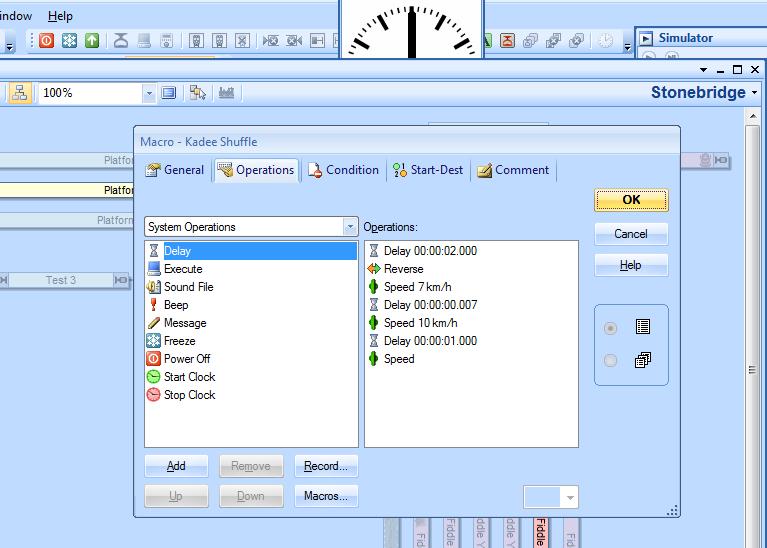
Matt is correct it is in the tutorial……….you do what Geoff calls the Kaydee shuffle as a series of operations at the end of a schedule…….eg
To uncouple
You schedule must stop with coupler over the magnet………so a precise stop marker is key
DELAY 3 sec
REVERSE (this reverses the previous direction of travel)
SPEED 9 mph
DELAY .08 sec
SPEED (on its own this means 0 and is the same as stop)
DELAY 3 sec
If this works you can set it up as a macro so each time you set up a shunting schedule you can enter this with one key stroke
To couple you need a second schedule with a second stop marker which will stop the loco beyond the magnet…….that way as the loco rolls back over the magnet it connects with the wagon and pushes it back beyond the magnet and couples………….I was doing this yesterday and found that I couldnt overcome the Kaydee delayed effect without having a coupling macro where the loco pushes the wagon off the magnet moves forward slightly and then back again quite sharply to couple
If you are creating a train set (in the tutorial there is a loco and 2 carriages) there are other issues but for now I would ignore it.
The first step is to get brake and stop markers set up in your blocks and make sure you are comfortable with setting up conditions so that each schedule use the correct marker
Once you have done that try the little routine set out above.
Its very time consuming setting it up and surprise surprise occasionally very frustrating:twisted:
When it works its brilliant…….yesterday I set up a schedule sequence involving 5 schedules where a light engine moves off shed move back and forth off the shed siding, accross the main line, backs into the bay and couples with the carriage and then moves back and forth on its regular schedule……….this could be with one click to start the sequence but I did it with a time table using the TC fast clock
I would post a video but I managed to crash the computor (my fault not TC) without saving:twisted::twisted::twisted::twisted: so guess what this mornings job is
Have fun and let us know how you get on
Posted
Full Member
I had a play with speed profiling this weekend and can confirm the following observations ref acceleration and deceleration.
When programming a decoder out side of TC, TC's manual says you should set deceleration (CV4) to minimum, i have set mine to one, this then allows TC to control the rate of deceleration through it control of the throttle instigated by the braking markers and stop markers in a block this it does, imo, very very well once the loco is speed profiled correctly.
On the other hand TC does not control acceleration, you will notice when TC starts a loco the throttle will go straight up to the programmed maximum block speed in TC, in my case snapping my passengers necks. Adjusting CV3 to give a lovely gentle acceleration outside of TC will be replicated in TC giving a gentle acceleration up to the set maximum block speed. i didn't know the latter now i do:doublethumb the momentum settings in TC have no effect on the loco if you have done speed profiling.
Regards
Pete.
ECOS2 with RR&Co Traincontroller and a load of other electronics so i can sit back and watch the trains go by.
Pete.
ECOS2 with RR&Co Traincontroller and a load of other electronics so i can sit back and watch the trains go by.
Posted
Full Member
When programming a decoder out side of TC, TC's manual says you should set deceleration (CV4) to minimum, i have set mine to one, this then allows TC to control the rate of deceleration through it control of the throttle instigated by the braking markers and stop markers in a block this it does, imo, very very well once the loco is speed profiled correctly.
On the other hand TC does not control acceleration, you will notice when TC starts a loco the throttle will go straight up to the programmed maximum block speed in TC, in my case snapping my passengers necks. Adjusting CV3 to give a lovely gentle acceleration outside of TC will be replicated in TC giving a gentle acceleration up to the set maximum block speed. i didn't know the latter now i do:doublethumb the momentum settings in TC have no effect on the loco if you have done speed profiling.
I didnt know that either Pete……..although now you explain it makes perfect sense…….deceleration is a product of brake markers……………I could never understand why the train didnt accelerate in the same smooth way as it braked so I did it by reducing the schedule block max speed………which just delays the snapping of the passengers heads until the next block

If I adjust CV3 as you suggest will I then have to re profile my locos:twisted: ?
Posted
Full Member
Yes i know John:oops: but its worth it, luckily i will only have eight to do, John=speed profiling=Jazz=wine so it ain't all that bad.If I adjust CV3 as you suggest will I then have to re profile my locos:twisted: ?
Regards
Pete.
ECOS2 with RR&Co Traincontroller and a load of other electronics so i can sit back and watch the trains go by.
Pete.
ECOS2 with RR&Co Traincontroller and a load of other electronics so i can sit back and watch the trains go by.
Posted
Full Member
[user=434]John Dew[/user] wrote:Yes i know John:oops: but its worth it, luckily i will only have eight to do, John=speed profiling=Jazz=wine so it ain't all that bad.If I adjust CV3 as you suggest will I then have to re profile my locos:twisted: ?
Posted
Inactive Member
I don't have my magnets in yet. I cleverly used Code 75, so I have some excavation work ahead to dig them in. I also plan to do some dry runs using the LH 100 and a swizzle stick to work out exactly where they need to go.
I'm going to ask some questions later about my cabooses, which will be in the switching puzzle. They have decoders in them which operate the lights. It will be nice if lights on and off can become part of the sequence.
It's all good fun. :cheers
Last edit: by MaxSouthOz
Max
Port Elderley
Port Elderley
Posted
Full Member
Have you tried playing with stop and brake markers yet……..thats the next step
ps dont forget to print screen your current Dr Railroad
Kind Regards
1 guest and 0 members have just viewed this.