
RR&Co Computor Control: Discussion
Posted
Guest user
Post any questions arising from "First Steps with RR&Co"
Maxit should save with all the locos in the blocks:hmm
try opening TC from the software (start, all programs, railroad&co) it should open up with a blank plan. go to files then at the bottom of the drop down menu should be a list of the last plans used. click on your plan. this will open up your last used plan, it may work……..

Posted

Inactive Member
My afternoon went down the toilet as I had another visitor with an SW 8 needing sound. He'd had a go himself, so I was behind the 8 ball for a while. All done now. Back to business.
I'm just loading the switcher into the system now. :pedal
 Last edit: by MaxSouthOz
Max
Port Elderley
Port Elderley

Posted
Inactive Member
I've set the Speed Forward and Backward to 80 km/h (50 mph), so the next box (Advanced Fine Tuning - Threshold Speed), values should be a copy of those from the General tab on box one, right? There doesn't seem to be a way of further adjusting them in the Advanced Tuning - Threshold Speed box, so if they are right, I select Speed Profile. If I test them with the green throttle bar and I need to change them, I have to go back to the General tab on box one, I think.
That's as far as I got, because when I moved to the Speed Profile the Train Window seized up. My brain seized up shortly after that and I went to bed.
On another subject, does Dr Railroad drop off the earliest messages as new ones come in? The QSI programmer is like that. You don't have to empty it once it's full. It just keeps the latest message and drops off the oldest one each time.
Last edit: by MaxSouthOz
Max
Port Elderley
Port Elderley
Posted
Guest user
what i do with dr railroad is open it up and then delete the messages and then click on dr railroad again. this refreshes the screen. handy when you are working through to get rid of faults.
Posted
Inactive Member
I understand about you and profiling. Hopefully when you get around to it, I will have got on top of it. One day I might do a thread entitled, "TC for Dummies." I can't be the only thick one on the forum.
I started deleting the messages in Dr Railroad, but there are so many of them, I gave up. What it needs is a bulk eraser.
Max
Port Elderley
Port Elderley
Posted
Guest user
One day I might do a thread entitled, "TC for Dummies." I can't be the only thick one on the forum.
Max i think you will get some serious competition for that title we will all be queing up to win that award:lol::lol:
Brian
Posted
Inactive Member
Max
Port Elderley
Port Elderley
Posted
Guest user
now who`s thick ???
 :lol::cool:
Posted
Guest user
Posted
Inactive Member
Max
Port Elderley
Port Elderley
Posted
Inactive Member
It looks like the "Threshold Speed" is the speed step at which the loco just starts to move. This is set in CV 2 in the decoder; often referred to as start voltage - which is a misnomer as DCC voltage doesn't change, but it is a convenient way of expressing it.
I'll have another go tonight.
Max
Port Elderley
Port Elderley
Posted

Full Member
Just got back……………..37 miles 4.5 hours……….sadly all motoring……………its getting a little colder but we will be sailing thru to the end of September……….I used to race throughout the winter………I am older and wiser nowI've just been re-reading the tutorial for the umpteenth time. On my print out the text looks like it refers to the Speed Profile screen shot. Once I read it in conjuction with the shot above it makes more sense. :oops:
It looks like the "Threshold Speed" is the speed step at which the loco just starts to move. This is set in CV 2 in the decoder; often referred to as start voltage - which is a misnomer as DCC voltage doesn't change, but it is a convenient way of expressing it.
I'll have another go tonight.
Max
I do my TC profiling in combination with some crude cv adjustments
[1] I use the single speed test to check that speed step 28 produces a speed that is close to the max speed set up in the engine profile……………….if it doesnt I adjust CV 5 and 6
[2] I do the threshold speed test and if I cant get less than 5 mph I adjust CV 2 until I do
[3] Only when I am happy with [1] and [2] do I start the complete train profile…….which as previously reported takes 30 minutes per loco and is exciting as watching paint dry
[4] Finally I do a brake test adjusting the TC brake compensation until the loco will always stop within .25" of a designated mark………..I have this set up at 12" from the start of the test block………..and the loco enters the block at 15mph……..but these numbers are just to suit my particular layout……..the big deal is to keep testing (forward and back) and adjusting the brake compensation until it always stops on the nail
PS Dont forget to measure the contact distance carefully
Hope this helps
Posted
Full Member
John i thought you were due to set sail again? i didn't have Vancouver down as a hot spot i imagined it to be akin the NW of England wet and miserable.
I have been thinking about speed profiling my DMU, whilst sweltering and unable to do anything other than ponder. Unlike my loco's which seemed to be straight forward, with the DMU i guess i must profile it as a complete 3 car unit due to there being pick ups at both ends?
Anybody any experience or thoughts with DMU's?
Hi Pete
I answered your first point in my prior email…………I am still sailing:thumbs
Is it always 3 cars? ie the centre car is never removed
If this is the case I think you treat the complete DMU as a single (rather long) loco and I would suggest you have some method of identifying the notional front otherwise you run the risk of unexpected results when you "orientate" the loco when assigning it to a block
If the centre car is sometimes removed or you from time to time insert a 4th car then I think you have to profile each end car as a separate loco and then set them up as a trainset and operate as a consist (the phraseology may be wrong here)………something I have yet to do
Enjoy your holiday!
Posted
Inactive Member
Just got back……………..37 miles 4.5 hours……….sadly all motoring……………its getting a little colder but we will be sailing thru to the end of September……….I used to race throughout the winter………I am older and wiser now
I'm just older, John.
I do my TC profiling in combination with some crude cv adjustments
[1] I use the single speed test to check that speed step 28 produces a speed that is close to the max speed set up in the engine profile……………….if it doesnt I adjust CV 5 and 6
[2] I do the threshold speed test and if I cant get less than 5 mph I adjust CV 2 until I do
Cheers, MaxI'm guessing that you do this in the decoder before you do it in TC? My locos are all set up with the Lokprogrammer and run well. So, I'm repeating this in TC, then?
[3] Only when I am happy with [1] and [2] do I start the complete train profile…….which as previously reported takes 30 minutes per loco and is exciting as watching paint dry
[4] Finally I do a brake test adjusting the TC brake compensation until the loco will always stop within .25" of a designated mark………..I have this set up at 12" from the start of the test block………..and the loco enters the block at 15mph……..but these numbers are just to suit my particular layout……..the big deal is to keep testing (forward and back) and adjusting the brake compensation until it always stops on the nail
PS Dont forget to measure the contact distance carefully. Is the contact distance the measurement from where the wheel meets the rail to the coupler face?
Max
Port Elderley
Port Elderley
Posted
Full Member
max you can hit the red X and it clears the messages, then click dr railroad again.
Hopefully that worked Max?
How many messages do you have now? Could you do a screen print in case you have any which really shouldnt be there
You actually get two types of Message on Dr Railroad……………the permanent ones are really about the structure and give you warnings about blocks without indicators or duplicated turnout numbers………………the best thing with these is go thru them each session and rectify the obvious errors……I always get warned that I havent adjusted the max speed on some of my locos…..I just ignore these
The second set of messages are accessed by clicking on details in the Dr Railroad window and they show line by line the progress (or lack thereof) of schedules as they operate………………..this is an invaluable, if sometimes confusing, tool when troubleshooting
Posted
Full Member
[user=434]John Dew[/user] wrote:I'm guessing that you do this in the decoder before you do it in TC? My locos are all set up with the Lokprogrammer and run well. So, I'm repeating this in TC, then?
[3] Only when I am happy with [1] and [2] do I start the complete train profile…….which as previously reported takes 30 minutes per loco and is exciting as watching paint dry
[4] Finally I do a brake test adjusting the TC brake compensation until the loco will always stop within .25" of a designated mark………..I have this set up at 12" from the start of the test block………..and the loco enters the block at 15mph……..but these numbers are just to suit my particular layout……..the big deal is to keep testing (forward and back) and adjusting the brake compensation until it always stops on the nail
TC creates its own profile with 1000 notional speed steps……………my guess is that if you are happy with the running of your loco……..particularly the crawl speed…….then you wont need to alter any CVs
I would be inclined to go ahead and profile one loco as is (ie with your existing CV settings) and see how it works
PS Dont forget to measure the contact distance carefully. Is the contact distance the measurement from where the wheel meets the rail to the coupler face?
Yes……..assuming that wheel has a pick up……otherwise measure from the coupler face to the first wheel that has a pick up
Probably unnnecesscary for you but important to remember with steam locos that dont always have pickups on the tender or bogey
Posted
Inactive Member
[user=13]Matt[/user] wrote:max you can hit the red X and it clears the messages, then click dr railroad again.
Hopefully that worked Max?
How many messages do you have now? Could you do a screen print in case you have any which really shouldnt be there
You actually get two types of Message on Dr Railroad……………the permanent ones are really about the structure and give you warnings about blocks without indicators or duplicated turnout numbers………………the best thing with these is go thru them each session and rectify the obvious errors……I always get warned that I havent adjusted the max speed on some of my locos…..I just ignore these
The second set of messages are accessed by clicking on details in the Dr Railroad window and they show line by line the progress (or lack thereof) of schedules as they operate………………..this is an invaluable, if sometimes confusing, tool when troubleshooting
Just got in from work. I made the Message window from Dr Railroad a tabbed document and that gave me the red X. Here are the messages before I deleted them:-
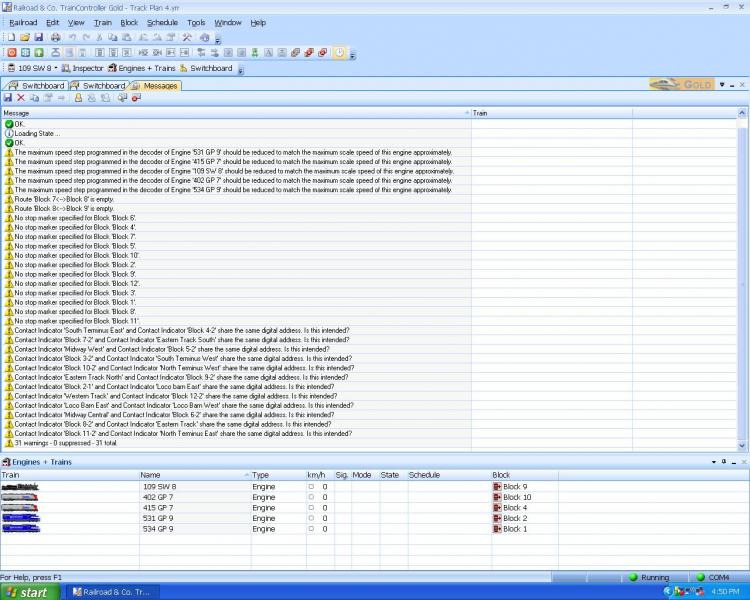
I couldn't find the second type - maybe there aren't any?
Max
Port Elderley
Port Elderley
Posted
Inactive Member
thanks, John.Probably unnnecesscary for you but important to remember with steam locos that dont always have pickups on the tender or bogey
. . . any steam loco that comes here without pickups on the tender bogies gets them fitted.
OK. I'm going to have a go at the SW 8. Interestingly, it's the first loco I ever fitted a sound decoder to - and still has the best sound. That says something - :Red Card
Last edit: by MaxSouthOz
Max
Port Elderley
Port Elderley
Posted
Inactive Member
I am thrilled to report that 109 moves forward at speed step 1. (Losound decoders increase engine rev sounds before this point to produce a proto result). In my case 42 out of 255. :thumbs
However:-
Now I'm in the Speed Profile box. Single Speed ie 1 x … TC step 1000 and decoder step 28 give a reading of 120 km/h forward and backwards instead of 80 km/h. How do I get step 28 close to maximum speed? (80 km/h)
Max
Port Elderley
Port Elderley
Posted
Inactive Member
Now, in Measurement there are seven icon options. To get Start, Centre, End boxes it looks like I need option 5. Enter the block numbers in the three boxes. Set length to 230 cm and run out to 30 cm. Press Start.
The loco is going up and down the track, 1 speed step at a time! Bloody amazing :exclam
Now, where's my glass of wine :question :cheers
Max
Port Elderley
Port Elderley
1 guest and 0 members have just viewed this.