
RR&Co Computor Control: Discussion
Posted

Full Member
Post any questions arising from "First Steps with RR&Co"
Max Dr Railroad can be confusing and it is looking for what can be only described as "best practice" when you set up your blocks TC obviously thinks that at sometime you want to stop a train in them so idealy you should set up brake and stop markers.i must admit Max i was surprised to see you haven't so how do the loco's stop in the end blocks? Putting a stop marker in each block will clear that first raft of error messages.
You plan to stop trains in the intermediate blocks i guess if they were through stations i can only see you being able to that by adding brake and stop markers in both directions
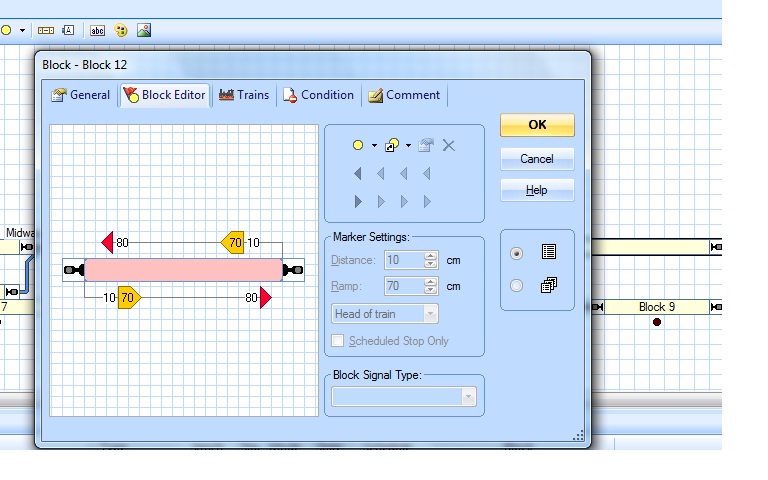
Now as for the contact indicator errors messages yes each CI should have its own unique address on the digital system as they are occupancy i guess this stops the loco being in two places at the same time, i don't use Lenz so i am a bit puzzled on how you set the system up. i will see if i can make sense of it but it may be one for Matt.
Regards
Pete.
ECOS2 with RR&Co Traincontroller and a load of other electronics so i can sit back and watch the trains go by.
Pete.
ECOS2 with RR&Co Traincontroller and a load of other electronics so i can sit back and watch the trains go by.


Posted

Inactive Member
The stop markers will be redundant, but if it keeps TC happy I guess I'd better do it.
:chicken just to separate the subjects . . . .
It's probably the reason I'm confused about Contact Indicators generally. The blocks are monitored by the LB 101s - one for each 2 blocks, and then each LB 101 is connected to a Feedback Module (LR 101). The two LR 101s are addresses 65 and 66 and the LB 101s are ports 1 - 8 on the LRs. So, the detector on block 1 address is 661 on block 2 is 662, up to 668 for block 8.
LR 101 address 65 (just to confuse the iussue), monitors blocks 9 -12. Their addreses are block 9 is 653, block 10 is 652, block 11 is 651 and block 12 is 654. They are aresway backwards because I wired the second LR 101 with the baseboard inverted and, well - you know . . .
So each block has it's own detector with it's own address. Should I make up a ficticious address for the Contact Indicators? I thought they had to be able to work through the detectors and use the same digital addresses
Max
Port Elderley
Port Elderley
Posted
Inactive Member
The digital addreses are specified in the Properties of the Contact Indicators. Belay my question about the ficticious addresses. If the blocks are being detected by the LB 101's with addresses the same as those of the related Contact Indicators, it stands to reason that they will have the same address.
I can't see why it should be a problem for Dr Railroad. :???:
Max
Port Elderley
Port Elderley
Posted
Full Member
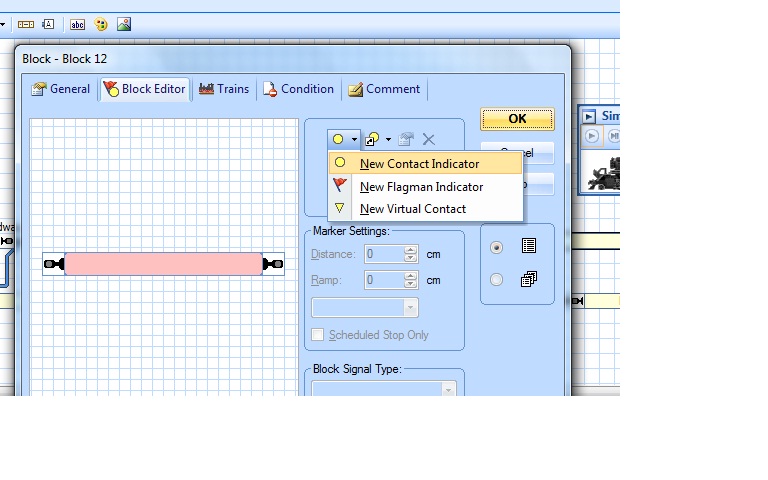
Do not use this use the shortcut to a CI as below which offers you a list of your CI's select the one that covers the block this stops the duplicates this was my Euruka moment at the get together here in the UK.
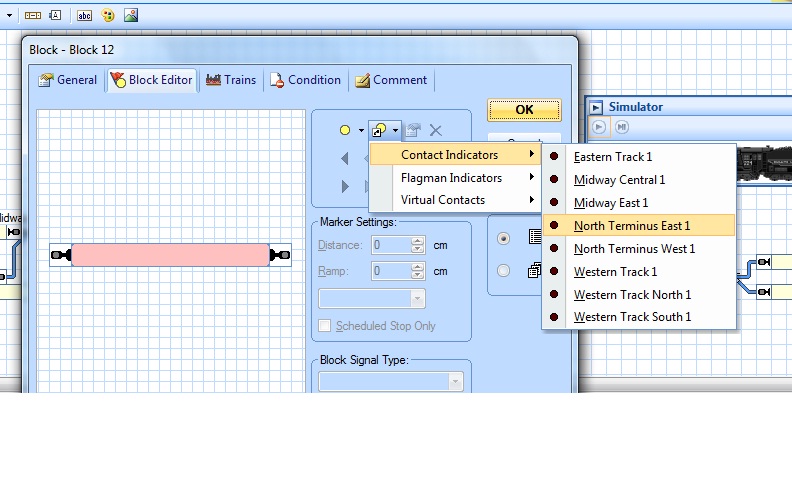
Now back to the drawing board for sched 16????
Regards
Pete.
ECOS2 with RR&Co Traincontroller and a load of other electronics so i can sit back and watch the trains go by.
Pete.
ECOS2 with RR&Co Traincontroller and a load of other electronics so i can sit back and watch the trains go by.
Posted
Inactive Member
Max
Port Elderley
Port Elderley
Posted
Full Member
If it runs in the sim it should run on the layout, TC is programmed right i am just wondering if its a hardware issue i have my loco'd sat in the block physically but not showing detection on TC usually down to crap contacts or a dirty track in my case.
 Last edit: by wogga
Regards
Pete.
ECOS2 with RR&Co Traincontroller and a load of other electronics so i can sit back and watch the trains go by.
Pete.
ECOS2 with RR&Co Traincontroller and a load of other electronics so i can sit back and watch the trains go by.
Posted
Inactive Member
I have redone all my CIs and Blocks and I am running the Schedules, who knows, it might even help with Schedule 1 re-starting. Fingers crossed.
Thanks. :cheers
Max
Port Elderley
Port Elderley
Posted
Guest user
Posted
Inactive Member
The turnouts won't change until Sched 1 starts. If I go Schedule 1, right click, start - the turnout changes for the new Schedule and off she goes.
I'd be doubtful if it's hardware related. I just hit start and away it went, then.
Max
Port Elderley
Port Elderley
Posted
Inactive Member
Back to the drawing board. :shock:
Max
Port Elderley
Port Elderley
Posted
Inactive Member

Still no Schedule 1 start, though. :pedal
Max
Port Elderley
Port Elderley
Posted
Inactive Member
Max
Port Elderley
Port Elderley
Posted
Guest user
should make a fortune !!!
:lol::cool:
Posted
Guest user
forum down so slow to catch up
i think the CI name is the same as the blocks, add an B to the end of each of the block names or an I at the start of the IC name. this will then seperate them.
if you right click on a message (or error) you can navigate straight to the properties page the error is talking about. this is a handy shortcut.
how do you run your successors?
in schedule 16 in operations after the schedule add a delay of 30 seconds and the add schedule 1. i run all my schedules this way rather than use a successor, just add it to the list at the end of the previous schedule.
another option is a flagman (yes i know they mess up a nice trackplan and is old school) but if all else fails set one up to-
trigger
1, operate when the end block is activated
2, schedule 16 must be active
action
start sch 1
this way when the train enters the last block on schedule 16 the flagman will trigger and start sch 1
an alternative is an on/off switch so the trigger will be the same as the flagman but it will allow you to manualy push the button to trigger sch 1
Posted
Guest user
TC takes away the need to tweak CV's in order to get the right stopping disatnce and Max speed. rather than mess about with CV's once the loco is profiled you can set up a brake marker (when the loco starts to brake) and a stop marker (when the loco stops). this is handy when stopping at a station or you need the loco to stop at a specific point.
i am no expert as i havn't got this far:oops:
Posted
Inactive Member
My Successors are set up in the Schedule under the Successors button. It should just run on from 16 back to 1 and then back down the stack. I can't understand why it isn't. Schedule 1 will start with the Start button and run through again, but it stops at 16. If Schedule 1 will hand over to Schedule 2, why wouldn't Schedule 16 hand over to Schedule 1? I doesn't make any sense and that's what bugs me.
I like your idea and I'll give it a go tomorrow. Maybe my brain will have uncramped itself by then. :lol:
I rather suspected that the brake/stop markers obviated the need for momentum in the decoder. I've been putting off changing it until I got the Schedules to run continuously.
I've got to put in the stops to get Dr Railroad off my back, so it might be time to bite the bullet. I guess putting in brake/stops will give me something to do while I'm pondering the Schedules. :roll:
I'll try to sort out the Contact Indicators as well. :pedalCheers
Max
Port Elderley
Port Elderley
Posted
Guest user
i like running schedule 2 from schedule 1 using the operations in the properties for sch 1 (end of sch). i think by doing it this way you have everything that will happen in one list and it does makes it easier, you can then go down the list to check. also by adding the next sch at the end of the list you ensure the sch has finished doing what it needs to do. i think TC ends a schedule when the loco stops and then runs the operations (finished), if a sch is a successor then it will start when the train stops (end of sch) and not when the operations have finished (the bells and whistles), if that makes sense:thudif a loco stops on sch 1 and starts on sch 2 it may still be performing the end of sch operations for sch 1 and cause problems.
Posted
Full Member
Regards
Pete.
ECOS2 with RR&Co Traincontroller and a load of other electronics so i can sit back and watch the trains go by.
Pete.
ECOS2 with RR&Co Traincontroller and a load of other electronics so i can sit back and watch the trains go by.
Posted
Inactive Member
:doublethumb It worked well, Matt. All I did was add Schedule 1 to the list of operations at the finish of Schedule 16. My layout will now run continuously. Thanks.
Re CI addresses in 5 and 7 :oops:
Thanks, Pete. I hadn't noticed that. It just goes to show how relevant it is at the moment.
Regarding Brake and Stop markers; Is it necessary to remove the momentum from CVs 3 and 4 before I start putting the markers in?
Max
Port Elderley
Port Elderley
Posted
Full Member
Max this is where you run a loco over a length of track with 3 blocks in succession with no points in between. i couldn't do this so i have a seperate section of track just for speed profiling. the first block if the start block, the second the measurement block and the third the stopping block. When you go profiling TC will run your engine back and forth at the different speed steps on these 3 sections and measure the engines characteristics. With this done and tuned when you use stop and brake markers you should end up with super smooth de acceleration and engine stopping on the same spot within a millimetre or three every time and it does. Great for stopping over uncouplers, signals and platform markers..every time Max!
When speed profiling a loco Max, 30 minutes is a typical time for the test because the first pass back and forth is at speedstep one and the guys recommend that the middle section of the profiling track is 2 metres long, mine is a yard of Peco and i am happy with the results. The only problem i have is the start and finish lengths aren't long enough so when its at the higher speed steps it over runs either end so i have to stop by hand wait till it stops running, changes direcection and release it..it works sort of. I see on your layout Max you could possibly use Blocks 7,8 & 9 for speed profiling as they appear to be consequtive.
When you setup your loco in Create Engine there is a tab called speed, so right click one one or your engines and go to the properties and click on the speed tab. You will see a button called automatic speed and brake…click it it will open a box called speed
, at the bottom you will see an unticked check box advanced fine tuning check the box to enable it then hit the advanced fine tuning button…..your in and you should have a box with 3 tabs, the decoder doesn't do anything for me.
The first tab is Threshold this is where you set the point when your loco starts to move smoothly, ideally what they mean is, if your loco cv's are correct when you select speedstep 1 hopefully your engine will start to move very slowly if the conditions are right and cv's good do you agree? This is what you ned to store for both forward and backward directions.
Now the second tab is the baby speed profile now you need to read JD's tute. Basically this is where you tell TC what are your test section Blocks are, how long they are, which is start etc, when you click on drop menu arrow Max you notice by magic your blocks are listed to select.
This is where you will run speed profiling from Max and it will become a close friend, enemy and whatever else it can become depends how perfect you want it.
Just a quick note Max in create engine you will now need to enter data such as the lentgh of your loco, scale, length to first pick up from front and from the back and a few other settings. this so TC knows that when it senses detection in a block that so many centimetres of the loco are already passed the point and how much is still left to cross it needs this data so it can calculate where to stop the engine accurately.
Last edit: by wogga
Regards
Pete.
ECOS2 with RR&Co Traincontroller and a load of other electronics so i can sit back and watch the trains go by.
Pete.
ECOS2 with RR&Co Traincontroller and a load of other electronics so i can sit back and watch the trains go by.
1 guest and 0 members have just viewed this.