
RR&Co Computor Control: Discussion
Posted
Guest user
Post any questions arising from "First Steps with RR&Co"
Maxthis may be your problem, i made the same mistake. you should only have one dispatch window. mine were conflicting with each other, i think i had 96:oops: everytime you press new dispatch window a new one pops up with all the old details in, you then edit a schedule in that dispatch window but the old schedule is still present under a different dispatch window. on the same drop down menu the new dispatch window is you have a selection with dispatcher. select this and another list shows with all the old dispatch windows on, delete all of them except the most recent. when you want to go into the dispatcher use this option.

Posted

Inactive Member
Max
Port Elderley
Port Elderley

Posted
Inactive Member
Which one is the most recent?
How do I Delete them?
I can see them all lined up, but I can't get a Delete button and highlighting each one won't delete with the keyboard button.
What's the secret?
That's three questions.

Max
Port Elderley
Port Elderley
Posted
Guest user
right click on each window in the list and select delete (i think):roll:
no that is wrong you have to open up the window and then delete it using the X button, it has been a while:???:
no secret, john dew told me to do mine when my schedules strted playing up:lol:
run dr railroad and it will pick up any faults like duplicate named blocks etc. work through the list, it solves a lot of problems. i now do this after a session of fiddling just to be sure.
Posted
Inactive Member
Thanks for trying.

Max
Port Elderley
Port Elderley
Posted
Inactive Member
I may have to uninstall RR&C0 and make a new one. I bet all this is really inspiring other members to try TC. :Red Card
Fancy using the X to delete Switchboards !!!!!!!
Max
Port Elderley
Port Elderley
Posted
Guest user
if you delete the schedules, then run dr railroad it will highlight any faults up to that point. then after creating a schedule run dr railroad to see if any faults have been picked up whilst editing the schedule.
the dispatcher screen is the one with the schedules running down the left, when you click a schedule the route and blocks Will be highlighted on the right. at the bottom left you will have 3 options
blocks
routes
schedules
make sure schedules is highlighted. you can also make the dispatcher dockable so you can swap between the switchboard and dispatcher. it is a bit confusing as they are both called the same thing:shock:
Posted
Inactive Member
Dr Railroad doesn't work on mine.
I've deleted all the excess Switchboards - or what ever they are. Reset, Stopped Trains. Stopped Schedules and everything else I can think of. Got my Despatcher Window set up with new Schedules.
Now TC won't connect to the Digital System.
I'm going to work. :twisted:
Max
Port Elderley
Port Elderley
Posted
Guest user
Brian
Posted
Inactive Member
Perhaps if we're going to push it, a garden variety computer won't be good enough. I've already increased the RAM to 2 Gigabytes, which in theory should be heaps, but as soon as I get a bit serious it can't cope.
Added to all this is the issue that the language behind it is German, translated into English, as are the paradigms. I'm no mental giant, and so far I have found the instructions (what there are of them), to be perverse and often counter-intuitive. The manual is hundreds of pages long, but it repeats sections over and over - each time with less actual instructions and more bragging about what TC will do.
As an example of the perversity of TC, the Despatcher Window calls itself a Switchboard when it opens. My window tab doesn't always have the option to open it other than through the "New" button. That way I have been blindly creating dozens of clones of my original set of Schedules in the same way Matt did. There is no delete button for these clones BUT there is a X on them which says Close when you put the cursor on it. It doesn't actually close it - it DELETES IT!
What hope have we got? There are more examples, but you see what I mean. Pete, Matt, Geoff and I, et. al., are hammering away at it and we will eventually understand it. My download version has now got to the state that it is unable to connect to the Digital System - AGAIN! Last time this happened I had to completely uninstall my copy and download a fresh one.
That means re-drawing the Track Plan, reloading the locos and creating 16 new Schedules. I'm going to have one last attempt to resurrect it, but then it's back to Square One.
Thank God for YMR!! The RR&Co forum members are either deliberately or intrinsically obtuse.
 Last edit: by MaxSouthOz
Max
Port Elderley
Port Elderley
Posted
Inactive Member

Last edit: by MaxSouthOz
Max
Port Elderley
Port Elderley
Posted
Inactive Member
Found Dr Railroad - it is called Messages.
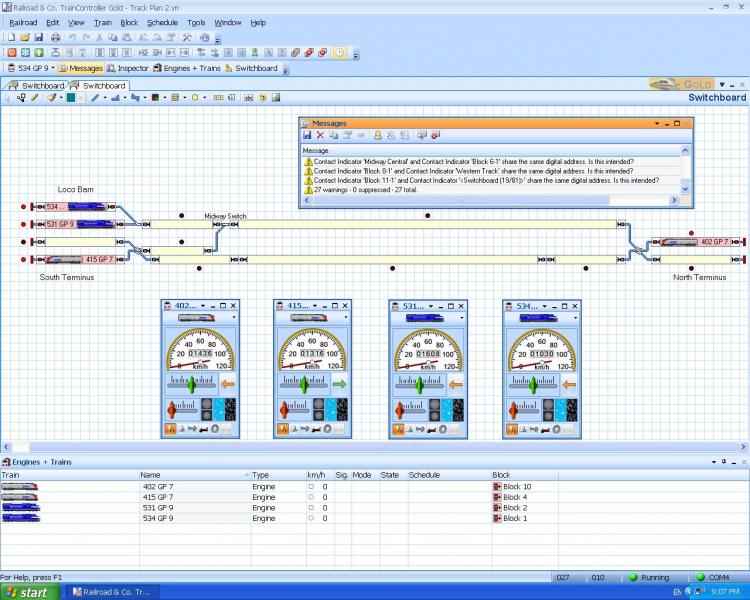
Can anyone tell me how to clear the messages, please?
Max
Port Elderley
Port Elderley
Posted
Guest user
if you click on the red x it should clear that message (but the problem will still be present). in your messages it has picked up duplicate names, if you go to the block or indicator and change the name the message will not show again. i call my indicators the same as the block and then add an I at the end to show it is the indiator and not the block. it is a good idea to clear all the dr railroad errors to avoid conflict. also if you have a problem with a schedule you can run the message screen and it will indicate what is happening something like this
train address 3 engine start
train address 3 sounds horn
train address 3 exits block station 1
so you get a running dialog, this is good when finding falts in a schedule. for example if you have a schedule waiting to start but can't because the block ahead is occupied you will get timed out message. you can then extend the start time.
Posted

Full Member
Also Max don't forget railroad by default should save your current layout file to my documents/railroad&cc/traincontroller. But if you open a back up file from say a backup hard disc or pendrive when you have finished working and save the file it will save back to where you opened it from i.e. backup hard disc or pendrive.
i always open and save to my documents/railroad&cc/traincontroller folder and it appears to be stable, i never run the program from the files on my backup devices i just use them for backup…its just a thought Max.
Pete
my DMU;s arrived but we are 120 miles apart
with a bit of luck its going to get a Marty makeover (i am assuming that our Perth based Marty is the one and the same as Marty Mc on RMweb the loco makeover maniac) and be making a noise:lol::lol::lol:.
Last edit: by wogga
Regards
Pete.
ECOS2 with RR&Co Traincontroller and a load of other electronics so i can sit back and watch the trains go by.
Pete.
ECOS2 with RR&Co Traincontroller and a load of other electronics so i can sit back and watch the trains go by.
Posted
Inactive Member
Max
Port Elderley
Port Elderley
Posted
Inactive Member
The row of Schedules still stops at Schedule 16, however. The Successor is set to Schedule 1, but it ignores it and stops. More work to do there.
I've solved the lack of connection problem. I have two Lenz systems. One defaults to ON at startup and one defaults to OFF. The sceond one drives my TC layout. If I shut TC down to re-boot it, the Lenz defaults to OFF. I have mounted a bracket where I can park the LH 100 so I can see it. Now if I re-boot I can see OFF in the window and press the red St button.
I'm not sure about the messages in Dr Railroad. I don't need stop markers and the Contact Indicators digital addresses are the same as the Blocks because they use the same LB 101. Any ideas, lads?
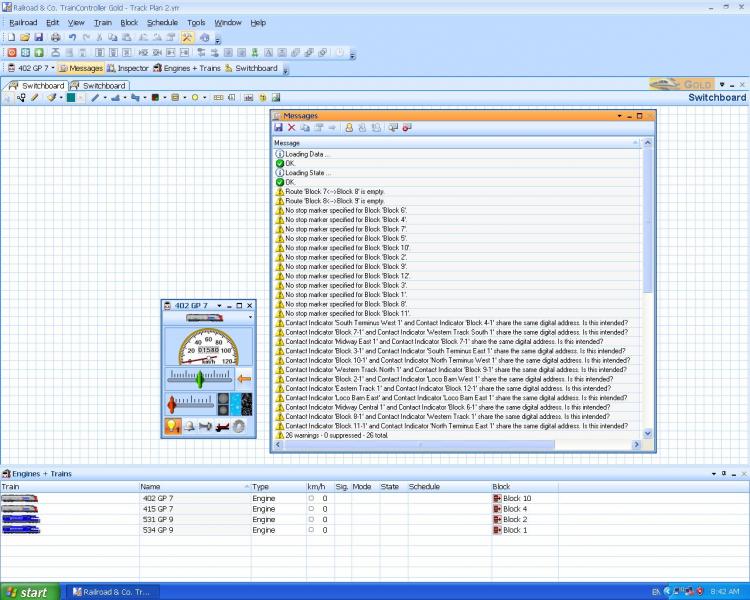
Cheers
Max
Max
Port Elderley
Port Elderley
Posted
Inactive Member
Max
Port Elderley
Port Elderley
Posted
Full Member
On each schedule put at least 120 seconds in the try again box as below, this is if for some reason the a schedule can't start at the point it wants to due to conditions not been correct it will continue to try for two minutes by which time points should of switched etc.
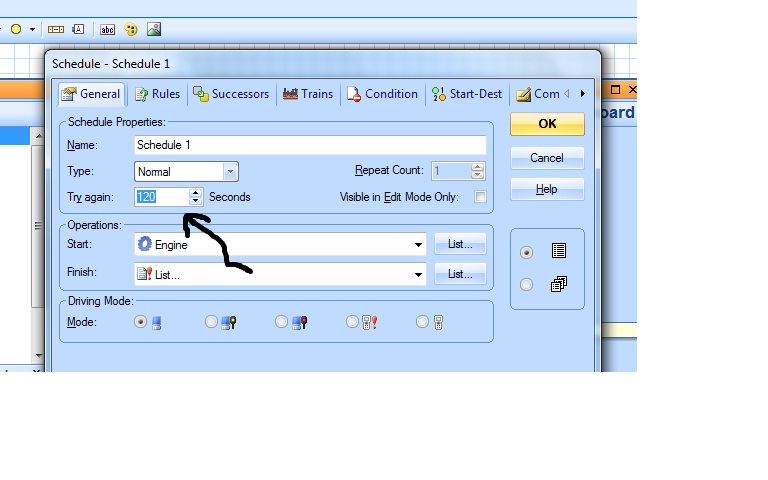
Regards
Pete.
ECOS2 with RR&Co Traincontroller and a load of other electronics so i can sit back and watch the trains go by.
Pete.
ECOS2 with RR&Co Traincontroller and a load of other electronics so i can sit back and watch the trains go by.
Posted
Inactive Member
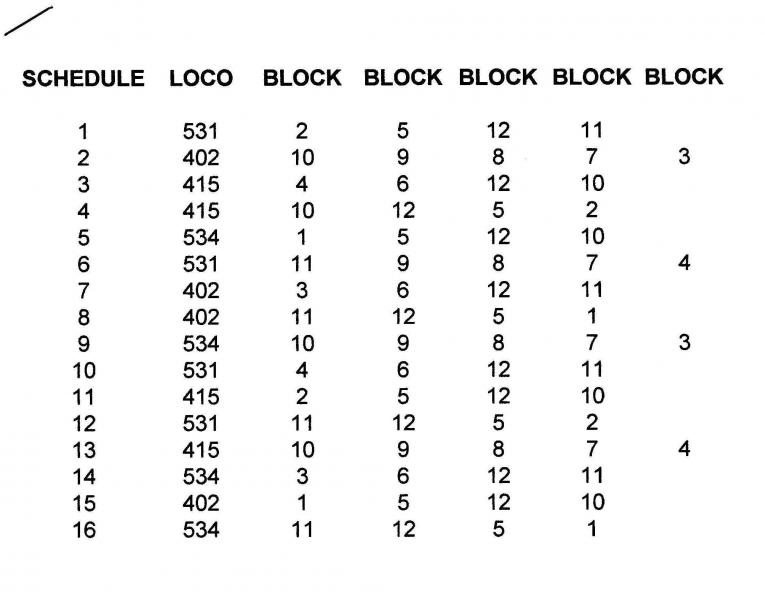
531 is in Block 2 to start the process and it returns there in Schedule 12. I know it's not starting as the Schedules stop appearing in the Engines and Trains - and when I click Schedule - Start, the engine starts up straight away.
Max
Port Elderley
Port Elderley
Posted
Inactive Member
On each schedule put at least 120 seconds in the try again box as below, this is if for some reason the a schedule can't start at the point it wants to due to conditions not been correct it will continue to try for two minutes by which time points should of switched etc.
I tried 60 seconds before. The engines start straight away and then the loco waits 60 seconds before it moves off. With 60 seconds in Schedule 1 nothing happens. If I monitor Active Schedules, after Schedule 16 it goes blank.
Puzzling, ain't it? :???:
Max
Port Elderley
Port Elderley
1 guest and 0 members have just viewed this.