
RR&Co Computor Control: Discussion
Posted

Inactive Member
Post any questions arising from "First Steps with RR&Co"
OK Two things. Where is "Options for Actions After the Schedule?"The engine sounds are on F8. All the rest are programmed into the decoder.
I'm afraid it's all a bit too cryptic for me, Matt. :oops:
 Last edit: by MaxSouthOz
Max
Port Elderley
Port Elderley


Posted

Full Member
Pete
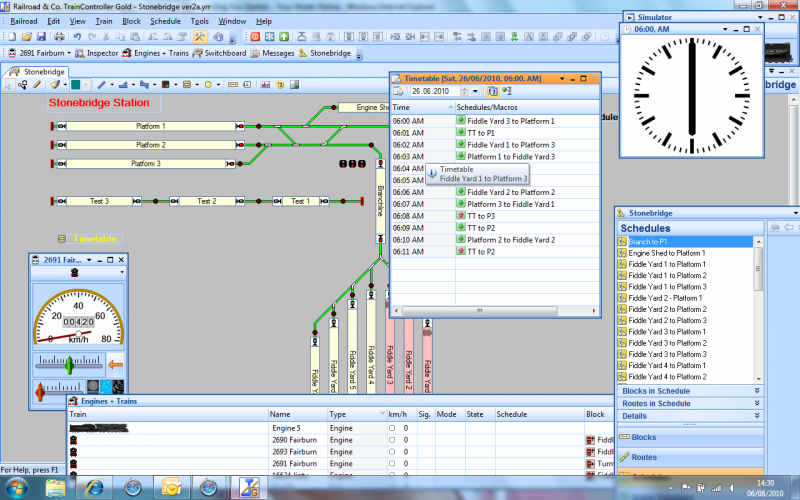
to me
Regards
Pete.
ECOS2 with RR&Co Traincontroller and a load of other electronics so i can sit back and watch the trains go by.
Pete.
ECOS2 with RR&Co Traincontroller and a load of other electronics so i can sit back and watch the trains go by.
Posted
Full Member
OK Two things. Where is "Options for Actions After the Schedule?"
The engine sounds are on F8. All the rest are programmed into the decoder.
I'm afraid it's all a bit too cryptic for me, Matt. :oops:
they are the operations at the end of the schedule that you set at the schedule "finish" menu in the operations box. Max so in there you can set the sound off engine stop etc just like at the start of the schedule.
, Sorry Matt i was on a roll don't mean to steal your thunder.
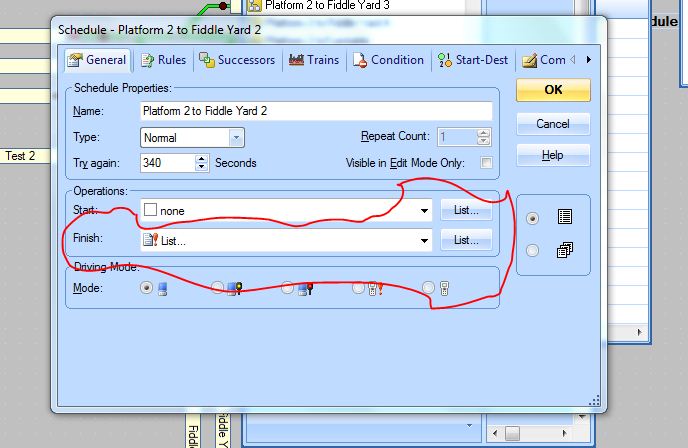
Last edit: by wogga
Regards
Pete.
ECOS2 with RR&Co Traincontroller and a load of other electronics so i can sit back and watch the trains go by.
Pete.
ECOS2 with RR&Co Traincontroller and a load of other electronics so i can sit back and watch the trains go by.
Posted
Inactive Member
It looks like the Timetable is a list of timed schedules for each train/loco. I lucked on to the Successor option and used that to run each of them one after the other in a kind of macro, just purely to help me learn.
I have the Sound Off icon, which is a grey gear, in the finish box of the Operations option, but it triggers as the loco enters the last block. As the loco is still slowing down to stop with its momentum, when the Sound Off operates it switches off the engine sound instantly. To get the engine shut down sequence to play correctly, the loco must be stationary.
I'm going to play around with Matt's suggestions, but I'm not sure I understand them yet. :oops:
I'm going to start off with delaying the start of the new successor schedule by say 5 seconds, as well. There is one Sequence where 402 stops and then begins the Successor schedule from the same block. With no delay it looks a bit odd as it stops and instantly starts again in the opposite direction. Extra time between the schedules should make the thing look a bit more interesting, as well.
Thanks for your interest.
Last edit: by MaxSouthOz
Max
Port Elderley
Port Elderley
Posted
Full Member
Must admit i am surprised the sound goes off when it enters the last block on the finish operations i wouldn't have expected that?
i will see how i get on and report back. Have fun.
Pete
Regards
Pete.
ECOS2 with RR&Co Traincontroller and a load of other electronics so i can sit back and watch the trains go by.
Pete.
ECOS2 with RR&Co Traincontroller and a load of other electronics so i can sit back and watch the trains go by.
Posted
Inactive Member
Max
Port Elderley
Port Elderley
Posted
Guest user
you can run the next schedule from the finish tab in operations using a delay. i have only played with the uncouple in the tut and not on the layout. in one week you will be tweaking to high heaven and well ahead of the game:thumbs
Pete
don't worry you are not stealing my thunder:mrgreen: providing we get to the place we need to go it doesn't matter how we get there. i must make a confession, i have not opened up TC in over a month. i have not lost interest or anything like that i just haven't had the time.
i will ask the question to see if we have anymore ways to start a schedule
1 a successor
2 finish tab in properties (operations)
3 start tab in properties (operations)
4 push button
5 timetable
anymore?
Posted
Full Member
Max, i have a Loksound 3.5 to fit in the power car, i have had it blown with a Howes Class 108 DMU scheme. i think i have to fit a second decoder in another car to get the lights to work correctly. i have a few cheapy bachmann decoders lurking some where so one of them will do they are ESU Lokpilot Basic anyway.Good luck, Pete. What brand of sound decoder does your DMU have?
I will u,se the default speaker but look at where i can fit a bass reflex or have both in parallel depends what i find when i get the body off.
Thats if the posty arrives with the DMU today but i have some grandad type duties to perform first so i may not have a chance until tomorrow, grandad? i am only 51 whats that all about?
i shall report back good or bad.
Pete
Regards
Pete.
ECOS2 with RR&Co Traincontroller and a load of other electronics so i can sit back and watch the trains go by.
Pete.
ECOS2 with RR&Co Traincontroller and a load of other electronics so i can sit back and watch the trains go by.
Posted
Full Member
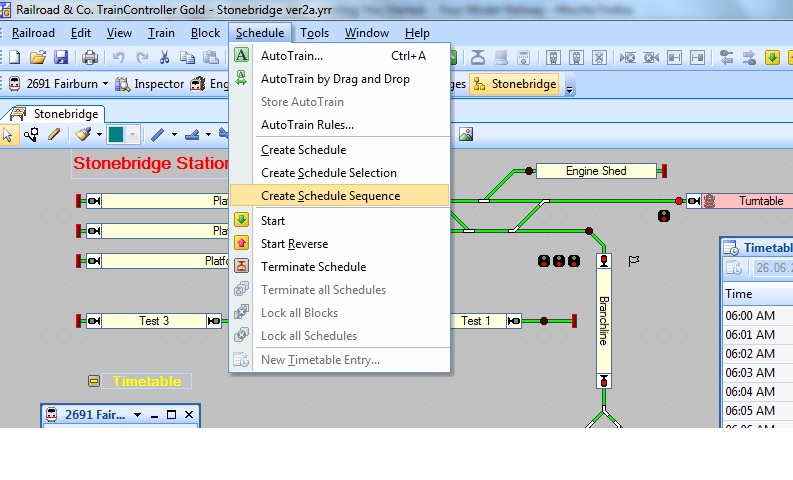
Regards
Pete.
ECOS2 with RR&Co Traincontroller and a load of other electronics so i can sit back and watch the trains go by.
Pete.
ECOS2 with RR&Co Traincontroller and a load of other electronics so i can sit back and watch the trains go by.
Posted
Inactive Member
If I can sort out my problems, it will work for you as I'm using 3.5 as well. :thumbs
FYI - I didn't use the Schedule selection; I just used the option in the Schedule itself to appoint a successor.
Matt
I'll have a look for the tab you suggest. At the moment, I'm looking at the Finish option box in the Schedule.
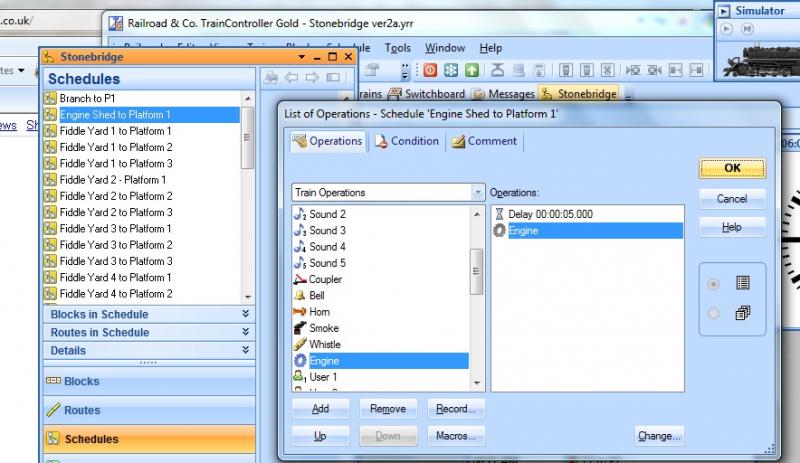
Viz:- Edit mode. Despatcher Window. Select Schedules. Right click Schedule 1. General. See the Finish selection? I'm selecting the grey (engine off), icon. I need to delay this happening, so I go into List. I select Delay and Add. Then I put 5 seconds in the time clock. Click OK twice. The grey icon has disappeared and the List icon is there.
The delay doesn't happen. When the loco gets to the end block, the engine keeps running.
I don't know how to find the Finish tab in Operations, but I'll keep looking - unless you put me out of my misery and tell me where it is. Click by click, if you know what I mean. :oops:
Last edit: by MaxSouthOz
Max
Port Elderley
Port Elderley
Posted
Guest user
in edit mode
go to window and select dispatcher, select schedules in the bottom left
all your schedules will be listed on the left hand side and the plan on the right. right click on any schedule (the one you want to edit) and the click properties. then in the general tab you will see operations and start and finish. click on list next to finish. a new box will pop up, in this box you can get TC to do whatever you want.
Posted
Full Member
Personal opinion here, now i shyed away from using successors in a schedule to start the next sched, because if i wanted to manually run an ad hoc schedule e.g. block a to block b, when it completed obviously it triggered the successor to start, which i found annoying especially if i was only fine tuning brake and stop markers in that particular schedule. Just a thought.
Last edit: by wogga
Regards
Pete.
ECOS2 with RR&Co Traincontroller and a load of other electronics so i can sit back and watch the trains go by.
Pete.
ECOS2 with RR&Co Traincontroller and a load of other electronics so i can sit back and watch the trains go by.
Posted
Guest user
could you not use a push button, then set up each successor with a condition saying the button must be off. that way if you only want one schedule to run you press the button:hmm
i must find some time.
Posted
Full Member
What i will say Matt while my layout runs ok for me at the moment i haven't dare look in Dr Railroad yet? I'll save that for when i am nearly done i think.
I have a couple of hyper active seep motors that ruin my timetable by switching and bouncing back? i see they do a self latching seep motor a PM4 i will investigate them, other that that its slow mo motors, those traintronics look ok.
After my holidays i am moving my layout against a different wall so i can get a longer scenic length and her indoors can get at the window to clean it! I will also hinge the boards against the wall so they can be raised up to get me better access to the wiring etc.
DMU didn't arrive today..gutted.
Regards
Pete.
ECOS2 with RR&Co Traincontroller and a load of other electronics so i can sit back and watch the trains go by.
Pete.
ECOS2 with RR&Co Traincontroller and a load of other electronics so i can sit back and watch the trains go by.
Posted
Inactive Member
Matt. Here is what I've done. It should explain the problem:-
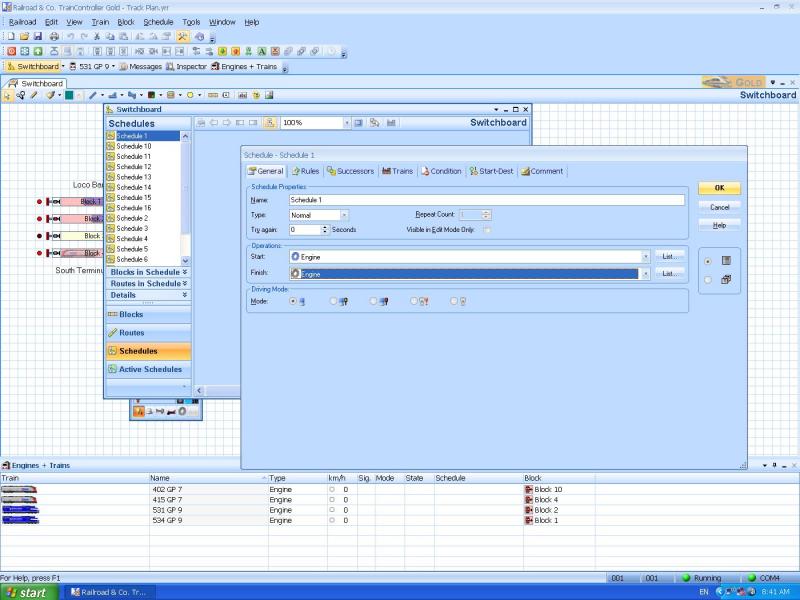
You can see the Engine Off icon is a grey gear wheel.
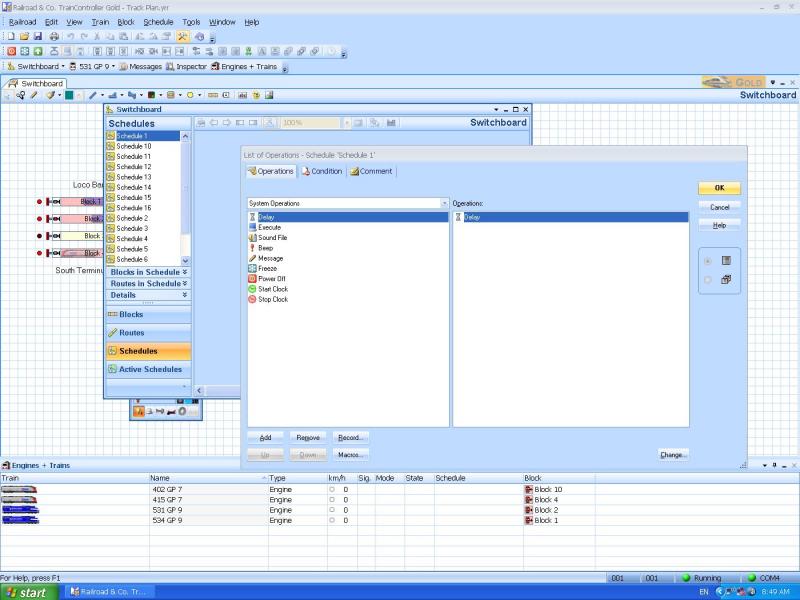
In System Operations I added the Delay option.
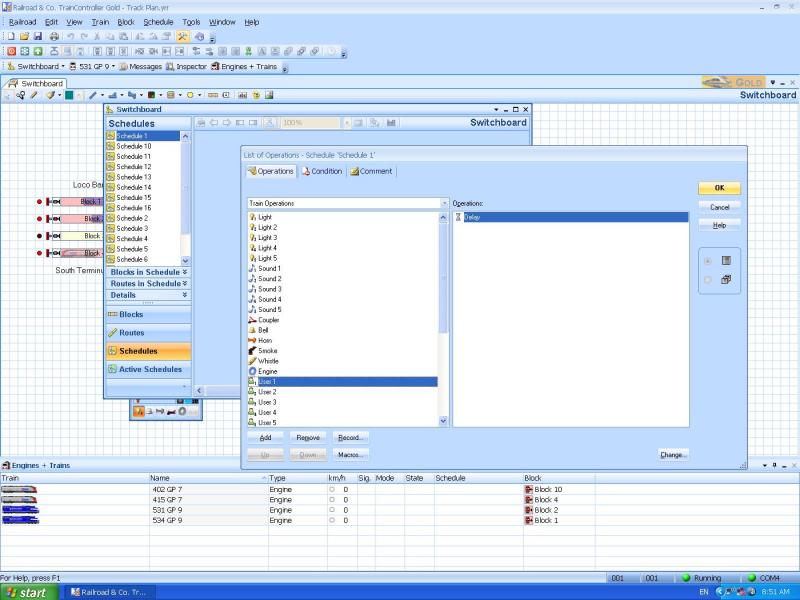
But in Train Operations, the Grey - Engine Off, has disappeared. :shock:
Max
Port Elderley
Port Elderley
Posted
Full Member
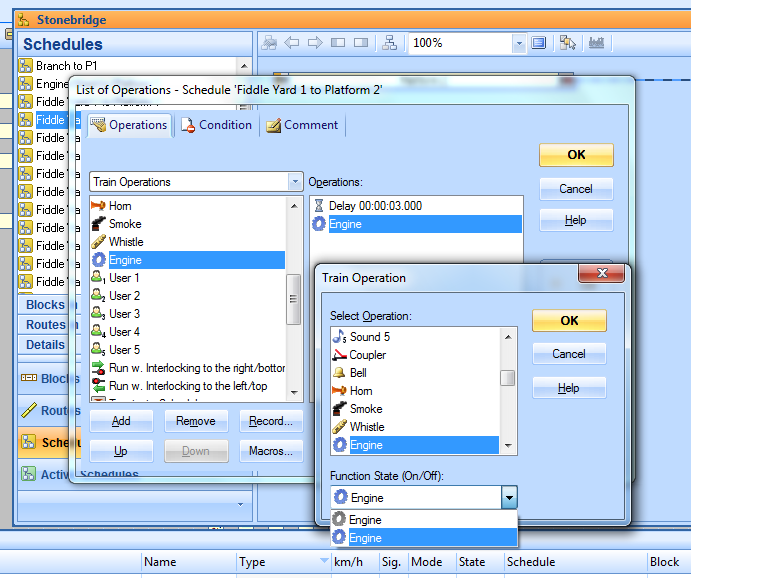
You can use this with all the functions. I had a play Max yesterday and as well as having to tell TC to operate the function i have to tell TC to stop the function. Most function are on/off basically when you set to operate the function to on TC presses the button on your controller so to speak it doesn't stop pressing it until you tell it too! Yesterday i set my horn to on at the start of the schedule and it never stopped. It does not recognise momentarty contact only on then off.
Last edit: by wogga
Regards
Pete.
ECOS2 with RR&Co Traincontroller and a load of other electronics so i can sit back and watch the trains go by.
Pete.
ECOS2 with RR&Co Traincontroller and a load of other electronics so i can sit back and watch the trains go by.
Posted
Inactive Member
Max
Port Elderley
Port Elderley
Posted
Full Member
Yesterday i built a long start operations list for my Howes sound Class 45 which started with engine start, lights on, door slamming, guards whistle and horn with delays inbetween, Now my theory is that these operations should complete before the loco departs, no such luck.
What i have observed is when i start the schedule the engine starts (this takes 20- 25 seconds on the howes sound project?) as planned, but you will notice that the throttle for the loco has started. As soon as the engine sound file has finished its actions the loco goes into move off and away it goes with doors slamming, guards whistle blowing and the horn halfway down the track:shock::shock:.
Max:Red Card fancy adding sound to TC
 i for the life of me cannot find yet how to delay the loco move off until the start operations have finished???
This going to be good finding a workaround.
Regards
Pete.
ECOS2 with RR&Co Traincontroller and a load of other electronics so i can sit back and watch the trains go by.
Pete.
ECOS2 with RR&Co Traincontroller and a load of other electronics so i can sit back and watch the trains go by.
Posted
Inactive Member
If you were driving the loco with say a Lenz set, are all those sounds on separate buttons, or do they all play one after the other on the same button?
Now a hard question, Do you have a Lokprogrammer - or access to one?
Max
Port Elderley
Port Elderley
Posted
Full Member
I do have a lokprogrammer but i cannot access the soundfiles they are locked by Howes, however i have access to all cv's and function set up.
Regards
Pete.
ECOS2 with RR&Co Traincontroller and a load of other electronics so i can sit back and watch the trains go by.
Pete.
ECOS2 with RR&Co Traincontroller and a load of other electronics so i can sit back and watch the trains go by.
1 guest and 0 members have just viewed this.