
RR&Co Computor Control: Discussion
Posted

Full Member
Post any questions arising from "First Steps with RR&Co"
Max its sounds like you are motoring on now, if you have got double slips performing to queue you are well ahead of the game.you sound a bit like me its nice just to sit back and watch the action suppose a bit like going to an exhibition. I am really looking forward to finishing the scenery etc. then running a timetable and viewing it from any angle i please.
Pete
Regards
Pete.
ECOS2 with RR&Co Traincontroller and a load of other electronics so i can sit back and watch the trains go by.
Pete.
ECOS2 with RR&Co Traincontroller and a load of other electronics so i can sit back and watch the trains go by.


Posted

Inactive Member
Max
Port Elderley
Port Elderley
Posted
Full Member
I did upload a small movie of my layout when i got a bit of automation its in this thread i think and my layout thread as well.
Matts done one as well i think, yes cracking idea that.
Pete
Regards
Pete.
ECOS2 with RR&Co Traincontroller and a load of other electronics so i can sit back and watch the trains go by.
Pete.
ECOS2 with RR&Co Traincontroller and a load of other electronics so i can sit back and watch the trains go by.
Posted
Inactive Member
Here's one of mine at night - so you can't be too critical of the scenery.

http://www.youtube.com/watch?v=AziWghIOsEw
You should be able to see the others once you are in - some are OK - some not so much. :oops:
Otherwise look for maxsouthoz.
None with TC as yet, though. :sad:
Max
Port Elderley
Port Elderley
Posted
Full Member
Regards
Pete.
ECOS2 with RR&Co Traincontroller and a load of other electronics so i can sit back and watch the trains go by.
Pete.
ECOS2 with RR&Co Traincontroller and a load of other electronics so i can sit back and watch the trains go by.
Posted
Inactive Member
Max
Port Elderley
Port Elderley
Posted
Guest user
Brian
Posted
Inactive Member
Max
Port Elderley
Port Elderley
Posted
Inactive Member
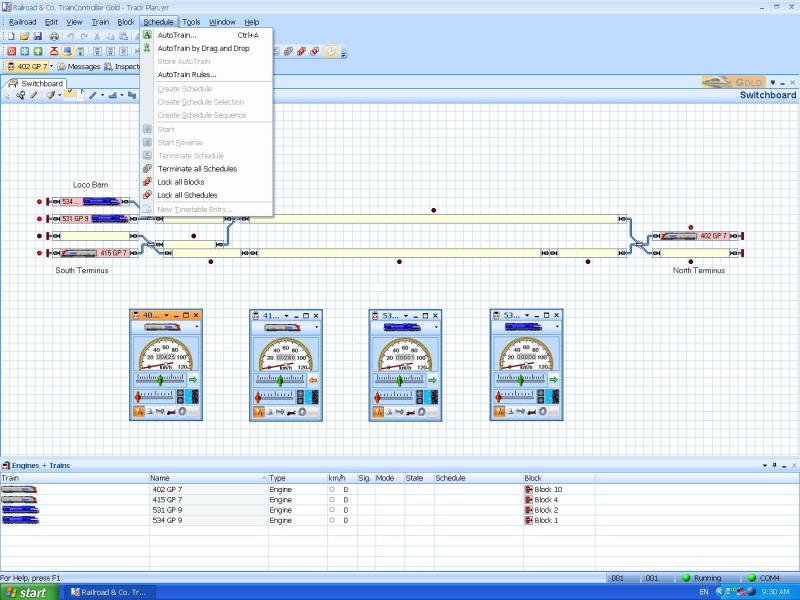
and . . .
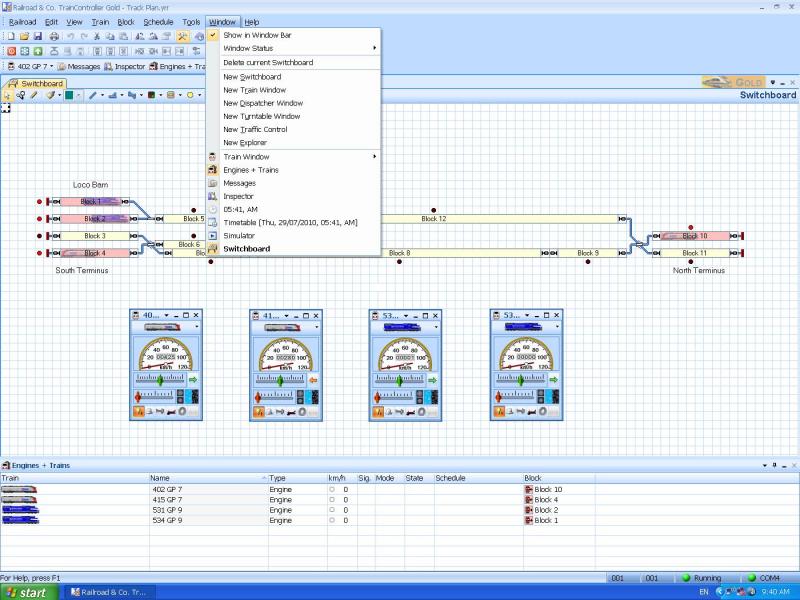
The Auto Train Schedules don't seem to work, - when I went back to them they were gone, even though I saved them.
So, I'm a bit stuck, lads. :oops:
 Last edit: by MaxSouthOz
Max
Port Elderley
Port Elderley
Posted
Inactive Member
If I make a series of Auto Train Schedules, is there a function which will make them play one after the other, in order? I'll have to run each one to clear the blocks before I make the next one, but am I on the right track?
Max
Port Elderley
Port Elderley
Posted
Full Member
I have not tried autotrain at all so am not sure how that is supposed to work.
Posted
Inactive Member
When Pete makes Schedules, he goes in through Window (see my second screen shot), but when I do it, I'm three options short on the bottom of the box; so I'm not able to make schedules.
I don't think Auto Train is the right place to make schedules, as you can't get them to follow each other. I might have to wait until Pete comes on so he can show us how he does it.
Max
Port Elderley
Port Elderley
Posted
Guest user
are you in EDIT mode?
you can make schedules follow on a number of ways. the best way i found was to use at the end of a schedule option(pete made a screen shot of theses in the video thread). select schedules and the schedule you want to follow. you can add a delay. those two tabs BEFORE and AFTER are very good foe all sorts of things. have a play with them.
when you get your schedule screen up if you click up on the top right you get some options up, floating, docked etc. pick docked at it will be available as a tab so you can swap between this and the layout plan.
Posted
Full Member
Now looking at your screen shots you do not have a dispatcher window, this must be created first before you can use the schedule creation tool. This is where my walk through could be confusing you.
Steps 1 and 2 on my walkthrough are to get you to create a dispatcher window.
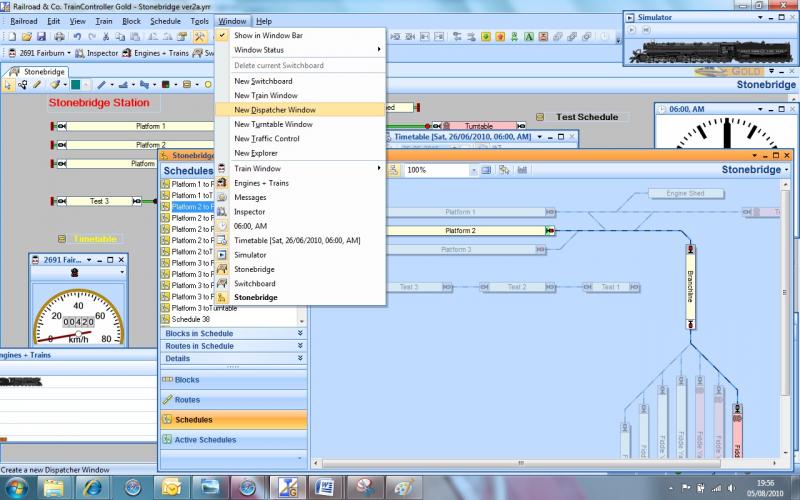
Select the window menu and hit New Dispatcher Window. this should appear and be a picture of your trackplan similar to below

If you select this window that is the title bar is orange, now go to the schedule menu and you should now see create schedule is now black and therefore selectable.
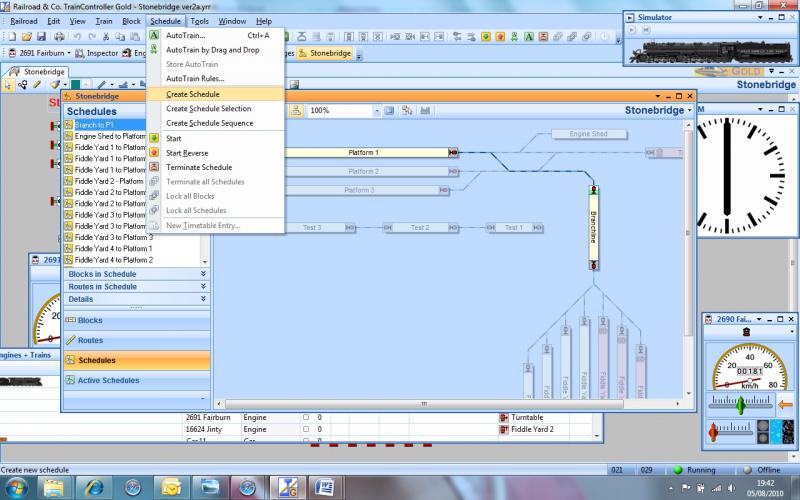
Max you can tell its the dispatcher window because it has this icon in the corner
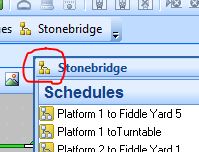
Get this on your screen and you can then get going with schedules and follow on with my walkthrough.
Once you have created your schedule to run it, i do this
from your dispatcher window put your mouse over the schedule you want to start and right click, a window opens and you see the options to start or start reverse, left click your choice and it will run
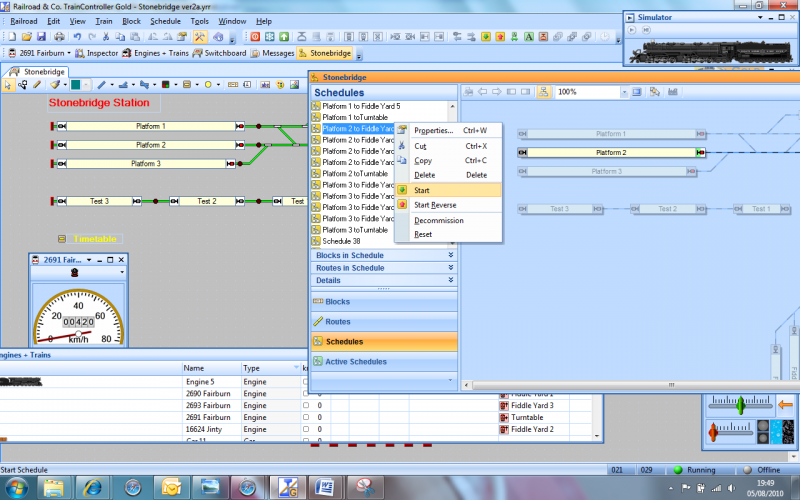
I have learnt to save screen shots as jpeg which helps me show the highlighted actions better for you Max
Sorry about the earlier confusion.
Pete
Last edit: by wogga
Regards
Pete.
ECOS2 with RR&Co Traincontroller and a load of other electronics so i can sit back and watch the trains go by.
Pete.
ECOS2 with RR&Co Traincontroller and a load of other electronics so i can sit back and watch the trains go by.
Posted
Inactive Member
Thanks for the explanation, Pete. It's 6.45 a.m. and I have to go to work in a while, so I'll have a go tonight.
I might have to pick your collective brains after I get the schedules done, as I'm going to have to put in some triggers to shut down the engines. At the moment, as the loco enters the last block it triggers the stopping process, using the deceleration time; which looks very good. However it also triggers the engine shut down and because the loco is still moving, it just switches the sound off.
But that's for later. In the meantime, thanks both of you for your input. I'll report back tonight. :thumbs
Last edit: by MaxSouthOz
Max
Port Elderley
Port Elderley
Posted
Inactive Member
I have 16 schedules made. This takes each loco in random order to every terminus until they are back in their original positions. :thumbs
Now to get the schedules to follow each other. :pedal
Max
Port Elderley
Port Elderley
Posted
Inactive Member
Now to figure out how to get the engines to turn off properly. Nearly there. :shock:
Max
Port Elderley
Port Elderley
Posted
Guest user
 :lol::lol::cool:
Posted
Guest user
set a delay for each schedule to turn off the sound. so in the options for actions after the schedule you will have
delay 6,
schedule XX (to start next schedule),
delay 5
F0 (lights),
delay 4
F1 (engine)
then in the next schedule
F1
delay 6
F0
delay 7
that shold sort it.
Posted
Inactive Member
Max
Port Elderley
Port Elderley
1 guest and 0 members have just viewed this.