
RR&Co Computor Control: Discussion
Posted
Guest user
Post any questions arising from "First Steps with RR&Co"
Maxi think we TC we all have hit a wall at some stage, you are now over that wall and you will find that things come together.
a question for you:lol:
as you are into sound setup on chips can you add any number of wav files to that chip?
my thought behind this is, when a train enters platform one at the end of a schedule you could set up an operation that plays a wav file from the sound loco. such as the train now entering platform 1 is the etc etc. i know you can set TC to operate a file on the PC such as a wav file.

Posted

Full Member
Progress Report:-Â Â Â Â Â I tried to do my Contact Indicators via the Manual - too hard!Â
Max i have got the t-shirt for that one i was scratching my head for weeks. It was only at the get together we had here in the UK after i was shown did i get it. Matt and BrianPr1 might have heard a muffled expletive from my direction after we were shown. Doing the contact indicators is such a critical step as well
Since then after Matt introduced me to this forum and JD's tute i haven't looked back.
Looking at the piccy Max you are well on the way.
Pete
Regards
Pete.
ECOS2 with RR&Co Traincontroller and a load of other electronics so i can sit back and watch the trains go by.
Pete.
ECOS2 with RR&Co Traincontroller and a load of other electronics so i can sit back and watch the trains go by.

Posted

Inactive Member
Matt, yes I can add any sound you like. I recently did a loco with a dog barking for a demo at a clinic I was doing. The only problem is, you must have Loksound 3.5 decoders to do it. But it is easily done. :thumbs
Max
Port Elderley
Port Elderley
Posted

Full Member
Progress Report:- I tried to do my Contact Indicators via the Manual - too hard! Went to John's Tutorial - Maggies Meat! Easy as; thanks, John.
Snail's pace, I know. But I'm progressing! :thumbs
Thats great Max:doublethumb:doublethumb glad it worked out.
Sorry I am so slow replying……I would have wished to be the first to email but we are out on the boat again….. Blue Skies, 15 knot westerly…….its a tough life but someone has to do it :lol:
Once again…………well done:doublethumb:doublethumb
Posted
Inactive Member
Sorry I am so slow replying……I would have wished to be the first to email but we are out on the boat again….. Blue Skies, 15 knot westerly…….its a tough life but someone has to do it :lol:
. . . you can go right off some people.
Thanks, John.
Max
Port Elderley
Port Elderley
Posted
Inactive Member
All four locos are now displayed in their relevant blocks. Manually drove a loco from one end of the layout to the other and watched the loco icon move across the page.
Ran a loco automatically (Run with Interlocking). The pathway seemed to set up randomly - different each time. I'll have to read up on that.
Much too much deceleration time. I'll have to read up on that as well.
Progress slow, but steady. :thumbs
Max
Port Elderley
Port Elderley
Posted
Full Member
Update . . .
Ran a loco automatically (Run with Interlocking). The pathway seemed to set up randomly - different each time. I'll have to read up on that.
Progress slow, but steady. :thumbs
Max this is where you need to create a schedule i.e starting block and finishing block and the route you wish to take. Once the schedule is set up it doesn't matter what loco is in the start block unless you wish to specify that.
De-acceleration is related to speed profiling each loco a topic and exercise in its own right, and the braking distance you set in the block.
It sounds you are getting on well, you must of been pleasantly pleased when you saw the loco slowly stopping on its own max?
Pete
Regards
Pete.
ECOS2 with RR&Co Traincontroller and a load of other electronics so i can sit back and watch the trains go by.
Pete.
ECOS2 with RR&Co Traincontroller and a load of other electronics so i can sit back and watch the trains go by.
Posted
Full Member
I was just about to reply and Pete beat me to it………I have nothing to add, he wrote exactly what I was going to do
I am afraid I am off on the boat again tomorrow and internet access is even more limited where we will be heading……but I will try and keep in touch
Good Luck
Posted
Full Member
Sorry Master, i must have had a good teacher:lol::lol::lol::lol:I was just about to reply and Pete beat me to it………I have nothing to add, he wrote exactly what I was going to do
Regards
Pete.
ECOS2 with RR&Co Traincontroller and a load of other electronics so i can sit back and watch the trains go by.
Pete.
ECOS2 with RR&Co Traincontroller and a load of other electronics so i can sit back and watch the trains go by.
Posted
Inactive Member
Max
Port Elderley
Port Elderley
Posted
Inactive Member
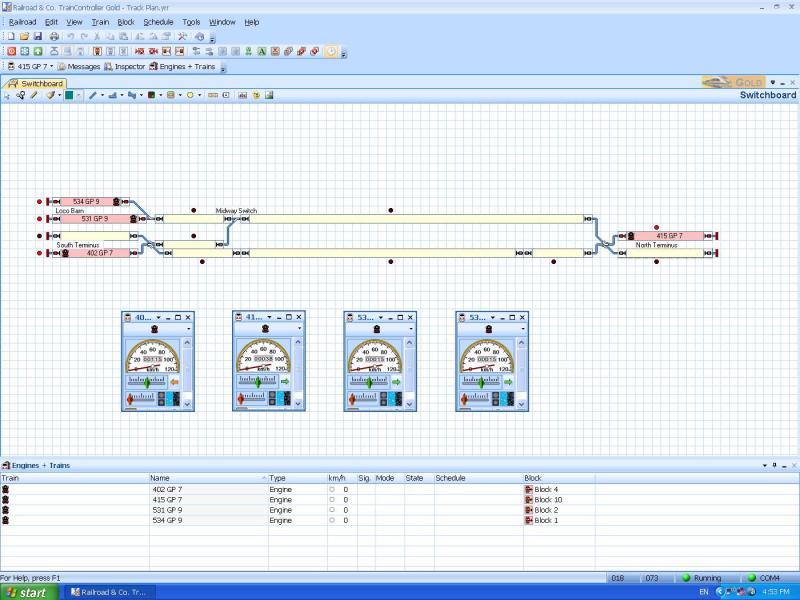
I have put them all on the Lokprogrammer and given them 3 seconds braking time which stops them in the right place in the terminus blocks.
As an exercise, I went into Train - Driving - Run with Interlocking - and try as I might, I couldn't get them collide or run over any turnouts set against them. I even set more than one off at a time, running towards each other, but TC kept them safe.
I'm ready to find out how to do the Schedules. Watch this space. :thumbs
Max
Port Elderley
Port Elderley
Posted
Full Member
As you can see, I have assigned each of the locos and the little icon shows which way it's pointing.
Great to see your progress, Max. Just a little caution with your above statement. I don't think the orange and green arrows in the train windows actually do show which way the loco is pointing. Rather they show whether the loco is going to go backwards or forwards, regardless of which direction it is pointed.
In other words, if a loco is pointing from left to right, a green arrow means it is going to go forwards to the right, but if a loco is pointing from right to left, then a green arrow still means it is going to go forwards, but this time, to the left.
Posted
Full Member
As an exercise, I went into Train - Driving - Run with Interlocking - and try as I might, I couldn't get them collide or run over any turnouts set against them. I even set more than one off at a time, running towards each other, but TC kept them safe.
Yes Max that is very satisfying watching an engine stop due to the block ahead being occupied then starting up again when its clear smashing!
Keep it going.
Pete
 Last edit: by wogga
Regards
Pete.
ECOS2 with RR&Co Traincontroller and a load of other electronics so i can sit back and watch the trains go by.
Pete.
ECOS2 with RR&Co Traincontroller and a load of other electronics so i can sit back and watch the trains go by.
Posted
Inactive Member
Max
Port Elderley
Port Elderley
Posted
Guest user
you can use the TC image software to add you own pictures. take a picture of your loco and have a go. you need to crop the picture you take first.
Posted
Inactive Member
Max
Port Elderley
Port Elderley
Posted
Inactive Member
Further checking back along the line showed that the whole of TC was disabled - including the desktop icon, which had changed into another icon. Further checking showed that the whole of my original download had gone. Not to worry. I downloaded a fresh version. Luckily, I still have my code that Jurgen sent me. Copied and Pasted it into the box and TC is back.
However, all of my original track plan has gone. I have searched in all my folders, but not a trace of it remains. So, now I have to start from scratch. Kind of like scratch building in cyberspace.
It is really very trying, to say the least.
 :shock: :shock: :thud
Max
Port Elderley
Port Elderley
Posted
Inactive Member
Max
Port Elderley
Port Elderley
Posted
Guest user
Posted
Inactive Member
I guess it's character building.

Max
Port Elderley
Port Elderley
1 guest and 0 members have just viewed this.