
RR&Co Computor Control: Discussion
Posted
Full Member
Post any questions arising from "First Steps with RR&Co"
[user=52]henryparrot[/user] wrote:Now here is a question for you Railroad &co chaps
What is the big advantage of paying for the Gold package the bronze one they do seems to do a great deal and is only 99 Euros.
I have only lightly looked but there seems a big jump in cost so whats the big advantage?
Brian
From what I think I have managed to find out by playing with the demos, is that you can't do much with Bronze other than operate trains from the PC, and you can do all that with your ECOS.
Silver, on the other hand, appears to be much the same as TC used to be up until version 5.7. Several people clearly used it successfully for some years with the limitations imposed by that version, so I still think I will most likely buy Silver first.
John and Pete both mention their need to easily be able to change locos. I understand that need, and I expect it may become a problem to me in the future, but my plans for now are to have TC handle just the main line and station approach. I will manually take control in the station(s) and then hand back to TC when I have a train ready to depart. TC can be handling through trains in the meantime. I am pretty sure it will work this way, but I have a long way to go, and for some reason continue to find myself underground and not in my train room anyway!!!


Posted

Inactive Member
TC is so big that I will take forever trying to master it via this thread on screen.
Max
Port Elderley
Port Elderley
Posted
Guest user
i was playing about for about 8 months with TC, then john came along with the tute and made everything fall into place. i picked up on things he wrote in the tute and i learned a lot. it is a time thing with the software and the more you play the more you pick up. i believe having the layout set up and having purchased gold you are at an advantage over us with the demo. it is hard to see things work on the screen.
it has happened a few times in this thread when someone needs a problem sorting and members sort the problem with three different solutions. TC has so many ways to do things, you just need to find the way that suites you. it is frustrating and i have re done my TC layout about 6 times until i am happy with it. nothing beets that buzz when it does go right.
HP
i brought gold as i am planing a layout for the future, so i want all the options available to me. if i decide i want to swap and change the layout to perform different operations i am not restricted. i am a firm believer in you get what you pay for. your layout is much the same as mine with different operations and quite large, if you was to purchase TC then that would restrict the layout potential. if you brought gold and started automating and shunting a small part of the layout you can always expand until the layout is complete. i think your mine is crying out for shunting and automation, this you only get with the gold version.
Posted
Inactive Member
Max
Port Elderley
Port Elderley
Posted
Inactive Member
Before I am accused of not reading the Tutorial, I hereby certify that I have read from Page 27 "ENGINE SET UP." I have deleted all of my locos and loaded them again. (I have not been able to get them to change colour, but that's minor.)
I followed the text word by word and this is what I ended up with:-
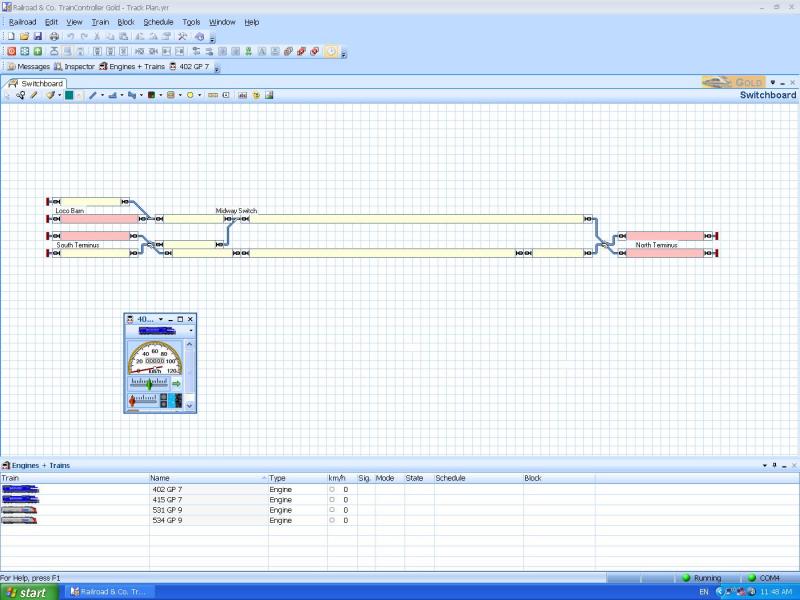
As you can see, all four locos appear in the roster at the bottom, but there is only one throttle available. I can change the address of the throttle, but I am unable to get more than one throttle on to the screen. Before anyone says anything, I tried it in Operation mode and Edit mode.
I don't expect any answers. I have just had to buy a new desktop computer. The power supply blew up and took all of the other parts with it. I just got it back on line this morning (after a 6 hour power outage due to a storm), and I can now print off all 350 odd pages of the Manual.
I will then carefully and diligently read the manual to see if I can pick up where I'm going wrong.
Max
Port Elderley
Port Elderley
Posted

Full Member
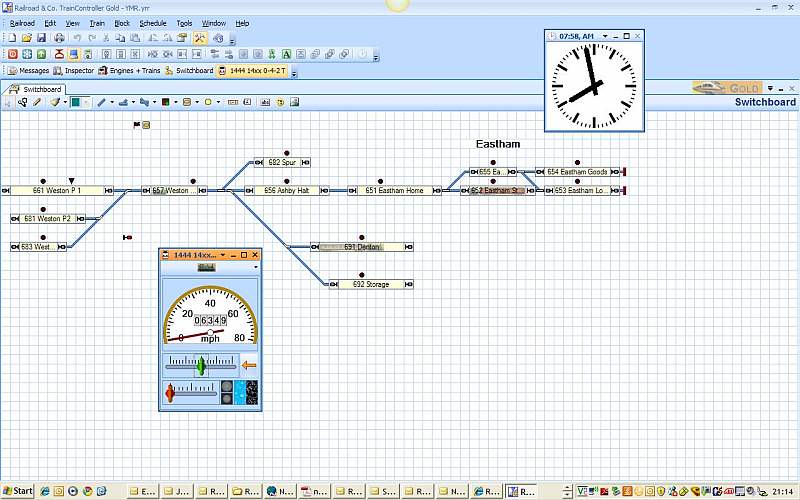
I have just run this off using the tutorial layout
[1] One Train Window up for 14xx
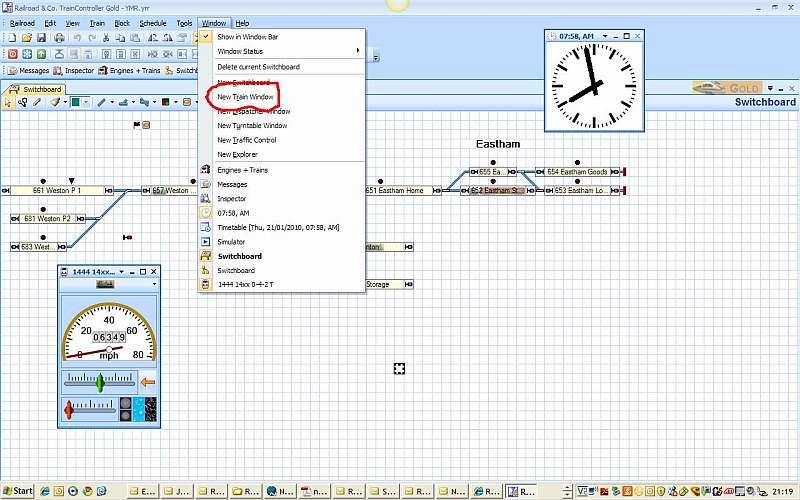
[2] Create new train window
[3] Second train window created which is a duplicate of existing window for 14xx
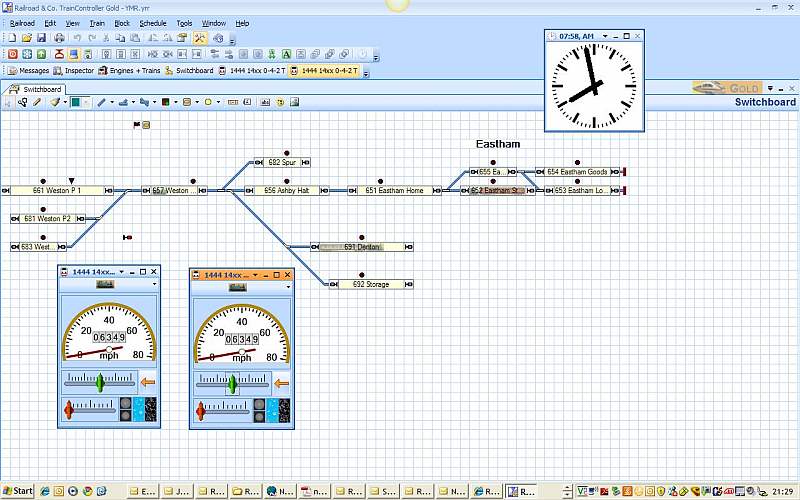
[4]
If you scroll down by the engine icon you will get a drop down menu for all the engines in your list.

Left click where the circle is
Be sure to click on the little arrow and you will see [Select Train]
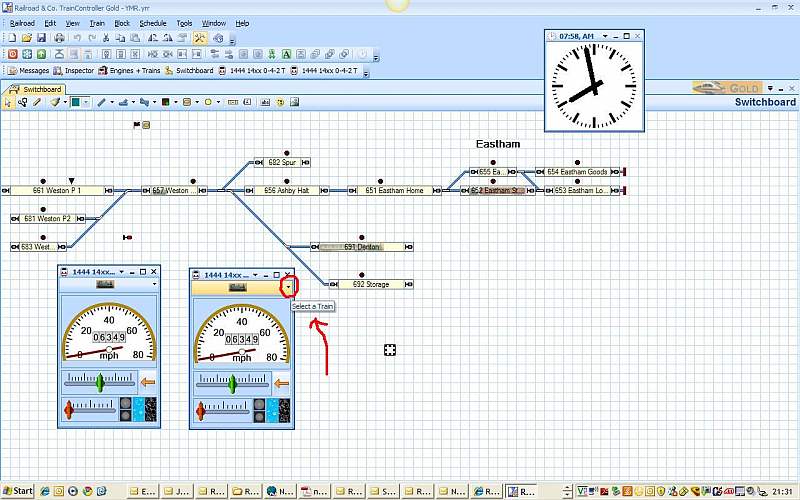
Left Click and you will see a list of the locos you have created

I then selected #5531
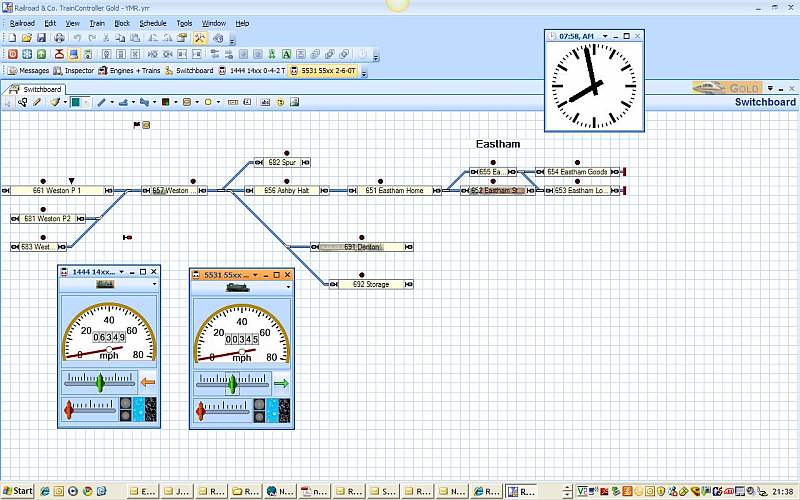
I now have two throttles one for 1444 and one for 5531
Take it slowly………step by step……..and you can do the same.
Posted
Inactive Member
One of the things I was missing was that the Throttles are called Train Windows.
Secondly, I didn't twig that when I was making duplicates, I can change the loco address on each new throttle. It's not like that in Zug or Decoder Pro.
I'm afaraid I get stuck in a paradigm and I need gelegnite to blow me out of it.
It's all about the language. However, the new throttles won't have any function buttons UNLESS I highlight each one in the roster before I make a new Train Window.
It's only a small step, but if I miss it . . .
I'm so bloody pedantic, I won't move forward unless I really understand the process so far.
Now, I forgot where I was - next step . . . :oops:
Max
Port Elderley
Port Elderley
Posted

Full Member
Regards
Pete.
ECOS2 with RR&Co Traincontroller and a load of other electronics so i can sit back and watch the trains go by.
Pete.
ECOS2 with RR&Co Traincontroller and a load of other electronics so i can sit back and watch the trains go by.
Posted
Guest user
Posted
Inactive Member
Max
Port Elderley
Port Elderley
Posted
Full Member
Thanks, John. That's very close.
One of the things I was missing was that the Throttles are called Train Windows.
It's all about the language. However, the new throttles won't have any function buttons UNLESS I highlight each one in the roster before I make a new Train Window.
It's only a small step, but if I miss it . . .
Glad it worked
Dont worry if you havent set up all the functions and you create a throttle (train window)…………….you can just delete the throttle or change it to another loco. Then edit the properties of the loco to include functions or change colour or whatever and then re create the window
I do this all the time I have 20 locos set up……the switchboard would be too crowded if I had throttles for all of them…….I just have 2 or 3 up and change them as required
The throttles dont have to be permanent……just create them when you need them or you can minimise them and they will show on the switchboard tool bar menu
Posted
Inactive Member
There was an option to download the new version, but it wouldn't overwrite the one in the C Drive Program Files so I put it into My Documents for the time being. A bit of argie bargie and it swapped over. I imagined that I would have to remake my Track Plan again, but it was still intact.
I was checking all the levers and knobs when I discovered that the Throttles were offline. Not to worry; into Railroad/Set up Digital Systems - a couple of false starts (once I found the interface in Com 4), and it was away. :thumbs
Max
Port Elderley
Port Elderley
Posted
Full Member
Posted
Inactive Member
I'm one of those sad people who don't get on with manuals on the screen.
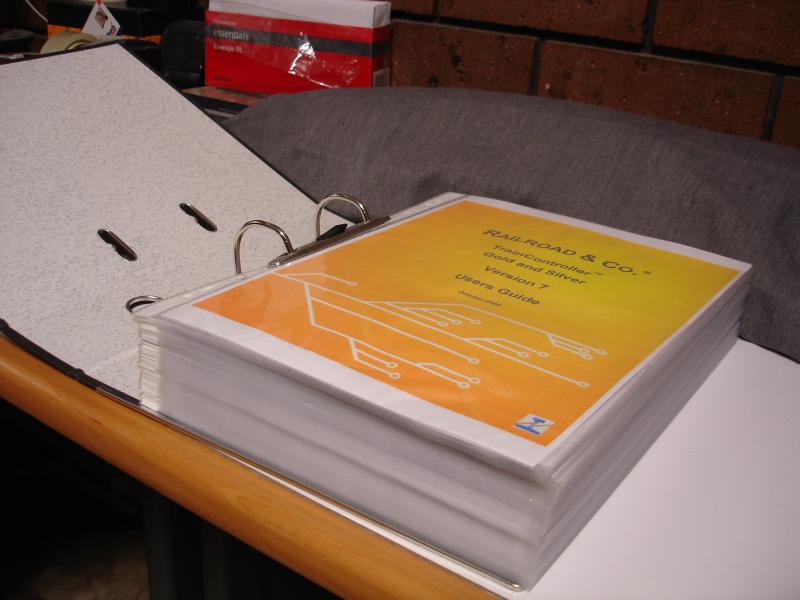
This is how I cope. It's been a bit of work, but I find it much more convenient.
Max
Port Elderley
Port Elderley
Posted
Guest user
I remember the days of getting a big book with new software as part of the price.
Posted
Full Member
I'm one of those sad people who don't get on with manuals on the screen.
This is how I cope. It's been a bit of work, but I find it much more convenient.
You know what Max …..I owe you an apology………………I should have mentioned earlier, the first thing I did was print out the manual
Posted
Inactive Member

Max
Port Elderley
Port Elderley
Posted
Guest user
That must have cost you a fortune in ink and paper.
Mind you i agree pdf computer manuals are not exactly easy to read thats one area incomputers they still trail behind on.
Brian
Posted
Inactive Member
Max
That must have cost you a fortune in ink and paper.
Brian
Not too bad, Brian. app. 350 sheets (a 500 sheet ream is about A$5.00), 175 pockets A$7.00. I'd have to estimate the ink - let's say A$20.00, no idea really :oops: Lever Arch folder in stock already. Maybe A$35.00? Not bad value as a book.
The story is interesting, but the characters are a bit staid.
 Last edit: by MaxSouthOz
Max
Port Elderley
Port Elderley
Posted
Inactive Member
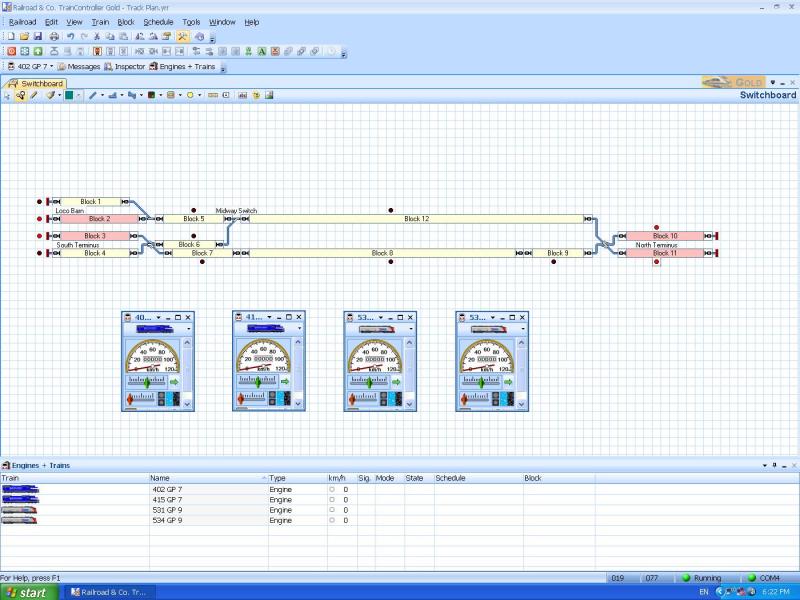
Snail's pace, I know. But I'm progressing! :thumbs
Max
Port Elderley
Port Elderley
1 guest and 0 members have just viewed this.