
RR&Co Computor Control: Discussion
Posted

Full Member
Post any questions arising from "First Steps with RR&Co"
Hi MaxLoco Set Up……………..read the tutorial it explains it step by step……
Functions…………………Pete is correct you can do this at the start and end of a schedule……….there are also other ways you can get these functions to work automatically………..one is to edit the schedule specific properties of a block you can toot when you enter, a given distance after you enter, when you stop or when you leave
But I sense you want to manually control the horn/bell and basically sound it whenever you choose?
I dont have sound so I cant test this but I think you could do it by creating a pushbutton were the train operation was "Horn" and the condition Loco 1…………place the button on your control panel…………label it Loco1 Horn…..make sure TC knows (or is tracking) which block Loco 1 is in…………click on the push button…………and I believe Loco 1s horn will sound
I would be inclined first to test TC can activate the horn by havinge it as an operation at the start of a schedule………..if it works……and it should……go ahead and try the push button idea
Let me know how you get on


Posted

Inactive Member
I can't follow any of that horn stuff at this stage. Let me try this:- When I load a loco I get a throttle. The properties of that throttle has a tab for functions. I can't find anything in the manual which tells me how to load functions into that tab.
Max
Port Elderley
Port Elderley
Posted

Full Member
Make sure you select push button or on/off on the drop menu under libary button.
Then when you open that locos throttle the function buttons should of appeared. click the help icon in the loco setup it will give you a better explaination than i can give on the meaning of various options.
Pete
Regards
Pete.
ECOS2 with RR&Co Traincontroller and a load of other electronics so i can sit back and watch the trains go by.
Pete.
ECOS2 with RR&Co Traincontroller and a load of other electronics so i can sit back and watch the trains go by.
Posted
Full Member
Regards
Pete.
ECOS2 with RR&Co Traincontroller and a load of other electronics so i can sit back and watch the trains go by.
Pete.
ECOS2 with RR&Co Traincontroller and a load of other electronics so i can sit back and watch the trains go by.
Posted
Full Member
I'm obviously missing a step in the tutorial as I go, John. When I go to add the second train it replaces the first one.
I thought Pete explained it pretty well…….let me try one more time
Ensure you are in Edit Mode
From the main TC menu select [TRAIN]
From the drop down menu select [CREATE ENGINE]
Now go back to the main menu select [WINDOW]
From the drop down select [ENGINES and TRAINS]
This will display a list of Engines you have created. In an ideal world there will be two……….your original loco designated by whatever engine# you have entered and the new engine which will be designated Engine 2. However I suspect you have been busy inadvertently creating engines, but not haveing accessed [Engines and Trains] there could be more than 2:Red Card
Select Engine 2 (delete any unwanted locos)
Right Click
Select [PROPERTIES]
Complete each tab as described in the Tutorial :thumbs
I can't follow any of that horn stuff at this stage.
Sorry I thought you wanted to sound a horn
Let me try this:- When I load a loco I get a throttle. The properties of that throttle has a tab for functions. I can't find anything in the manual which tells me how to load functions into that tab.
Right click on the Throttle
Select [PROPERTIES]
Select [FUNCTION]
Press [NEW]
Select from Drop Down Menu
OR
Press [HELP] on the [FUNCTIONS] Tab
The TC Help Icon will be displayed on your Computors Tool Bar (typically alongside the TC Icon) Click on that and there is a full help page describng Engine Functions
I find this time zone thing fascinating………Pete is asleep in Sunny West Brom (from memory I doubt it) I have no idea what day of the week it is for you Max………..here on Gabriola Island it is indeed Hot and Sunny……….I am on my second glass of Rose as I contemplate tomorrows 24 mile sail across the Gulf back to the Big City for a few days

Posted
Inactive Member
It's Wednesday 7th June here. Clear blue skies and freezing bloody cold. :thud
Max
Port Elderley
Port Elderley
Posted
Inactive Member
I can still only get one throttle at a time on the screen, and it's always the same one. I'll try to put some functions on the one I can get up.
I really DO NOT want TC to sound the horn. I want to be able to do it myself manually. I only used the horn as an example. For those who have sound equipped locos there is a need to be able to punch the F buttons at the start of a session.
I chose the horn button (F2) because I thought it would be the one non sound people could relate to. Let's try another one - F8. This button starts the engine. It goes through start up sequence and then runs in idle sequence. So I need to be able to set up the throttle with all 14 function buttons active.
Does that make a bit more sense? :oops:
Max
Port Elderley
Port Elderley
Posted
Inactive Member
Now to figure out how to get more than one throttle up. :pedal
 Last edit: by MaxSouthOz
Max
Port Elderley
Port Elderley
Posted
Inactive Member
At the bottom I have the roster (Engines and trains) of four locos, (all with Function buttons assingned :thumbs).
On the Toolbar next to Engines and trains, the first loco has a button which opens its throttle. I reckon I should be able to put the other three up there as well, so I can activate any or all of the throttles by clicking on them, but I can't recognise the button which will allow me to include the other three on the toolbar.
I'll keep looking, but I'm running out of ideas.
Max
Port Elderley
Port Elderley
Posted
Full Member
[WINDOW]
[CREATE NEW TRAIN WINDOW]
Posted
Full Member
Regards
Pete.
ECOS2 with RR&Co Traincontroller and a load of other electronics so i can sit back and watch the trains go by.
Pete.
ECOS2 with RR&Co Traincontroller and a load of other electronics so i can sit back and watch the trains go by.
Posted
Inactive Member
I don't walk away just because I don't understand. It took me more than a year to learn Lokprogramming and this year I have been invited to present a clinic at the National Convention of the NMRA. I will keep asking questions as long as you will keep answering them.
I did try (CREATE A NEW TRAIN), but it just makes copies of the first loco on the roster. I must be still missing a step.
Max
Port Elderley
Port Elderley
Posted
Full Member
Hopefully you meant [CREATE A NEW TRAIN WINDOW] …………..there is a differenceI did try (CREATE A NEW TRAIN), but it just makes copies of the first loco on the roster. I must be still missing a step.
Max, I am happy to help as much as I can………….I would only ask that you try to follow the steps outlined in the Tutorial before assuming you are missing a step
I have copied this directly from the tutorial
Now we need to create a train window
Select [WINDOW] in the main railroad menu and then [NEW TRAIN WINDOW]

This is the Train Window or throttle and it works just like a DCC Throttle except you use the keyboard……when I am operating manually I often find the TC Throttle more convenient to use than the Lenz hand set
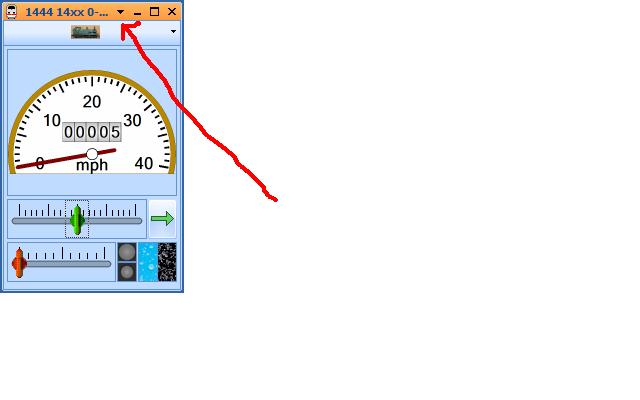
The arrow highlights an option to customise the size and the way the window is displayed…..floating or locked etc. You can have as many train windows up as you wish……….ie as many throttles or handsets……which is one of the reasons I would eventually like to have two monitors in the railwayroom:shock:
If you scroll down by the engine icon you will get a drop down menu for all the engines in your list.
The underlined last sentence explains how to select the particular loco you want for each train window or throttle you create. Assuming there are 4 locos set up on your engines and trains list if you click by the engine icon on any of the train windows you have created you will get a drop down menu listing your 4 locos……select which one you want for that throttle
Posted
Inactive Member
Max, I am happy to help as much as I can………….I would only ask that you try to follow the steps outlined in the Tutorial before assuming you are missing a step
I have printed off the 74 pages of the tutorial as I am clearly having difficulties following it on the screen.
I shouldn't have to bother you again.
Max
Port Elderley
Port Elderley
Posted
Full Member
But don't be afraid to ask any more questions we are all here to help.
Questions? you are not alone look at some of my posts! its what forums are for.
John's bobbing up and down on a boat by the sounds of it so i don't think he has the time to respond so he 's pointing you to the tute.
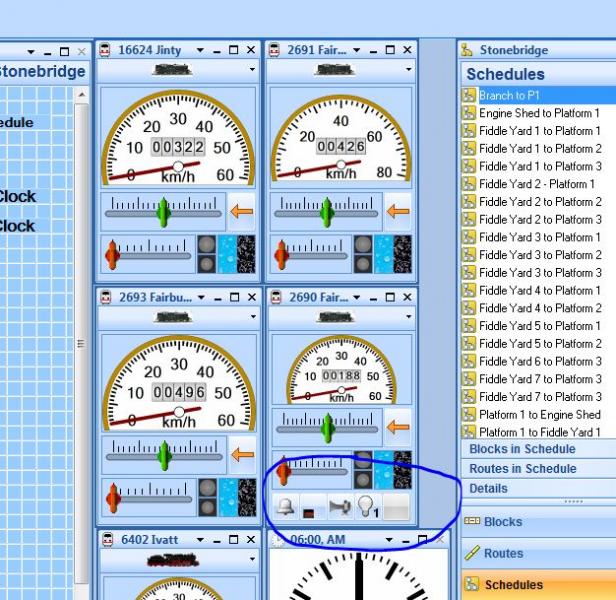
Anyway have you found the f buttons and got the throttles on screen. i have attached a screenshot of my throttles and highlighted some f buttons.
Some guidance may be better with more screenshots, we will help
Last edit: by wogga
Regards
Pete.
ECOS2 with RR&Co Traincontroller and a load of other electronics so i can sit back and watch the trains go by.
Pete.
ECOS2 with RR&Co Traincontroller and a load of other electronics so i can sit back and watch the trains go by.
Posted
Inactive Member
You won't hear from me for a while on this thread. Cheers Max
Max
Port Elderley
Port Elderley
Posted
Guest user
What is the big advantage of paying for the Gold package the bronze one they do seems to do a great deal and is only 99 Euros.
I have only lightly looked but there seems a big jump in cost so whats the big advantage?
Brian
Posted
Full Member
What is the big advantage of paying for the Gold package the bronze one they do seems to do a great deal and is only 99 Euros.
Brian
As I understand it Bronze is very much an entry level offer and has very limited options. I am afraid I dont know much more than that……..you dont see too many bronze users on the various forums
Silver is the upgraded version of the original programme……………Geoff is pretty committed to this and has found work arounds for many of the things one can do with Gold and may wish to comment
Gold….. I learned about TC on the original version (5.8) and the Gold upgrades and enhancements to my mind make it worth the extra price………..but then I am biased I have paid for it:lol: . I guess the deciding factor for me when choosing between Gold and Silver was the enhanced automatic running……particularly shunting,loco run around and loco exchange.
As you have seen the learning curve can be steep and it can be very frustrating at times but in all honesty it has totally transformed my approach to the hobby and I do not regret the purchase at all. It is complex and there are so many diffrent options I know I am just scratching the surface and probably will be for many years
This is a very recent thread on the RR&Co Forum called "Which Version" which you may help. Both Juergen and Paul Turvill, one of the most informative and helpful Beta Testers, make some interesting comments
http://www.freiwald.com/forum/viewtopic.php?t=12766
Hope this helps………..regards from a very hot and sunny Vancouver
Posted
Full Member
I shouldn't have to bother you again.
Max
I hope that is not the case and I am sorry if I have offended you in any way
Regards
Posted
Full Member
Now here is a question for you Railroad &co chaps
What is the big advantage of paying for the Gold package the bronze one they do seems to do a great deal and is only 99 Euros.
I have only lightly looked but there seems a big jump in cost so whats the big advantage?
Brian
Good question Brian well posed.
Let me give you my experience, as you know i only have a dinky layout but the operations i wanted to do i.e. terminus loco exchange operations are only available in gold! When i drive a train into the terminus i want to uncouple the arriving loco and back on the departing loco to the carriages. The two commands to do this is join and separate are only in Gold! I also think that turntable operations are only available in Gold and Silver.
You can download all three demos of the software and have a go start with Bronze and work up. Johns tutorial is for Gold.
I asked Freiwald for a Gold Lite version with the limitations being the number of locos you could use but he cold shouldered that one saying that there are 257 differences between the versions!
It is a hard question to answer mate.
Regards
Pete.
ECOS2 with RR&Co Traincontroller and a load of other electronics so i can sit back and watch the trains go by.
Pete.
ECOS2 with RR&Co Traincontroller and a load of other electronics so i can sit back and watch the trains go by.
1 guest and 0 members have just viewed this.