
RR&Co Computor Control: Discussion
Posted
Guest user
Post any questions arising from "First Steps with RR&Co"
PeteSomeone with your type of end to end layout has a difficult time trying to run in locos It may well be worth your while getting a rolling road of some sort to run in plus helps if checking for runng problems in a static position.
I know Owen has made some up cheaply its in the index somewhere i think the cheapest buying option which is ok for steam engines but not for double bogied diesals is the Hornby rolling road which i have myself. there are others but the price can climb steeply but to be fair you get what you pay for.
New locos that have problems yes that occurs in sure in the factories the engines get a quick 2 second burst of power both ways if that works its put in the box i cetainly dont think they are put on a test bed and run for 5 minutes each way at differant speeds
they probably work on an an expected 2% failure rate or something.
Another thing worth checking new engines can sometimes have dirty and greasy wheels plus on the inside edge where the pick ups contact Heljan engines i have bought i have always had to clean the wheels before they work properly
Brian

Posted

Full Member
If they can run as well and as reliably as the Fairburns then i will be sorted.
I must put a Lenz decoder to test as a comparison for the hell of it, at the moment i have rated Lokpilot at number one, but value for money (and easy of install due to their size)its TCS, which i know is a popular choice.
Must get on with some other stuff though or it will never be finished.
Brian i am led to beleive you may have a great collection of backscenes?;-)
Regards
Pete.
ECOS2 with RR&Co Traincontroller and a load of other electronics so i can sit back and watch the trains go by.
Pete.
ECOS2 with RR&Co Traincontroller and a load of other electronics so i can sit back and watch the trains go by.

Posted
Guest user
Yes i do have a lot of backscenes i need to upload them to some server space the one they were on before the domain name ran out and i did not want to renew it so i will have to upload them elsewhere i will let everyone know when they have returned.
Brian
Posted
Full Member
in the diagram below i have ringed the 3 two aspect signals that control access to platforms 3 - 1 left to right. When the schedule is running and the train enters the branch the respective home signal turns green dependant on the platform the schedule is running in to no problems here at all it works lovely.
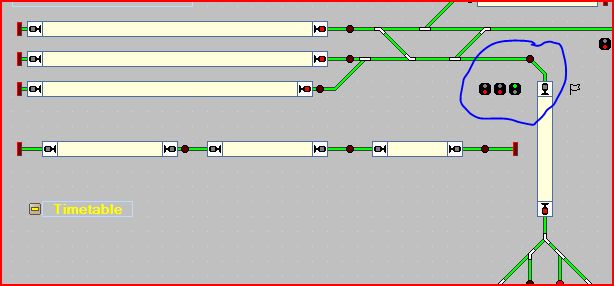
The problem is when a departing train leaves a platform the corrosponding signal changes to green despite the fact it is travelling in the opposite direction! potential for a theoretical collision here, so its not right
The "triggers" to change to green, are the points into the station set correctly and empty occupancy on the platform, which i think would be a reasonable assumption. Now in the "conditions" i have put in only the arriving schedules, but they still go green when a train departs? Now i have tried allsorts including making the return schedule set to to red but they don't.
Therefore can i assume that the triggers are overriding the conditions, obviously the points have to be set that way to get the train on the right track!
Any pointers wiould be appreciated.
Regards
Pete
Regards
Pete.
ECOS2 with RR&Co Traincontroller and a load of other electronics so i can sit back and watch the trains go by.
Pete.
ECOS2 with RR&Co Traincontroller and a load of other electronics so i can sit back and watch the trains go by.
Posted

Full Member
This isnt very elegant but should work
Limit the trigger to the points for each signal
Make it a condition that the platform block is unoccupied AND the signal controlling exits from the storage yard is red
Change the storage yard signal to green as an operation at the start of each schedule that leaves the storage yard
Change it back to Red by using an Action Marker in the intermediate block which will be activated when a train enters from the storage yards
Hope this helps
Posted
Full Member
Although my time is going into the YMR module, I am trying to keep up with RR&Co, so I thought I would try out Pete's signalling concern with a simple test myself. An interesting thing I find is that because the scheduler reserves blocks ahead, on the simple switchboard I have created, the signal goes back to red as soon as the station block is reserved, and at that time the train is still two blocks away and has not reached the signal!! All using the simulator, I should add.
Posted
Full Member
I am in a hotel for next few nights so i will have peace and quiet to try John's suggestions and any you can cook up Geoff.
Regards
Pete.
ECOS2 with RR&Co Traincontroller and a load of other electronics so i can sit back and watch the trains go by.
Pete.
ECOS2 with RR&Co Traincontroller and a load of other electronics so i can sit back and watch the trains go by.
Posted
Full Member
Okay, I am now with you. Doing it your way, I find that the trigger needs to be something that changes. If I start with the platform unoccupied and the points already set correctly and the signal at red, then it never changes to green during the schedule, because there is actually no trigger.
However, when the train leaves, the station goes from occupied to unoccupied so the trigger occurs and the signal goes green, although the train behind the engine will still be in the station block, and hence your concern.
One thing I have discovered and that is when you set the schedule as a condition, you can set whether the train is going forward (a green arrow) or backwards (a red arrow). If I set it for forward, the signal only operates when entering the station. If I set it for backward, the signal only operates when leaving the station.
Any help?
Posted
Full Member
Hi John and Pete,
Although my time is going into the YMR module, I am trying to keep up with RR&Co, so I thought I would try out Pete's signalling concern with a simple test myself. An interesting thing I find is that because the scheduler reserves blocks ahead, on the simple switchboard I have created, the signal goes back to red as soon as the station block is reserved, and at that time the train is still two blocks away and has not reached the signal!! All using the simulator, I should add.
Geoff
Is this with the TC block signals or signals you have inserted on the layout as per Pete
Pete
I think the smart look ahead options etc relate to only to the block signals not signals that you install
Posted
Full Member
You are right Geoff I now realise you need both as a trigger:oops::oops:Hi Pete,
Okay, I am now with you. Doing it your way, I find that the trigger needs to be something that changes. If I start with the platform unoccupied and the points already set correctly and the signal at red, then it never changes to green during the schedule, because there is actually no trigger.
However, when the train leaves, the station goes from occupied to unoccupied so the trigger occurs and the signal goes green, although the train behind the engine will still be in the station block, and hence your concern.
But I think my suggestion will fix this
One thing I have discovered and that is when you set the schedule as a condition, you can set whether the train is going forward (a green arrow) or backwards (a red arrow). If I set it for forward, the signal only operates when entering the station. If I set it for backward, the signal only operates when leaving the station.
The direction arrow on schedules is very useful as a condition……..the problem is if you have a lot of schedules you have to remember to enter each one……thats why I always try and search for a global solution if I can
ps I think your module is fantastic
Posted
Full Member
The only "condition" is that the respective platform occupancy must be empty to allow a green signal.
Here the the triggers for platform ones approach and is replicated for the other platforms with the correct point settings.

Having that branchline exit block signal set as a trigger for green sorts out the direction issue because if the trains are coming into the branch from the platforms that block signal is red so i don't get the green in the wrong direction.
So only when that block signal is green will my home signals for access to the station platforms will be green easy when you suss it.
Another thing that annoyed me was once the train passed the green signal to enter the station it stayed green until the train occupied the platform block, so even though the train had passed the signal it didn't go to red to protect the train. i resolved this by a trigger for the red signal that the branch block is unoccupied a red signal is shown so when the branch block is unoccupied only a red signal can be shown. So the moment the loco passes the green it changes to red to protect the rear
of the train.
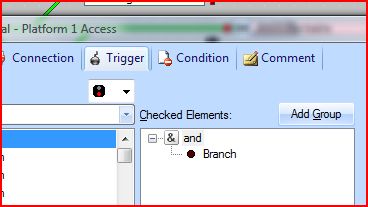
Thanks chaps mission successful.
Regards
Pete
 Last edit: by wogga
Regards
Pete.
ECOS2 with RR&Co Traincontroller and a load of other electronics so i can sit back and watch the trains go by.
Pete.
ECOS2 with RR&Co Traincontroller and a load of other electronics so i can sit back and watch the trains go by.
Posted
Full Member
Also, running under the simulator I don't get the problem you have solved for immediately setting red after the engine has passed the signal. The simulator just thinks the blocks are adjacent (actually I have not included any pointwork anyway!!). Something to remember when I get back to the real thing to allow for time taken over pointwork before reaching the next block. In my case at the Mangarth Junction, I have some significant lengths of pointwork to cross after the main approach signals.
Incidentally - for John as well - I have played with the above tests only in Silver - so no limitations there, apparently!
Posted
Full Member
[user=422]Geoff R[/user] wrote:
There is a school of thought that is in favour of creating occupancy detectors for blocks of points…….there was a longish thread on the other forum……TTG is a big fan of this but I think that is because he started with V3……with V7 there are a lot of different ways to protect the rear of the train over a long section of points.Something to remember when I get back to the real thing to allow for time taken over pointwork before reaching the next block. In my case at the Mangarth Junction, I have some significant lengths of pointwork to cross after the main approach signals.
Incidentally - for John as well - I have played with the above tests only in Silver - so no limitations there, apparently!
Posted
Full Member
the various ways to solve a problem on TC are amazing?
[
That is so true John, but it is easy to lose your way with all the different permutations thats why a forum question when you know there are some clever people out there solves many a heartache.
Pete
Regards
Pete.
ECOS2 with RR&Co Traincontroller and a load of other electronics so i can sit back and watch the trains go by.
Pete.
ECOS2 with RR&Co Traincontroller and a load of other electronics so i can sit back and watch the trains go by.
Posted
Guest user
Just for info.
Posted
Full Member
Pete
Regards
Pete.
ECOS2 with RR&Co Traincontroller and a load of other electronics so i can sit back and watch the trains go by.
Pete.
ECOS2 with RR&Co Traincontroller and a load of other electronics so i can sit back and watch the trains go by.
Posted
Guest user
Posted
Full Member
Pete
Regards
Pete.
ECOS2 with RR&Co Traincontroller and a load of other electronics so i can sit back and watch the trains go by.
Pete.
ECOS2 with RR&Co Traincontroller and a load of other electronics so i can sit back and watch the trains go by.
Posted
Guest user
Price wise if it works i would consider this whereas the railroad one to much for me
Heres a link if you are interested
Ps its another one man band
http://berros.eu/itrain/en/index.php
Brian
Posted
Full Member
Pete
Regards
Pete.
ECOS2 with RR&Co Traincontroller and a load of other electronics so i can sit back and watch the trains go by.
Pete.
ECOS2 with RR&Co Traincontroller and a load of other electronics so i can sit back and watch the trains go by.
1 guest and 0 members have just viewed this.