
RR&Co Computor Control: Discussion
Posted
Full Member
Post any questions arising from "First Steps with RR&Co"
Do you have another computer available? If you do, you might try downloading the software on to that and trying again with the stick without any controller attached.Have to go out now myself. Maybe some of those with sticks may have an answer for you, but it just seems to me that either the code on the stick is wrong or something is stopping TC from reading the stick on your computer???
Hope you get it sorted soon.
 Last edit: by Geoff R


Posted
Inactive Member
I have a 6 road traverser that is fed from 2 tracks from the layout. The layout is fully wired with occupancy detectors and so is each track in the traverser. The problem is that I'd like the appropriately aligned track in the traverser to correspond within RR&Co so it knows if the traverser block is empty or not. The traverser is manually operated and my initial thoughts are to use a feedback encoder to send the position of the aligned track to RR&Co. This would then trigger contact indicators or flagmen to move 'virtual points' to the correct position. However this seems a bit clunky and I was wondering if there was a more elegant way of achieving this or, if I do use this approach, a way of hiding the virtual points from the screen?
Julian
Posted

Inactive Member
Anyone want to buy a stick? Never been used. Would I recommend RR&Co? :Red Card
Max
Port Elderley
Port Elderley
Posted

Full Member
Do you have another computer available? If you do, you might try downloading the software on to that and trying again with the stick without any controller attached.
Max
Have you tried Geoff's suggestion? If it doesnt work on clean start with a different computor we may have to assume the stick is defective in which case I am sure it will be exchanged
Contact@freiwald.com has always worked for me……………… I have emailed Mr Freiwald, copy to you, asking him to contact you. I requested delivery and receipt notification…………I will let you know whay happens
We will sort it……believe me :thumbs
Posted

Full Member
The fact you are still getting the dialogue box concerns me you haven't disabled the autorun features on your pc have you as you see in my screenshots there is an autorun file on the stick have you got this?
When i start my pc i always get a dialogue box of RR&co which asks me what iwant to do (i am on windows 7 but this shouldn't matter) see attached picture
Files on my stick are:
Autorun which is an icon file
autorun which is a setup info file
and a system folder containing a driver all approximately only 14kb. Not a lot for £400.
Pete

(Click to enlarge)
Regards
Pete.
ECOS2 with RR&Co Traincontroller and a load of other electronics so i can sit back and watch the trains go by.
Pete.
ECOS2 with RR&Co Traincontroller and a load of other electronics so i can sit back and watch the trains go by.
Posted
Full Member
I have a 6 road traverser that is fed from 2 tracks from the layout. The layout is fully wired with occupancy detectors and so is each track in the traverser. The problem is that I'd like the appropriately aligned track in the traverser to correspond within RR&Co so it knows if the traverser block is empty or not. The traverser is manually operated and my initial thoughts are to use a feedback encoder to send the position of the aligned track to RR&Co. This would then trigger contact indicators or flagmen to move 'virtual points' to the correct position. However this seems a bit clunky and I was wondering if there was a more elegant way of achieving this or, if I do use this approach, a way of hiding the virtual points from the screen?
Julian
Hi Julian
I am afraid I have no experience with Traversers/Turntables but I believe I have read a detailed explanation of how to do this on the RR&Co Forum
I think it could be done with schedules, possibly switches and appropriate conditions……………..could you describe the sort of sequence or train movement you have in mind……………………….is the plan to automatically drive a train to the last block before the traverser and if the aligned traverser block is clear have the train move automatically on to the traverser?
Posted
Full Member
Railroad & Co. Forum • Login
All i can say is that i didn't receive the stick then get the license from Freiwald all i got was the stick and it works!
Could he have sent you a blank one? do have the system folder containing one file called "driver" about 1kb in size?
i would chill until you got hold of Freiwald, he maybe suspiscious of you aussies:hmm
Although if i was in your shoes i too would be fuming!
Last edit: by wogga
Regards
Pete.
ECOS2 with RR&Co Traincontroller and a load of other electronics so i can sit back and watch the trains go by.
Pete.
ECOS2 with RR&Co Traincontroller and a load of other electronics so i can sit back and watch the trains go by.
Posted
Full Member
I checked back to when I made the purchase and my stick already contained the code
What did your email say Max?
Posted
Inactive Member
Hi Julian
I am afraid I have no experience with Traversers/Turntables but I believe I have read a detailed explanation of how to do this on the RR&Co Forum
I think it could be done with schedules, possibly switches and appropriate conditions……………..could you describe the sort of sequence or train movement you have in mind……………………….is the plan to automatically drive a train to the last block before the traverser and if the aligned traverser block is clear have the train move automatically on to the traverser?
It's a small terminus to fiddle yard layout and my main use of RR&Co is for signalling and interlocking - I may use it more for automation in the future. So the need for knowing if the traverser block is clear is really just for signalling purposes. I'll have a look on the RR&Co forum.
Julian
Posted
Full Member
[user=434]John Dew[/user] wrote:Hi Julian
I am afraid I have no experience with Traversers/Turntables but I believe I have read a detailed explanation of how to do this on the RR&Co Forum
I think it could be done with schedules, possibly switches and appropriate conditions……………..could you describe the sort of sequence or train movement you have in mind……………………….is the plan to automatically drive a train to the last block before the traverser and if the aligned traverser block is clear have the train move automatically on to the traverser?
It's a small terminus to fiddle yard layout and my main use of RR&Co is for signalling and interlocking - I may use it more for automation in the future. So the need for knowing if the traverser block is clear is really just for signalling purposes. I'll have a look on the RR&Co forum.
Julian
How will the feed back encoder identify the position of each traverser track…..by some secondary electric contact?
Will the signals just be on the 2 runnng tracks ie if Track A is aligned to Trav 6 and Trav 6 is empty the signal is green?
Its an intriguing problem on a wet Friday Morning:lol:
Posted
Guest user
the stick at 16 kb is fine, it will only be a small file with the code installed. the rest of the space can be used to save track plans so if you change pc's just insert the dongle. i still think it is a laptop usb problem. i will download the driver for my dell latitude d610 and then email you with a how to install.
Posted
Inactive Member
Yes. I'll probably use photo diodes illuminated by an LED on the underside of the traverser to provide input to the encoder. I could use some kind of flexible copper or phosphor bronze contact but I think this should be more reliable and more easily adjusted to align with the traverser tracks. It will probably need some electronics to get the sensitivity correct followed by a schmitt trigger or similar but that should be straightforward with a bit of CMOS logic. The traverser is just manually operated at the moment.How will the feed back encoder identify the position of each traverser track…..by some secondary electric contact?
Here's a photo of it on my layout Loch Lochy.
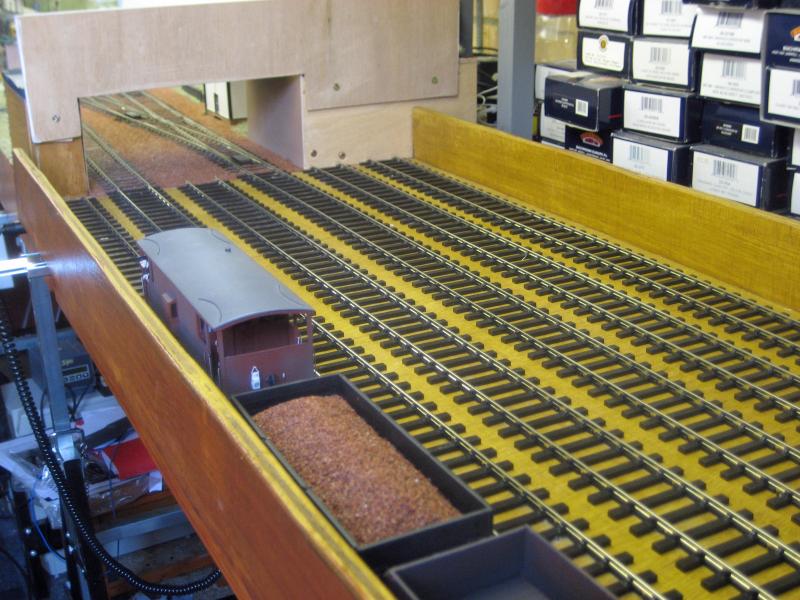
[user=434]John Dew[/user] wrote:
Will the signals just be on the 2 runnng tracks ie if Track A is aligned to Trav 6 and Trav 6 is empty the signal is green?
Yes exactly so. RR&Co is so comprehensive I can't help but think someone must have done this already.
Julian
Posted
Full Member
I am afraid you lost me with the tracking device…..but I believe you!
If you created a switch or flagman for each track alignment say
A1 A2 A3 A4 A5 A6 B1 thru 6
and activate each switch through the encoder you could then set up an operation for each switch that:
if the switch was on ( ie A is connected to 1) then the A line signal (default red) would turn to green on condition that
the contact indicators for both A and 1 were off (ie track empty)
This involves 12 virtual switches or flagmen but 2 could be located over each traverser block without cluttering the screen switchboard
This may be another way of restating your original post :shock:
Page 252 and 3 (or similar) of the manual…… Complex groups and conditions may help provide a more elegant solution
There is also a section on passing from manual to automatic control that might be useful
Let us know how you get on….good luck
Posted
Inactive Member
Unfortunately my layout is O gauge and that stock is OO! I've recently changed scale and I can't quite bring myself to sell on my old stock just yet. There's always that thought I might build a small OO layout some time :lol:Lot of stock there Julian and a neat looking Traverser!
I probably will eventually so I can fund more O gauge purchases…
[user=434]John Dew[/user] wrote:
If you created a switch or flagman for each track alignment say
A1 A2 A3 A4 A5 A6 B1 thru 6
and activate each switch through the encoder you could then set up an operation for each switch that:
if the switch was on ( ie A is connected to 1) then the A line signal (default red) would turn to green on condition that
the contact indicators for both A and 1 were off (ie track empty)
This involves 12 virtual switches or flagmen but 2 could be located over each traverser block without cluttering the screen switchboard
This may be another way of restating your original post :shock:
No I don't think it is restating my original post and it's a very good idea - I don't need to bother with virtual points at all if I do it with virtual switch logic. Great bit of thinking :thumbs
I'll give it a go and let you know how I get on.
Julian
Posted
Inactive Member
Having said all that, I have been thinking overnight about the trouble I had getting the LI USB to work. That was caused by a driver issue and this sounds more and more like another one. I think Matt is on to something. I'll wait until he send me his update.
In the last week or so, my four computers in the train room have all been hit with a major virus, despite being protected by Avast. I have a computer repairman who I use, as this one (the desk top) is the one I use for my business. He has sorted it out and has taken the Dell D600 I use for the Lok/QSI programming away. I found 13 Trojans in it and he has found more. He may have to do the other two as well.
I became suspicious when they all started having problems at the same time. The one I'm using for RR&Co is a D600 as well and I have an IBM on the layout. I will try running RR&Co on this one now it's fixed, and see what happens. Initially I thought it wouldn't work as I have no L1/layout on it, but I can see that it might not be necessary just to try it. I'll let you know.
Cheers
Max
Port Elderley
Port Elderley
Posted
Inactive Member
Sorry Max found this on the RR&Co forum:
http://www.freiwald.com/forum/viewtopic.php?t=11711&highlight=usb+recognised
All i can say is that i didn't receive the stick then get the license from Freiwald all i got was the stick and it works!
Could he have sent you a blank one? do have the system folder containing one file called "driver" about 1kb in size?
i would chill until you got hold of Freiwald, he maybe suspiscious of you aussies:hmm
Although if i was in your shoes i too would be fuming!
When you read that thread Pete, Jurgen says the stick is shipped empty. :shock::???: It's interesting that another forum member has had trouble getting a response from Jurgen. Maybe that's why they're not answering my thread - they just want to see what happens. I get the impression that I'm not an isolated case and that Jurgen's tactic is to say nothing initially to see if we sort it out ourselves.
If I was collecting A$750.00 a pop from my customers, I would treat them with more resepect.
I'll have to have another look to see if I can see a file named Driver.
Max
Port Elderley
Port Elderley
Posted
Inactive Member
I installed TC on this desktop (which I'm sure has no viruses or driver problems after it's Major Service). TC opened at the end of the install and asked for the code or stick to be inserted. I inserted the stick. Nothing. Checked Help About and it showed I am in Test mode.
The computer acknowledged the stick and opened it to show the files in it. There was only one icon (an autorun) which was empty.
I reckon that's compelling evidence that the stick is empty - even though the pie chart shows 16 Kb used.
I guess we will now have to wait to see if Jurgen deigns to answer John's email.
Thanks to you all for your interest. :thumbs
Max
Port Elderley
Port Elderley
Posted
Guest user
I installed TC on this desktop (which I'm sure has no viruses or driver problems after it's Major Service). TC opened at the end of the install and asked for the code or stick to be inserted. I inserted the stick. Nothing. Checked Help About and it showed I am in Test mode.
Max a quick one, you said that you waited to ba asked for the code then inserted the stick.
suck eggs time here
insert the stick into the PC before you boot the PC up and then leave it in. once the PC has settled start TC and see what happens.
when the software boots the first thing it will do is search for the code and if it can't find he dongle it will ask for a code. inserting the stich at this point would be to late for the autorun to kick in.
Posted
Inactive Member
Max
Port Elderley
Port Elderley
Posted
Guest user
this may be a long shot this one but you never know.
open up TC and then save your plan to your dongle, it will not overide the stuff you have already on the stick.
close TC down and the lunch TC from the dongle by double clicking on your saved file. this way you are establishing a link between TC and the dongle.
try tat if it does not work i have another idea:thumbs
it may work
1 guest and 0 members have just viewed this.