
RR&Co Computor Control: Discussion
Posted

Full Member
Post any questions arising from "First Steps with RR&Co"
[user=269]MaxSouthOz[/user] wrote:I'm not sure it's the fact that it's Hornby, Pete. I have done a couple of retro-fit Bachmann steam locos recently, and they suffer from the same pickup problems. Putting in extra pickups helps, but it's a lot of work to get it right. I'm glad your Bachmanns work well. It might be because they are new generation. Anyway, you're not alone. ;-)
Max
About 10 years ago I think Bachmann were far superior to Hornby in terms of smooth running………..but I have a Hornby Black 5, 8 F and best of all (despite the shirt button livery) a Grange that when chipped are absolutely superb runners……………I get so frustrated being unable to run them with the layout half finished…………….I know its my layout etc but did anyone ever see a Black 5 on a single line GWR branch?
Max is there any chance of a "step by step" putting additional pick ups on a tender…….its something I have always wanted to do………..but if it requires a high degree of skill then maybe not…..I am a time served bodger but if its fairly simple and wont fry the chip (theres a joke there somewhere) that would be great.
I was just about to do a warts and all post on my layout thread asking for help with tender pick ups
Kind Regards from a wet Vancouver


Posted

Inactive Member
There are two good "how to's," in the Index under P by Sol and Owen. Also put Pickups into the word search on the home page and you'll find some other interesting references.
My system is by using fine Phosfor-bronze wire.
Cheers
Max
 Last edit: by MaxSouthOz
Max
Port Elderley
Port Elderley
Posted
Inactive Member
Here's the link to how I did some on a brake van, John. It should explain it. Note the right hand rail goes on the red wire and the left hand rail goes to the black wire on the decoder.
Max
Port Elderley
Port Elderley
Posted
Full Member
I really wish you hadnt sent me that link!
When planning a layout you should lay out (another pun sorry!) certain parameters
I did:
Computor Control YES
Sound NO (I am deaf……….too much shooting in the Army)
Lights NO
now look at the problems you have created……………I have at least 5 Toads that now demand lighting
:cheers
ps
thanks for the index pointer
Posted
Inactive Member
Max
Port Elderley
Port Elderley
Posted
Guest user
i will have 12 s88's when i am finished:shock:
i have come to the conclusion that trying anything on the layout in demo mode is a waist of time. it is ok to test the odd point but anything further than that is a pain. i tried to do a bit but all i was doing was rushing to get it sorted before the 15 minutes ran out:twisted: i would rather have a full 30 day trial with no time limit, at least you would be able to set things up and get stuff running. i think TC looses a lot of business with people getting frustrated with the 15 minute restriction. if it was 30 days you would well and truly get the bug, everything would be working then the trial stops. two choices 1 revert back to normal control 2 buy the software, i am sure most would buy the software..
Posted

Full Member
And the Jinty is the problem. It appears and disappears in occupancy when it feel likes it, more pick ups required as suggested i feel it only picks up on the rear axle. When it is detected well it performs well as the speed profiling was performed with good results.
I have found a workaround for my occupancy detection errors between the ECOS and TC, if i change any of the detectors to a different number in TC, then change it back again it all works fine to a fashion for hours. I am thinking of doing a full uninstall of TC and re load got nowt to lose.
Time for a few timetables and loco exchanging i think. Now where did i put Johns tutorial?
Pete
Last edit: by wogga
Regards
Pete.
ECOS2 with RR&Co Traincontroller and a load of other electronics so i can sit back and watch the trains go by.
Pete.
ECOS2 with RR&Co Traincontroller and a load of other electronics so i can sit back and watch the trains go by.
Posted
Full Member
I loaded an earlier version of my layout and occupancy is spot on quick and responsive (Jinty still poor). Load my version 3 and occupancy is pants. What's that all that about?
Then i thought hell i am going to have to profile my loco's again but i have found you can export and import the loco's profiles between layouts in the Train sub menu, what a result! So theoretically get a good profile, don't touch the cv's again and save it via the export, should save loads of time.
Still baffled why there is difference between two versions when the hardware and settings are identical?
Regards
Pete
Regards
Pete.
ECOS2 with RR&Co Traincontroller and a load of other electronics so i can sit back and watch the trains go by.
Pete.
ECOS2 with RR&Co Traincontroller and a load of other electronics so i can sit back and watch the trains go by.
Posted
Full Member
I loaded an earlier version of my layout and occupancy is spot on quick and responsive (Jinty still poor). Load my version 3 and occupancy is pants. What's that all that about?
Still baffled why there is difference between two versions when the hardware and settings are identical?
TC is a database application and I guess from time to time an individual file gets corrupted……………….I have deleted a non working schedule…….and recreated it…..similarly with a block which would not clear when the train ceased to occupy it. And I guess the same thing happened yesterday with my 2 corrupted loco files….see below
It doesnt happen that often generally TC is very robust
Then i thought hell i am going to have to profile my loco's again but i have found you can export and import the loco's profiles between layouts in the Train sub menu, what a result! So theoretically get a good profile, don't touch the cv's again and save it via the export, should save loads of time.
Now there is a coincidence Pete at almost the same time thousands of miles apart I discover how to copy and paste engine profiles and you discover import and export…….amazing…….I wrote my discovery up in the tutorial………….I will edit to add import/export if I may
I have been thinking about your Jinty, Pete, poor running shouldnt affect occupancy……………at least it doesnt with me. If you manually place the Jinty on a block, the block should colour up anf if you lift it off it should clear. Having assigned the Jinty to the block if you use the train window to drive it to the next block, even with manual help, the first block should clear after the jinty has left and the new block should colour up and show the jinty image……..often times both blocks colour up momentarily.
Does this happen with you?
Posted
Full Member
Jinty has had a good run and is performing much better in my "fixed version" of TC. Started to fine tune my locos and blocks now i have some good solid occupancy.
Its all working as it should now. Just got my granddaughter around again for the umteenth time so duty calls.
Cheers for the support.
Pete
Regards
Pete.
ECOS2 with RR&Co Traincontroller and a load of other electronics so i can sit back and watch the trains go by.
Pete.
ECOS2 with RR&Co Traincontroller and a load of other electronics so i can sit back and watch the trains go by.
Posted
Inactive Member
Not to worry. It's a beautiful peice of hardware. A 256 Mb USB stick in a metal case - which I may get engraved with my name and telephone number.
Tonight I begin. "To eat an elephant, first pick up the tail and take a bite . . . "
Last edit: by MaxSouthOz
Max
Port Elderley
Port Elderley
Posted
Full Member
I think there is only Matt to splash the cash, its a big step but in Matt's case he is going with 12 S88's he will acheive nowt on the trial. I still think £400 is a lot of money especially for indvidual layouts, clubs yes a fair price. Its the frustration of trying to make progress that led me to purchase, otherwise the addiction and not being able to progress would have led me to give up i think. When decided to build from day one i had this vision to get home from work and just sit and chill while some trains did the business on their own through a well built layout which can be viewed at a multitude of different angles…. brill.
Just on loco profiling (like John i have been doing a fair bit recently) i have setup a special profiling track because my layout does not have enough length to do profiling, with my experience the run out track needs to be at least twice the length of the test track i.e. profile length is 1metre then the runouts either end need to be at least 2 metres each, this will allow the loco to accelerate and deaccelerate under its own control, anything less the loco is still accelerating into the test length and will give skewed results.
Pete
Regards
Pete.
ECOS2 with RR&Co Traincontroller and a load of other electronics so i can sit back and watch the trains go by.
Pete.
ECOS2 with RR&Co Traincontroller and a load of other electronics so i can sit back and watch the trains go by.
Posted
Inactive Member

Now, I'm trying to configure my double slips motors.
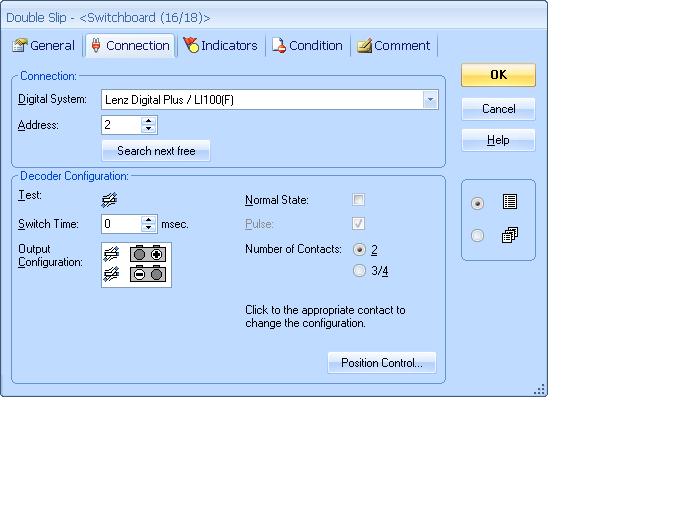
How do I add both the Tortoise motors?
Max
Port Elderley
Port Elderley
Posted
Guest user
Posted
Inactive Member
Max
Port Elderley
Port Elderley
Posted
Inactive Member
Max
Port Elderley
Port Elderley
Posted
Full Member
I think in TC you check the 3/4 contacts and then this gives you the option for another connection output for your system. but that is still only two outputs for four point motors so that leads me to suspect the motors must be connected in parallel in pairs?
Pete
Last edit: by wogga
Regards
Pete.
ECOS2 with RR&Co Traincontroller and a load of other electronics so i can sit back and watch the trains go by.
Pete.
ECOS2 with RR&Co Traincontroller and a load of other electronics so i can sit back and watch the trains go by.
Posted
Full Member
I might have to uninstall TC and reinstall it again. It keeps asking me for the code even though I have the stick plugged in. After several rejections, it opens. :???:
Max make sure your computer recognises the stick is plugged in and check my computer, if the usb RR&co is shown as a drive everything should be ok.
Judging by me experience with old layout files i think a good clear out of old TC files would be an excellent idea.
Pete
Regards
Pete.
ECOS2 with RR&Co Traincontroller and a load of other electronics so i can sit back and watch the trains go by.
Pete.
ECOS2 with RR&Co Traincontroller and a load of other electronics so i can sit back and watch the trains go by.
Posted
Full Member
Railroad & Co. Forum • Login
Pete
Regards
Pete.
ECOS2 with RR&Co Traincontroller and a load of other electronics so i can sit back and watch the trains go by.
Pete.
ECOS2 with RR&Co Traincontroller and a load of other electronics so i can sit back and watch the trains go by.
Posted
Full Member
MaxSouthOz[/user] wrote:
Thanks, Matt. It looks like you should be able to do it, but I just can't figure it out. Maybe John will come up with something. :???:
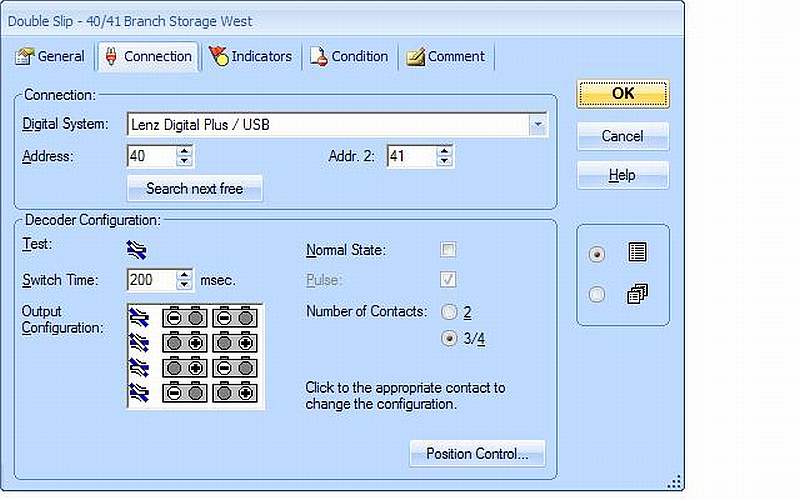
Hope this helps Max
I am using Tortoises hence the switch time
Fiddling the output configuration took a while and was easiest as a two person job………..one changing the configuration and the other testing by running a wagon
It works like a charm
I guess I should have added this to the tutorial……………
1 guest and 0 members have just viewed this.