
RR&Co Computor Control: Discussion
Posted

Full Member
Post any questions arising from "First Steps with RR&Co"
Thanks Geoff…..thats a lot clearer…..its quite a complex layout to absorb all at once! I have a Fleischmann Turntable unconnected and never operated for real…..I am really looking forward to connecting it up with TC
[1] The period helps me assess the block layout
[2] Sensors: As you know I use Lenz but a number of people have spoken highly of S88s. Matt who started all this has them.I thought TTG gave some very sound advice on system in the other forum
[3] Profiling: You dont need long blocks for the start and finish…..the start has to be long enough for the loco to achieve max speed before it enters the centre measuring block……..this is the block that needs to be reasonable length…..mine is 60". The blocks need to be readily accessible and viewable…..speed profiling is crucial and takes a long time 30 minutes on average per loco and to adjust the braking involves a lot of going back and forth.
[4] Contact Indicator Placing: I didnt quite follow this but I dont want to get ahead of myself because in the next day or so I will write the block section of the tutorial and that may be the best time to go into this in a bit more detail. I have found that determining block placing and block length really important if you want maximum flexibility in running things automatically
[5] Schedules: Once I have a few blocks set up in the test layout I just have to do a post on setting up locos in the engine list and then my plan is to do a very simple 3 block schedule and progressively build up from there
Kind Regards


Posted
Full Member
This is the s88 module I am planning to purchase for the occupancy detection:-
http://www.southwestdigital.co.uk/PDF/EcoS/RMGB8%20SWD%20ECoS%20S88.pdf
Those are the ones I use with the ECoS. I am going to have to get some new ones now as one of the recent ECoS updates meant that the older ones would no longer work if railcom was activated. They have rectified this in the new ones and I believe that LDT will provide the parts you need to change the older ones. I will have to get these for my new layout anyway.
I tend to buy mine direct from LDT.
http://www.ldt-infocen…r den s88-Rückmeldebus
They do lots of other Digital goodies too.
cheers
Neil
 Last edit: by Neil Wood

Posted
Guest user
keep it up John, i wish something like you are doing was available when i was starting to plan my layout.
Posted

Legacy Member
Apologies for the blatant plug, but I have around 25 brand new LB101's of the latest design, still unopened in their bags. If anyone is interested in buying them, please drop me a PM.
Posted
Full Member
Here we have a train approaching:-

The train stops in the station at the signal:-

I have connected this signal to the pointwork at the station throat - just as I have done on my actual layout - so when the point is set for the Slow Down to depart, the signal clears:-

Finally the train departs into the next block, and the point changes back to normal, returning the signal to on.

So to the questions.
1) Is this a valid use of RR&Co? If I had a real train there, I presume that my intervention in controlling the point would be as if I was acting as the signalman - allowing the computer to drive the train forwards?
2) Did I need to create the semaphore image, or is there a library of icons somewhere?
3) How should I show the other arm required for the diverging path from the station throat pointwork?
4) I thought that I would have been able to do all this from the Dispatcher window, but the signal does not even show up there and I cannot change points there. All that happens at the moment is that if I click on a track, it seems to show up all possible routes for that track along with any occupied blocks?
Still a great deal to learn, I think!!
Posted
Full Member
So to the questions.
1) Is this a valid use of RR&Co? If I had a real train there, I presume that my intervention in controlling the point would be as if I was acting as the signalman - allowing the computer to drive the train forwards?
2) Did I need to create the semaphore image, or is there a library of icons somewhere?
3) How should I show the other arm required for the diverging path from the station throat pointwork?
4) I thought that I would have been able to do all this from the Dispatcher window, but the signal does not even show up there and I cannot change points there. All that happens at the moment is that if I click on a track, it seems to show up all possible routes for that track along with any occupied blocks?
Still a great deal to learn, I think!!
Great stuff Geoff……you have been busy
You are subtly applying pressure for me to get to the next phase:lol:
Where did the signal come from…..through the Tools/Signals menu or?
How is it connected to the points?
[1] I have focussed on running trains automatically so I am somewhat vague on both signalling and manual operation. RR& Co has a number of different driving modes
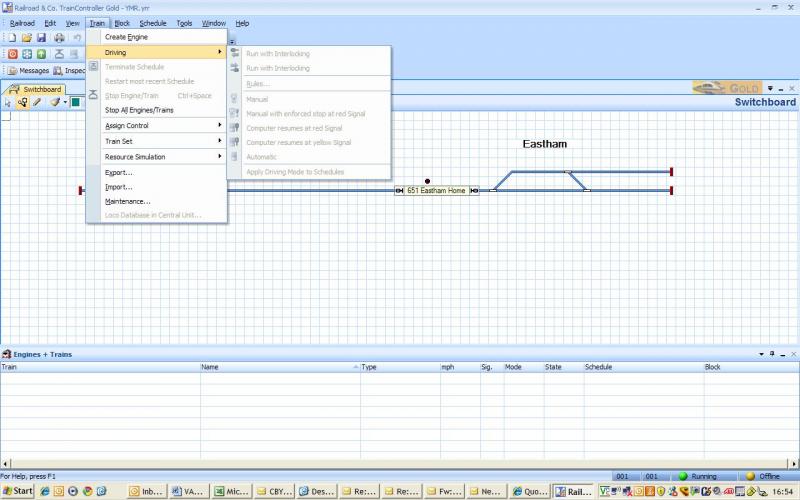
Its greyed out because I am not hooked up. You can see there are a number of ways of manual driving….ie starting and stopping controlled by signals……I think you can set up semi manual routes using push buttons
[2] There is a whole raft of different aspect light signals and some good ground signals but no semaphores.You can use points to represent upper quadrant semaphores but I think twin aspect lights are clearer.
[3] You would position the second signal next to the other
[4] I will have to check but I think the despatcher (or block diagram) window only works with auto operation……you havent any schedules set up(?) so you only see all the available blocks. The dispatcher block just shows RR&Co internal signals which you will see once we set up some routes.
Hope this helps?
Once I had done some route setting my plan was to signal the test layout but that will have to be something of a joint exercise
I will try and get the block tutorial out tomorrow……promise:lol:
Kind Regards
Posted
Full Member
I am toying with the idea of buying an LDT s88 interface for the PC so that I can see that the detectors are working, but that is an extra investment I would not need longer term - I will almost certainly go to the ESU controller, but it is not available until March. If only I could find someone with a ZTC interface for sale, I could at least start moving trains.
I have set up a schedule to try to send a train around one of the tracks of my main loop. I had not realised that TC would make the decisions about which tracks to use for a schedule, so I am now being tighter with the specifications on each block, as I think the only place I would want it to make those decisions would be when arriving in the main terminus, or when "parking" in one of the storage loops - whatever was vacant at the time.
Not having an interface, means that I have been trying to find out what the simulator does to see if I can run a complete schedule offline - at the moment, when I hit "Start" the engine symbol occupies the next block in the schedule as well as the first, but no matter what I do in regard to changing the status of the block detectors, nothing else happens!
Anyway, I will try and be patient, and get on with the homework and await your tutorials. It really is great of you to put time into sharing with us like that.
Thanks
Posted
Legacy Member
I wish you had been around when I was looking in that direction. Maybe once the layout is up and running I may revisit RR & Co as I'm sure this excellent step by step tuition will still be around.
Geoff, I'm following your progress every step of the way. Knowing your layout and your understanding of electronics, I'm sure this will be a successful integration. Can't wait to see it running later in the year when we all get together again..:thumbs
Posted

Full Member
Posted
Legacy Member
Posted
Full Member
That one which was sold, would have done me fine. I wonder if the purchaser has used it yet??
Posted
Full Member
I have posted a question on RMWeb to see if any of the experts there have an opinion about it.
Posted
Legacy Member
http://www.lenz.com/manuals/xpressnet/li-usb_hardware.pdf
Posted
Guest user
i had the same problem with the simulator, ensure the indicator are set to active (red), they are linked to the block and the block turns pink when the indicator is pressed, sorry if i am telling you to suck eggs… i was banging my head as nothing would move.
John
another great how to
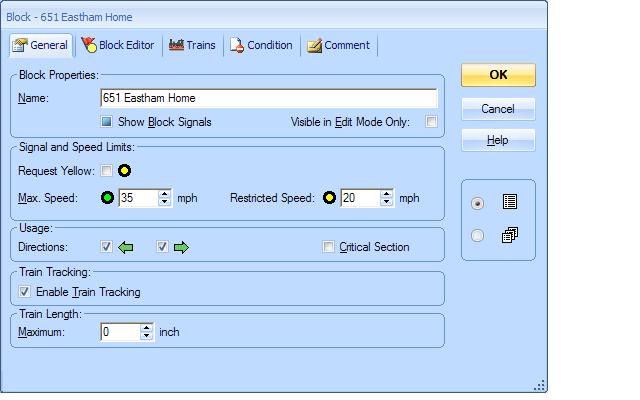
could you explain what request yellow means? this pops up in a number of tabs. i presume it has something to do with the status of the next block but i am not sure.
Posted
Full Member
The block signal is the signal calculated by TC and is situated at the end of the block (if the block is two way there is a signal at either end.)
If you "request Yellow" the action is similar to a Distant Signal set at Warning…….the train can exit the block and enter the next block but when it does so its speed will reduce to the restricted speed at Yellow designated in the properties of the next block…..
I have used this once where I wanted to slow a train before going over a fan of points……(which had low speeds set) but I realise I could have achieved that just setting the green max speed. If using this I think you would want to try and link it to specific schedules or train groups or trains going in one direction and I havent worked out how to do that yet think you
Kind Regards
Last edit: by John Dew
Posted
Full Member
I think I was testing the water at the same time that you were…..I remember your posts in the "other forum"
Hopefully we will convert you yet…………I assume your new layout is DCC? If you are not wired up yet you can set up your blocks (ie isolate the power feed) and then tag those feeds so they are readily identifiable when you eventually feed them through detectors;-)
Incidentally thats no excuse for not doing your homework on the demo version:lol:
Kind Regards
Posted
Full Member
Posted
Full Member
Thats RR&Co in a nut shell……lots of this
 :lol: but isnt it great when the wall finally falls down:lol:
Kind Regards
Posted
Full Member
Posted
Full Member
Must stop playing now and worry about the snow! On the other hand, the snow will still be there tomorrow anyway. Let's see what else we can find out.
Last edit: by Geoff R
1 guest and 0 members have just viewed this.