
RR&Co Computor Control: Discussion
Posted

Full Member
Post any questions arising from "First Steps with RR&Co"
Cheers John, i will persevere and run through the tutorial again. I didn't use a virtual contact in the end i couldn't get my head round it this weekend, too hasty to get some movement.I shall study the tutorial again but now i must cook meine Frau's dinner and speak to her for the first time this easter!
Regards
Pete
Regards
Pete.
ECOS2 with RR&Co Traincontroller and a load of other electronics so i can sit back and watch the trains go by.
Pete.
ECOS2 with RR&Co Traincontroller and a load of other electronics so i can sit back and watch the trains go by.


Posted
Full Member
That will teach me!
Regards
Pete.
ECOS2 with RR&Co Traincontroller and a load of other electronics so i can sit back and watch the trains go by.
Pete.
ECOS2 with RR&Co Traincontroller and a load of other electronics so i can sit back and watch the trains go by.
Posted
Guest user
when john came up with the shuffle i came up with an alternate way, i posted this on page 13 it may help. i seperated the loco twice as you can see below.
John
i may have missed a problem you have brought up but i think i have solved the loco exchange. i have not yet set up block specific stop markers when the 2nd loco enters the block but this could be done easily. i have uncoupled the loco as per normal
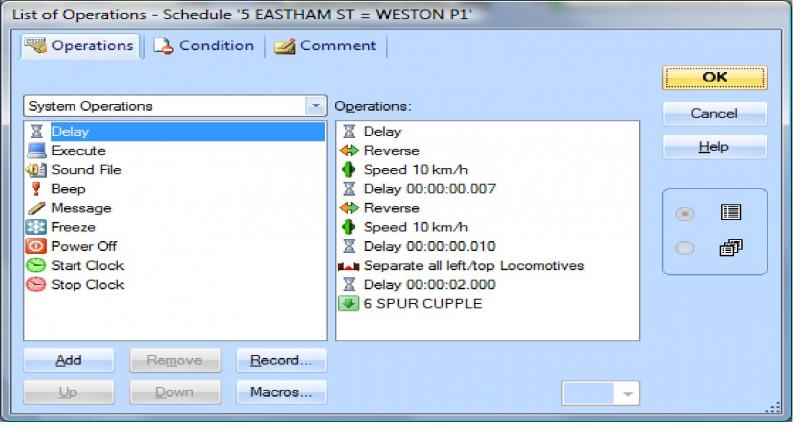
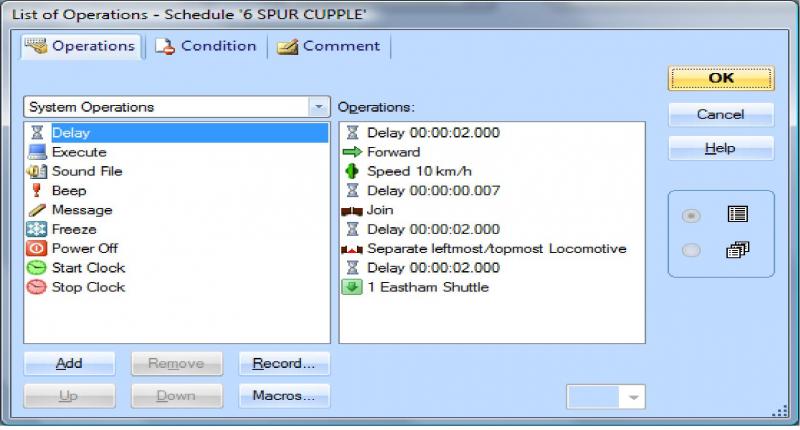
then in the schedule from the spur in rules i put in enter reserved block for joining. i then in the list join the loco and seperate left most loc (seperate again)
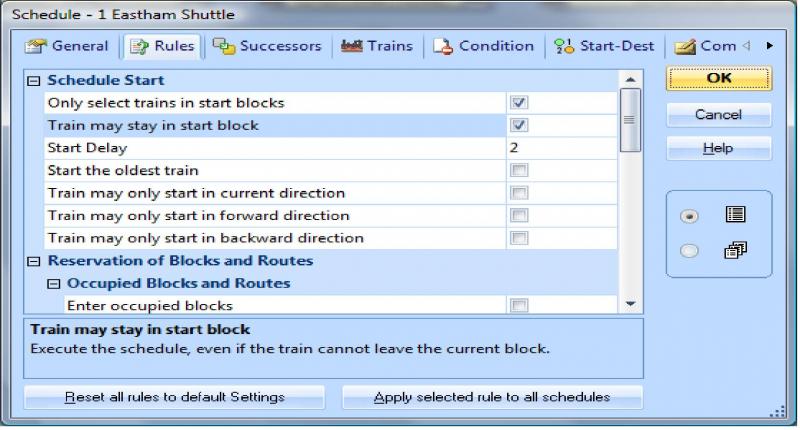
then on the eastham shuttle in the rules i select train may stay in start block.
this works in a loop. i have uploaded the file to have a look at.
Attachment: TUTORIL sat.zip (Downloaded 1 time)
Posted
Full Member
Then when i did it, i saw that John at the arse end of his tutorial is a section on loco exchange..gutted.
Whilst i am away next week i shall try to fine tune my operation using proper train configurations and give your shuffle a go.
I must get some kadees next week and give them a go too, the Ivatt tanks i have don't clear the peco uncouplers and their bellies drag and stop the tank. So hopefully the magnets will give me the clearance. I need to get a solution because i want to get my platforms in and do some ballasting.
Regards
Pete.
ECOS2 with RR&Co Traincontroller and a load of other electronics so i can sit back and watch the trains go by.
Pete.
ECOS2 with RR&Co Traincontroller and a load of other electronics so i can sit back and watch the trains go by.
Posted
Guest user
The attachment shows my attempts to run with Silver. I intended to bodge a way of using stop markers for different train lengths, but keeping track of them would be a nightmare. I am changing to Gold.
Posted

Full Member
I opened your file but it got automatically converted to Gold. Having said that I am certain that is the correct solution for you anyway
Do you have some specific queries?
I am not sure what stage you are at with the files because:
[1] The stop blocks……….which I am convinced are redundant…… only have one stopmarker and no conditions, in fact there are no conditions anywhere…..oops just found some attached to the flagmen
[2] You have train groups set up, which I thought was a gold option, but you are not using them anywhere
[3] The switches are set up but I couldnt see where the arrival switch was activated………you can turn them on automatically as an operation………….and they werent used as conditions
If we work on these three factors I am sure you can achieve your objectives. I would be inclined to work on perfecting the loco exchange and random departure for trains of the same length (say without sound) first. Once that is perfected we could work on the options for sound and finally different lengths. I find the building block approach works best with TC.
I have to go out now……its morning here……but will get back to you later if you wish to expand on your post
Regards
 Last edit: by John Dew
Posted
Full Member
That little loco exchange routine i did i now have it running in a sort of a continuous automated cycle without the coaches because its end to end. If i could fit in a return loop to get the trains back into their starting block in the fiddle yard the bloody thing would run and run.
Next objective is to get a second train to another platform for a repeat session.
I think i have only made progress by going live and watching them go and the immense satisfaction spurs you on.
I tried Herr Freiwald for a cheaper Gold Lite version, he wasn't having any of it so i have got to find a slush fund from somewhere.
Don't give up if you need a secong head i am sure i can nip round if you want. I am a novice but a problem shared is a problem aired.
Pete
Regards
Pete.
ECOS2 with RR&Co Traincontroller and a load of other electronics so i can sit back and watch the trains go by.
Pete.
ECOS2 with RR&Co Traincontroller and a load of other electronics so i can sit back and watch the trains go by.
Posted
Guest user
when I ran those files on Silver I just pressed the start all switch. From there the first train ran to Eastham and did the run round. As the first train passes Midby (or should that be Ashby?) on the way to Eastham the released engine runs into the spur, waits for a while then selects the platform where both switches, Arr and Dep, are off, runs in & couples up. That changes the dep switch for that platform to ON and puts the other two OFF. It waits there until the train gets back from Eastham, then departs with its train and the whole routine repeats continuously with different train/engine combos. At first I made all arrivals do the shuffle, but the sim seems to throw a random wobbly so I deleted some, but not all, stop block operations/macros to try and cure it.
The switches arr & dep are just internal markers, they are not for playing with. Each arrival puts the arr switch for that platform ON and the other two OFF, so to stay in sequence the next departure must be one with arr OFF, chosen with conditions on the three spur to platform schedules so that only one of the three can start. Two arr switches are off, which is why I need to use both switches, arr & dep, in the conditions to select the platform. I could probably make the two flagmen redundant, but they're hard working guys so I'll keep them on.
There are (or were) lots of conditions and operations scattered around, many of the schedules have them. There are some to select the right stop marker where the blocks have two. It must be that the conversion to Gold has knocked them out at random. There should be a train group for sound equipped and one for silent. I use them as train type conditions in the E-W and W-E schedules to select either the Sound or the Silent schedule. The difference in the two types is the time allowed for the push back in the shuffle to allow for delay in the sound decoder. I cannot see any convenient way in Silver to get rid of the stop block: Silver does not have "enter the block to join". Because it is just for the engine it only needs one stop marker.
Posting the files seems to have backfired big time, I was quite happy that I had got it all to work in a continuous sequence without having to set up any trains(of coaches). You probably know that, using a train in Silver, it is impossible to do an engine change automatically. When running these schedules the engines just make the right moves, stop to couple at 20" from the uncoupler and so on. Until it goes live you have to imagine the coaches. About the only advantage I could find over Gold was that I can use Tail of Train (ie Engine) to stop over the uncoupler.
It's not intended to be prototypical, just an exercise in seeing the drawbacks of Silver as well as getting used to the software. I assumed that it would run in exactly the same way in Gold, but it seems that it doesn't.
If it had worked for you I would have asked for ideas for keeping tabs on those non existent B sets and dealing with different lengths. As it is, the main purpose has succeeded. The exercise has convinced me that Silver is more trouble than it is worth for what I want to do, so I'm leaving the branch and getting back on to the main line.
Pete,
thanks very much for the offer, I expect I will take it up when I do go live.
The best I have done so far is a bit of settrack running across my desktop as three blocks. I only tried a few simple schedule moves, and that was before I read about the shuffle. Also I tried three long blocks of settrack on the carpet and managed to profile one engine. I had to progressively shorten the central timing block because the software kept timing out.
Posted
Full Member
I think I was a little too hasty……my apologies. As has often been remarked there are usually at least 3 different ways to solve a problem in TC. I had a preconceived idea of how you were approaching this so when the conditions etc I would have put in were not where I expected to find them I leapt to some erroneous conclusions. :oops:
If the system you have set up works ok then that is great……and you are certainly a very quick learner……I spotted some of your work arounds for sound and non sound:thumbs
For greater certainty…….you are just running locos no carriages?
So if I set up locos from your list and put them in the appropriate blocks and press start it should all run tickety boo……. so is there a specific issue you want me to look at………………..or if you have now made a decision to go with Gold (which I applaud) do we wait until you have set it up in Gold?
I do agree that the Flagmen are redundant and I have a feeling you could achieve what you want with just one switch per platform.
Regards
ps I guess the time out you are talking about is the 15 minutes per session in demo mode? Thats a real catch 22 because shortening the profile block is not a good idea…………..I have 60"………………profiling takes forever but as I wrote somewhere a glass of wine and some cool jazz makes the time pass ok!
Posted
Guest user
I am running just locos, I cannot do an engine change with the primitive train functions in Silver, so the trains are phantoms.
My intention in setting it up was to have a foundation to sort out stop positions for coupling to different train lengths. I was hoping you would have some ideas on that, but the experience of setting it up suggests that the work involved, either in writing up copies of schedules for each train length, or in constructing switch matrices to link each train length with each start/destination block, would be out of all proportion to the advantages. Those are the only two possibilities I can think of apart from the really bizarre, such as installing an array of optical detectors to cover a range of rear end positions.
I had hoped that the files I posted would load the position where I saved it, including engines in the right places. All that should be necessary then is to click on the "start all" button and let it rip. To set it up manually needs the arr & dep switches to correspond with the train about to depart.
Today's job is to uninstall Silver, replace it with Gold and play with the trains. I will get rid of the stop blocks and, probably, the flagmen. Then I can start to think about multiple stop positions etc. and perhaps call on your expertise. although I expect it to be much easier in Gold.
The 15 min. limit is a real pain when profiling: Will it finish in time? When it doesn't it means altering the track and wasting another 15min. I only did one engine as a trial, it will have to be done again when I get a longer timing block and a functional version of TC.
This is a late edit:
I have installed Gold and tried my Silver files. I overlooked two things, it opens in edit mode and the P2 stop block is occupied but the indicator is off. All the trains are positioned correctly. If you fix these two items then press "start all" it should run properly.
Once again thanks for the tutorial, I have been referring to it all morning to set up trains and get them to join and separate.
Posted
Full Member
Thanks for the reply John, I hope I am not becoming a nuisance with this
No Problem Brian. I enjoy doing this because it forces me to look outside my own layout. I have only been doing this for a year (for real) so it helps my learning curve
Let me know how you get on………………….I am wrestling with the problem of how the light loco knows where to stop………somehow we need to turn a switch when the trainset first arrives in the terminus but right now I cant think how to do it……………….I will get back to you
PS………..Can I assume B Sets and say 4 carriage sets……..arriving with the same loco on from the same location?
Posted
Guest user
I thought it would be an easy job to adapt my previous files to work with train sets in Gold.
I've just quit, and they're still not running properly. Totally unexpected snags: A silent engine pulls a train into W1. A sound fitted engine backs in, couples, and the silent separates. The W-E sound schedule will not start because the silent engine does not have permission for it, even though it is separated. I'm still looking at it, but the answer seems to be to use a combi group in the conditions inside the operations list ( inside the macros!) to start either the sound or the silent macro. That seems to work,so I will not need separate schedules for sound & silent. I need two or three more days (at least) on this, I spend more time reading the tutorial and the manual than writing schedules, but things are slowly coming together.
I am using three B sets at 20ins and one siphon at 10ins, although I have not used the siphon on the (virtual) track yet. The plan is to allow any engine to take any train, (I did say it was unrealistic) so I am looking at ways of stopping over the uncoupler without knowing the length of the engine.
With trains of known fixed length I am using tail of train and putting stop markers for B sets 20ins to the rear of the uncoupler. The same marker is used for coupling using head of train for the relief engine. Uncoupling pushes it to the rear of the marker, coupling pushes it back to the marker. A second marker at 10ins will deal with the siphon. I cannot see any way to cope with trains of varying composition.
I'm experimenting with entry & exit locks as operations - that looks promising.
I am still blown away by the complexity and huge range of possibilities of TC, but I really must spend more time building than playing with virtual trains.
Posted
Full Member
John,
The plan is to allow any engine to take any train, (I did say it was unrealistic) so I am looking at ways of stopping over the uncoupler without knowing the length of the engine.
I cannot see any way to cope with trains of varying composition.
Its the random requirement that throws it………..if the initial schedule can in some way identify the longer train it can be done as Matt and I indicated in an earlier post……..you just need something to trigger a switch which then serves as condition to operate the nearer stop block
Posted
Guest user
one thing i have found and this may not help:roll: but….
i have re started from scratch about 4 times, not because i have messed everything up. i have found that after learning a number of tricks and you understand how it all goes together it is easier and quicker to start again rather than trying to spring clean all the junk left around.
Posted
Guest user
I agree with both of you about using TC. Now that i've made my mind up to use Gold I need to go live rather than rely on the sim alone, and I have found out the hard way what a tangle of logic I get into by adding fixes to patches on workarounds. It is definitely easier to start again. I suppose eventually I will have to start making lots of notes and screen prints to keep track of it all. I'm already seeing the merits of the inspector, traffic control, Dr Railroad etc.
Posted
Full Member
I have found out the hard way what a tangle of logic I get into by adding fixes to patches on workarounds. It is definitely easier to start again. I suppose eventually I will have to start making lots of notes and screen prints to keep track of it all. I'm already seeing the merits of the inspector, traffic control, Dr Railroad etc.
Been there…..done that etc
I use the comments tab on all the relevant elements so you can quickly see where there is a buried condition or operation. Where I have multiple stop markers in a block I have started giving them meaningful names like "3 car coupler" or "2 Car Platform Stop" etc
For my pick up goods shunting routine where the sequence has 18 short schedules I eventually had to list them along with all the relevant details in an Excel Spreadsheet and that helped enormously……I intend to create similar worksheets for any other multi schedule sequences I develop
Have fun!
Posted
Full Member
Been doing a timetable at the moment so needs to be tracked well to ensure the successors are right.
Regards
Pete
Regards
Pete.
ECOS2 with RR&Co Traincontroller and a load of other electronics so i can sit back and watch the trains go by.
Pete.
ECOS2 with RR&Co Traincontroller and a load of other electronics so i can sit back and watch the trains go by.
Posted

Inactive Member
I'm dragging along in the dust at the back, but getting there. I have all my turnouts working via the LS 150 - still have to program delay in, but that shouldn't be a problem.
HOWEVER. I have hit something of a hurdle. I have installed my L1 USB several times in various orders, but it is Very Bad. When I double click on the Server shortcut, I'm asked to select a language. I select English and this happens:-
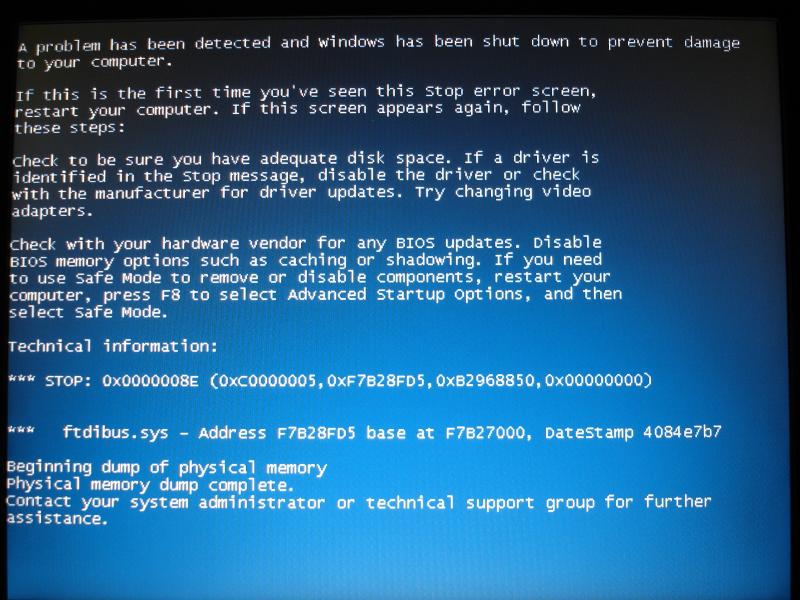
The only way to escape is to hold the off button down for 5+ seconds, which shuts down the laptop.
By way of supporting information:-
The laptop is supporting a 1 Terabyte external hard drive, and a powered external hub which supports an optical mouse and various 4Gb sticks as required, with no problems. The C drive is less than 1/3rd full.
I have another layout with a laptop and an L1 USB interface. I have established that the new cables, (one of which I made myself - so I took particular care to test that one!), and the L1 USB interface work correctly by inserting them into the other system and running it.
Does the STOP message have a description of a driver? The CD ROM I used to install the software is the latest version. Frankly, I'm baffled. Can anyone make any sense of the message, please?
Regards Max
P.S. I've posted the question on the Lenz User Group Forum, but so far I have had no response.
Last edit: by MaxSouthOz
Max
Port Elderley
Port Elderley
Posted
Guest user
have you updated your drivers recently? i have a dell 610 and i had problems when running server. it would not pick it up. i will be using a dell desktop in the train room so i transfered it to this and it worked fine. try using driver genious to update your drivers. the dell 600 and the 610 are now very outdated. have you tried installing the softwre from both disks and also download the software from the lenz site.
first try to update the USB drivers (suck eggs moment)
two options
1
press start
right click on computer
left click on properties
(may differ with operating system)
select device manager
then select the USB drivers, right click and then select properties and update driver
use the internet to update the drivers
2
do the same as above but for the last step select the usb driver the select action (at top) and delete. then select action again and scan for new hardware. this should then pick up the usb and install the drivers.
PM sent also
Posted
Full Member
1 guest and 0 members have just viewed this.