
RR&Co Computor Control: Discussion
Posted

Full Member
Post any questions arising from "First Steps with RR&Co"
MaxWhen talking about blocks I forgot to mention for speed profiling, which I think you will need to do, you need 3 contiguous blocks…..no points in between. So one of those long runs should be split into three…….when you have a moment read the speed profiling bit that I wrote and let me know if you have any queries
Regards


Posted

Inactive Member
I must admit that I don't read far ahead when I'm learning new things. Without reference points, it becomes a bit hard to follow. I'll try reading it to see if I can grasp it and get back to you.
I have started a thread on the building side of things, so I don't clutter this one up. You can see how much (or little) progress I'm making.
http://yourmodelrailway.net/view_topic.php?id=6202&forum_id=94
I've got some decoders to fit for some people as well - and I have to go out and do a sound recording of a local Red Hen, for two models I'm doing for a customer. That is, if SteamRanger ever get the wretched thing going!
:pedal
Max
Port Elderley
Port Elderley
Posted
Inactive Member
Max
Port Elderley
Port Elderley
Posted
Full Member
TC needs to store the loco's performance data in its own database so it knows how to calculate the distance a loco has travelled from a contact indicator………if a chip is set up correctly for normal DCC running there is rarely any need to alter CV settings……. the speed profiling process runs the loco back and forth about 10 times at varying speeds……the process can take up to 30 minutes…….. at the end of that time TC will use the data collected to stop the loco anywhere on the layout at a stop marker you specify within .25" every time……without fail
Regards
Posted
Inactive Member
The long runs will be three separate, insulated sections in a row. Consider it done, John. :doublethumb
Max
Port Elderley
Port Elderley
Posted
Full Member
The three blocks are not equidistant……..the first or start block can be about 15"-30" but must be long enough to get up to max speed…………….the centre or measuring block is the key……..the longer the better……mine is 60"………….the last block is the run out block and start for the return run again 15"-30"
You wil only be profiling occasionally so allowing for the above the block lengths should also suit your operational needs
Regards
Posted
Inactive Member
I've got a scale speed trap, so I can set the top speed of the trams at about 40 s.m.p.h. I can set the momentum by the second so it should be easy enough to get the distance right. An exponential speed table should help as well.
Looking good. :thumbs
Max
Port Elderley
Port Elderley
Posted
Guest user
John
i agree with what you say about the software and how it has evolved. i followed what you did and at the point you added the contact indicator the light bulb came on. i can't see why it won't work on the layout. the only problem i noticed is when the new loco leaves the old loco in P1 the occupancy detector reverts to un occupied. this is in the sim and should not happen in reality as the loco will be drawing current from the track.
did you notice in DR Railroad
0 warnings
lesson learnt :thumbs
Posted
Inactive Member
Max
Port Elderley
Port Elderley
Posted
Full Member
What would you use the feedback for?
The LS 100 is more expensive in the sense it serves 4 points (I think) as opposed to 6 from the LS 150
One of the V7 innovations, (confined to gold I believe) allows you to track whether the blade actually moved as opposed to just receiving the signal. So with a microswitch or Tortoise you could use this feature
There was a guy on RMWeb….Mike Friedmann…..who was very keen on this…..but not too many others
Hopefully others will contribuite to this
Posted
Inactive Member
Hi Max
What would you use the feedback for?
I have no idea, John. Her suggestion completely threw me, but I took it in the spirit it was offered - then went to the Gurus!
Thank you.
Max
Port Elderley
Port Elderley
Posted
Full Member
http://tonystrains.com/productcompare/sta_dec_comparison.htm
Not only can you see what the site has to say about the 100 vs the 150, but also against other accessory decoders. In a nutshell, it seems that the 100 is more powerful and will drive its outputs from just the DCC bus without the need for a separate power supply as required by the 150.
As for feedback, the only thing I have seen suggesting the need for this is to cater for a manual movement of the point by a finger or other stray object. Not something that would worry me. And as for taking power from the DCC bus, my preference is to provide a separate power supply anyway so as not to steal pulses of current from the DCC bus.
What point motors are you going to be driving?
Posted
Inactive Member
Max, I often find Tonys Trains a useful source of information for these sort of questions. Try looking here:-
http://tonystrains.com/productcompare/sta_dec_comparison.htm
Not only can you see what the site has to say about the 100 vs the 150, but also against other accessory decoders. In a nutshell, it seems that the 100 is more powerful and will drive its outputs from just the DCC bus without the need for a separate power supply as required by the 150.
As for feedback, the only thing I have seen suggesting the need for this is to cater for a manual movement of the point by a finger or other stray object. Not something that would worry me. And as for taking power from the DCC bus, my preference is to provide a separate power supply anyway so as not to steal pulses of current from the DCC bus.
What point motors are you going to be driving?
I have read that in the past, Geoff, but I wasn't able to relate it to Rr&Co as I have virtually no knowledge of the subject. It's clear now that the LS 100 has less outputs and the feedback is irrelevant to the software, so I'll be going with the LS 150.
I normally set my Tortoise motors up with their own motor power supply, so that should all be good.
The big problem with all suppliers is that they don't list all Lenz products on their website, so there is no way of telling if they carry them all. Deb has assured me that Tony's does sell all the bits, so that won't be a problem. I have a trade pricing arrangement with Tony's, so it's a bit of a relief.
Max
Port Elderley
Port Elderley
Posted
Guest user
Posted
Guest user
Just for the hell of it I connected a computer up to my Lenz system, loaded TC and bullied it into making a simple schedule. A sound equipped 25 now fires up, toots and runs. After a few seconds it stops, waits, toots again and moves off faster. After a while it slows, stops and shuts down. All from one click of the mouse. Meanwhile I can drive another loco. Brilliant :doublethumb
I suspect he'll want a system that can interface to a computer after he sees that :lol:.
Posted
Inactive Member
Max
When talking about blocks I forgot to mention for speed profiling, which I think you will need to do, you need 3 contiguous blocks…..no points in between. So one of those long runs should be split into three…….when you have a moment read the speed profiling bit that I wrote and let me know if you have any queries
Regards
OK JD. Here's what she looks like so far . . .
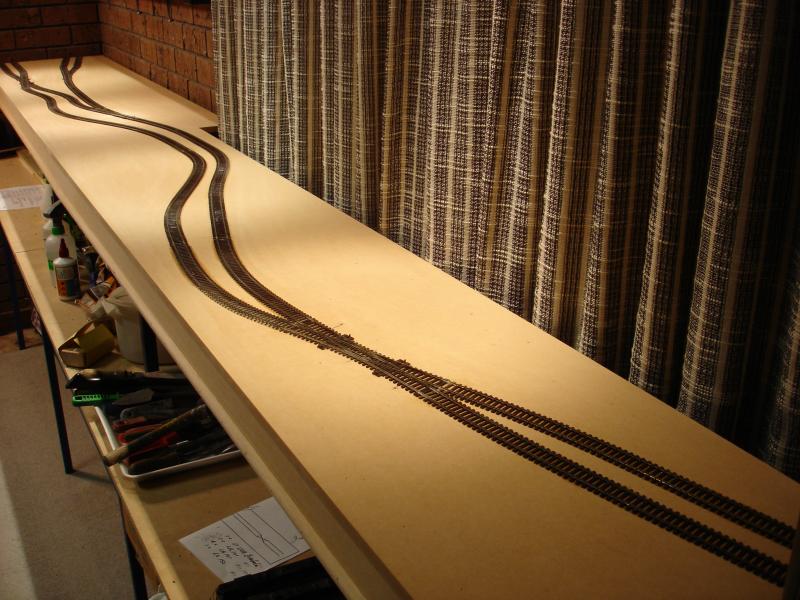
. . . and here's the schematic . . .
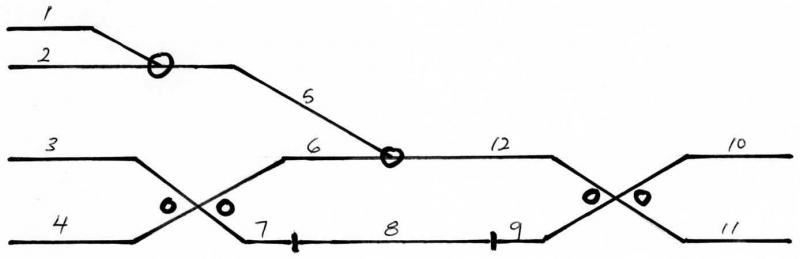
According to me, I'm going to need 12 x LB 101s and 3 x LR 101s. Is that right?
Max
Port Elderley
Port Elderley
Posted
Full Member
Looks good……however
1 LB101 covers 2 separate blocks. Each LR101 covers 4 LB 101s……ie 8 blocks………….as LR 101s dont come in half pints, for 12 blocks you need 6 LB 101s and 2 LR 101s.
I would use the 4 spare that you have to split Block 12 and probably split each of the two storage sidings 10 and 11 into two and that would still leave one spare……of course that means you have to buy 2 more LB 101s (ie 8 in total)
Regards
Posted
Guest user
you could also split 12 into two blocks.
Posted
Full Member
Posted
Inactive Member
I can see why you would split 12 into 2 if I have spares. If I still have one over, could I split it into 3?
Does making smaller blocks give better control?
Max
Port Elderley
Port Elderley
1 guest and 0 members have just viewed this.