
RR&Co Computor Control: Discussion
Posted

Full Member
Post any questions arising from "First Steps with RR&Co"
[user=422]Geoff R[/user] wrote:The virtual contact is the key and it was guy on the RR&Co Forum who finally took pity on me and pointed it out to me. I have feeling they were used more extensively in 5.8 so there may be some useful applications for you in your Silver questHi John, read the latest tutorial with great interest. Had not found that virtual contact before, looks as if it could be very useful. In the same way as I found a not very elegant work around to the engine run round routine in Silver, I have also found a partial non elegant work around for the change in loco.
I am busy searching for a way of dynamically assigning a train to a block. If I can find one, then the schedule which sends the old loco to the spur could start by making that assigment. If that is not possible, then in reality, one would either have to drive that loco out manually, or probably the smarter thing to do would be to assign it back to P1 manually so that TC realised it was back again, and then run the return to spur schedule.
One way that I was originally considering is to have short detected blocks to move the old loco into after uncoupling……but that is more expense but at least TC wouldnt lose sight of the loco……………I wonder if you could use another virtual contact?
I think a combination of automated and manual operation will be fine but personally I wouldnt like to be interupted having to manually assign locos…….its tedious enough now when I am testing!


Posted
Full Member
It looks OK. The software seems to be blocking my attempts to take screen shot. Is that right?
The diagram looks to be schematic, so each block doesn't need to be directly proportional to the size of the block on the layout. Is that right?
Hi Max
Good to see that all is progressing
I just press [print screen] and paste it into Windows Paint Shop save it in JPEG format and it uploads into the forum without the need for resizing
Enjoy the Olympics…………the Womens Downhill was pretty exciting……we have skiied that run many times but somewhat slower:lol::lol:
Posted
Full Member
the problem you mention about getting the train into the right station is the same one i had with the scrap sidings. use the two onoff switches, 3 in this case. and set up the condition for the switches.
You are absolutely right :thumbs……its essentially the same problem…….why didnt I see that :roll:
I will try it on the layout tonight and let you know how it goes
Posted
Full Member
One way that I was originally considering is to have short detected blocks to move the old loco into after uncoupling……but that is more expense but at least TC wouldnt lose sight of the loco……………I wonder if you could use another virtual contact?
Yes, that works. I have added an extra block to the left of Weston P1 and associated it with a virtual contact which is triggered by Weston Home, and stays on for 20 seconds. I have then extended the return to Weston schedule to enter this new "virtual" block. Now the new loco can happily enter Weston P1 as it is unoccupied and unreserved. TC doesn't realise that we have "fooled" it.
Everything else seems to work out fine. One thing though, is the use of icons for the trains in blocks. There seems little point of having one icon for the engine and another for the train, as you can never separate the two in Silver. If I continue this way, I think I would only use engine icons and references in schedules. It means that I have to remember or work out what is a train and what is just an engine, but that is not a great price to pay, if the engines and trains are actually operated correctly.
Posted

Inactive Member

I substituted Alt with Ctrl/ for the Prnt Scrn and it worked. Thank you. Can you see any mistakes? Have I created another block between the two RH turnouts?
Max
Port Elderley
Port Elderley
Posted
Full Member
Posted
Inactive Member
Max
Port Elderley
Port Elderley
Posted
Guest user
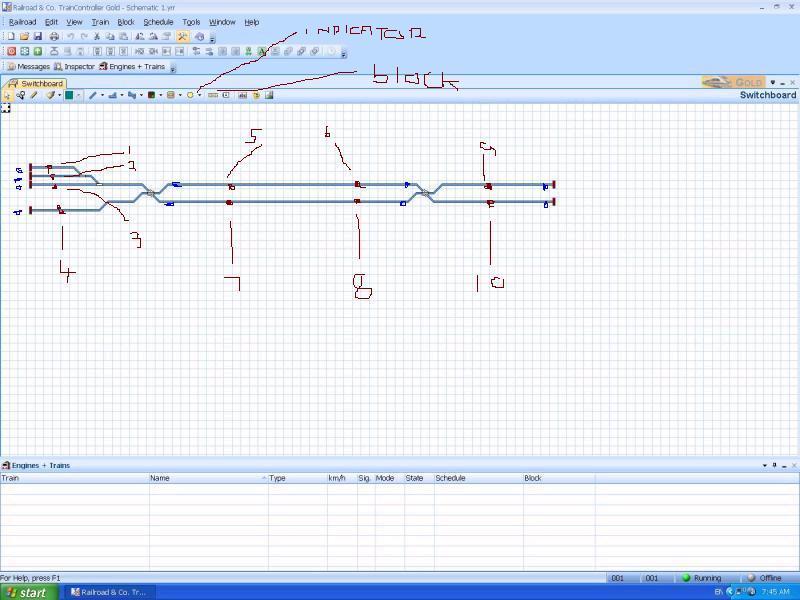
i have added the points you need to add blocks, i have also added in the the points you need to add block occupancy detectors.
if you want i will sit down tonight and do a switchboard for you as i would set it out.
Posted
Inactive Member
Max
Port Elderley
Port Elderley
Posted
Guest user
you can have them at one block long which is fine, as it is a small layout i would have the extra blocks as this would add to operation potential. all my straights are a single blocks but it is a much larger layout. a train will reserve two blocks ahead (this can be changed) but has its problems. so if a train was to run from left to right it would reserve the centre block and the end finish block, it would also reserve the route meaning both X POINTS at either end of the straight would be reserved also. this would stop any other train travelling through either point right to left or left to right. it would mean only one train moving at the any time. if you had two blocks in each centre stretch when a schedule starts it would reserve those two blocks which would leave the X points the other end and the other straight of the two blocks free to be used by another train. hope that makes sense.
Posted
Inactive Member
The layout is 3.9 metres long. Perhaps I will need even more blocks, as I will be running trams. What do you think?
Max
Port Elderley
Port Elderley
Posted
Guest user
Posted
Full Member
It does, Matt. I had budgeted for 1 x LR 101 and 4 x LB 101's. I thought I'd stick with Lenz, as it's what I know. So, with the two extra blocks, I'll need some more hardware. Not a problem, so long as I know.
The layout is 3.9 metres long. Perhaps I will need even more blocks, as I will be running trams. What do you think?
Hi Max
I agree with Matt about having at least one more block in the centre runs……..the other place I would put a block is on the track in front of the 3 points in the top left just below Matt's "2" ……I think you will find that gives you more flexibility
I think you should budget for another LR101 and 2 more LB101s…………….. that will give you 12 blocks with the potential for 4 more.
Before you start wiring get the layout working on the simulator with a series of schedules. You will quickly find out where the hold up areas are and where to put additional blocks. Remember only one loco or tram per block. How many trams in total do you plan to have on the layout? I would probably use the "12th" block to create an additional storage block on one of the right hand sidings
When working on the simulator you should also try and get an idea about block length in the centre sections although I guess it is less critical with Trams
Are the trams all going to be single units and never coupled up? If this is the case you may well be able to operate just with Silver
The layout looks as though it has the potential for some very high intensive automatic operation…… should be fun
When you create the contact indicators it is a good idea to display them on the switchboard so they are always visible rather than embed them within the block (as in my layout:twisted:) Matts method of putting them at the head of each block is ,I think, better than the way I do in the tutorial
Have fun
Posted
Full Member
Yes, that works. I have added an extra block to the left of Weston P1 and associated it with a virtual contact which is triggered by Weston Home, and stays on for 20 seconds. I have then extended the return to Weston schedule to enter this new "virtual" block. Now the new loco can happily enter Weston P1 as it is unoccupied and unreserved. TC doesn't realise that we have "fooled" it.
Thats cool…..well done. So does that mean the initial virtual contact is redundant? The new loco will be recognised by the P1 contact indicator and you can just make the "coupling" brake marker conditional on the coupling schedule
Everything else seems to work out fine. One thing though, is the use of icons for the trains in blocks. There seems little point of having one icon for the engine and another for the train, as you can never separate the two in Silver. If I continue this way, I think I would only use engine icons and references in schedules. It means that I have to remember or work out what is a train and what is just an engine, but that is not a great price to pay, if the engines and trains are actually operated correctly.
I dont think this will be a big issue……you should be able to tell from their position and the schedule they are running on. The manual recommends this for permanent set ups (consists to be N American)
However loss of train length could be an issue…..I havent addressed this yet but I can visualise occasions when the ability to prevent a long train from stopping in a short block could be useful……….there is bound to be a workaround
Posted
Inactive Member
I've upped my shopping list to 2 x LR 101s and as the LB 101s are relatively cheap, I may as well get 8. The track plan will possibly still "evolve" a bit more as I go.
The trams are too small to worry about remote coupling. If I have a double set, I'll just leave them coupled together.
This is my first effort.
http://www.youtube.com/watch?v=cVGOpEiZwNY
They say the first one is the hardest. I have only made one so far, but I plan to make another one soon, so I can at least run two. I'm planning to make the block long enough to accommodate two, but as you can see, they're only tiny - 200 mm overall length.
Max
Port Elderley
Port Elderley
Posted
Full Member
Posted
Inactive Member
Max
Port Elderley
Port Elderley
Posted
Full Member
Posted
Guest user
i may have missed a problem you have brought up but i think i have solved the loco exchange. i have not yet set up block specific stop markers when the 2nd loco enters the block but this could be done easily. i have uncoupled the loco as per normal
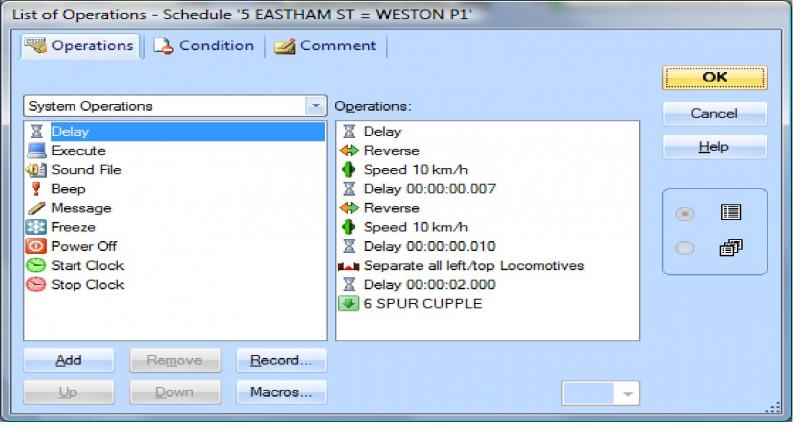
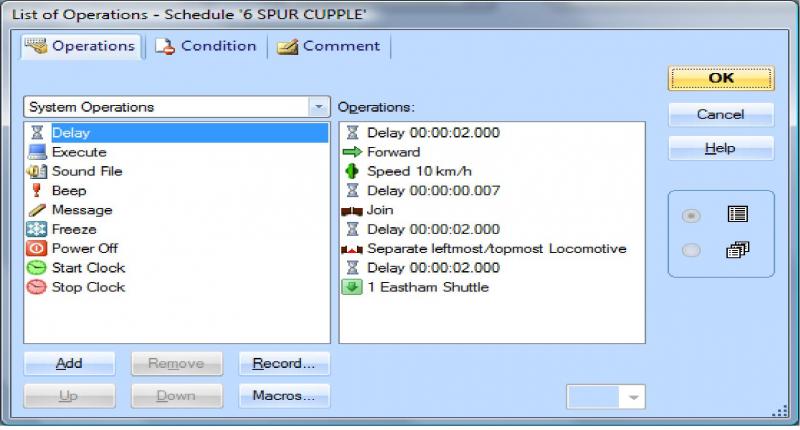
then in the schedule from the spur in rules i put in enter reserved block for joining. i then in the list join the loco and seperate left most loc (seperate again)
then on the eastham shuttle in the rules i select train may stay in start block.
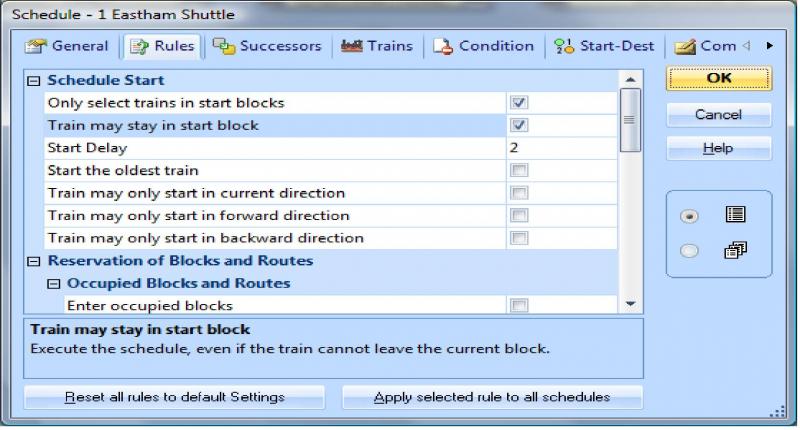
this works in a loop. i have uploaded the file to have a look at.
Posted
Full Member
John
i may have missed a problem you have brought up but i think i have solved the loco exchange. i have not yet set up block specific stop markers when the 2nd loco enters the block but this could be done easily. i have uncoupled the loco as per normal
You know what Matt…….that is a far more elegant solution than mine……………I got the idea of virtual contacts from a very experienced user on the RR&Co forum and the developer Herr Freiwald never questioned it or suggested this as an alternative.
Version 7 is clearly a huge advance on 5.8. I think many of the operations that can now be done easily in 7.0 required complex workarounds in 5.8 and once perfected are difficult for people to give up despite the fact is is easier, but different in 7.0
The acid test, of course, is will it work on the track……I think I will give it a go when Matilda has gone on her way……the big problem I had was getting locos to stop correctly but I can see no reason why using your solution one could not introduce a conventional stop marker with a schedule specific condition
A minor point…..why wait so long to move the old loco back to the spur? Prototypically I dont think one would want a busy terminus platform to be occupied until the departing train reached its destination
Other than that……….brilliant go to the top of the class:doublethumb
1 guest and 0 members have just viewed this.