
RR&Co Computor Control: Discussion
Posted
Guest user
Post any questions arising from "First Steps with RR&Co"
i have been a naughty boy and i have been sent to the back of the class to stand in the corner:lol:john uploaded my plan and had a look for me
the problems
i had loads of train dispatch windows….
every time i went into the dispatch window i went WINDOW\NEW DISPATCH WINDOW instead of just tabbing the window. i have now deleted all these window.
i had no stop markers for the blocks, i have now added stop markers for each block at 60cm.
when i set up a new train i did not give the train an address, each train now has an address.
as a result of sorting out these problems i now have 0 conflicts in DR railroad and everything now works fine within the simulator:mrgreen:
so thanks to john my frustration levels have now dropped to a decent level.

Posted

Full Member

Posted
Guest user
i must admit i have opened the clock and then closed it again.
it is something i have not explored, i will have 3 aspects to my layout 1. freight 2. passenger 3 scrap or ballast. now looking at my freight schedules i have at the moment it would make sense to include the start schedule within a timetable and repeat this every 20 minutes real time. then once i have a second freight schedule and can run this schedule in between the first.
one thing i have noticed is with just 4 locos on schedules that the time it takes to complete because of trains waiting for blocks to clear has gone up. i have had to increase the timing to start a schedule to 180 secs, it was on 120 secs but i found that some schedules would not complete because the could not start within the 120 secs. it takes between 10 and 12 minutes for 4 trains to complete the schedules, before creating a timetable all the delays would have to be worked out as starting a passenger schedule from platform 1 is no good if that train is stuck in a block not yet arrived in platform 1. also every-time you add a train or schedule the delay time between the schedules completing would be increased as the traffic will increase. i can see me having lots of fun for years to come:cool:
a quick question
i have a freight pass loop that runs along a main up and down line approaching my large station
now i want to tell the freight trains to use the freight line and the passenger trains to use the up\down line but
when i set a condition in each schedule the train stops and is unable to use the block, i have tried playing with this but i cannot figure it out. as this will be standard for all schedules can i set the condition for that block rather than schedule specific.
i tried to figure out train groups as i read (and yes you guessed it couldn't get my head around it) that you can set these up and tell a train group to use or not to use a block, or set a condition up for a train group.
John at your convenience could you go through train groups.
Posted
Guest user
For example, I have a special scheduled, this has been set up to leave the fiddle yard at 08:30, probability 20% and then hourly until 12:30. The return departures are similarly set for 14:40 at 20% through to 18:40 and then 19:40 at 100%.
What happens in practice?
There is a 1 in 5 chance that the special will leave the fiddle yard at 08:30. If it does any subsequent attempt to despatch it from the fiddle yard fails which doesn't cause a problem, just a message in the message window.
If it doesn't leave at 08:30 there's a 1 in 5 chance it will at 09:30, and so on to 12:30. This gives a probability of the special running roughly 2 days in three within a four hour window.
The return is similarly set to run at a variable time, with the extra departure set at 100% to ensure that the train isn't left in the station at the end of the day.
This is a pretty impressive piece of software :thumbs
Posted
Full Member
I am still playing with train groups……but I think this should worka quick question
i have a freight pass loop that runs along a main up and down line approaching my large station
now i want to tell the freight trains to use the freight line and the passenger trains to use the updown line but
when i set a condition in each schedule the train stops and is unable to use the block, i have tried playing with this but i cannot figure it out. as this will be standard for all schedules can i set the condition for that block rather than schedule specific.
i tried to figure out train groups as i read (and yes you guessed it couldn't get my head around it) that you can set these up and tell a train group to use or not to use a block, or set a condition up for a train group.
John at your convenience could you go through train groups.
I am assuming that the schedules are identical for both passenger trains and freight?
Create a train group for all your passenger trains……….create another one for all your freight trains. The group icon is different from the various train icons
In the block properties for the up and down lines select the Train Tab and then from the list of available train groups select the passenger train group and then press the add button…….it will then appear in the right hand "Trains affected" window
Only passenger trains listed in the passenger train group will be able to enter the up and down blocks……..to complete the schedule all other trains will be obliged to use the freight line
Similarly you can prevent passenger trains from ever selecting the freight line by specifying the freight train group for that block
A word of warning based on personal experience

[1] If you create a new passenger train and omit to add it to the passenger train group……..guess what!!!:twisted:
[2] You need to highlight the restriction….maybe in the block title because as I found out its easy to forget its there and then you spend forever wondering why a train wont run.
Finally its a good idea and should speed things up to specify the up and down blocks as one way
Let us know how you get on
Regards
Posted
Full Member
John, just looked at your post on timetables - I'm slightly ahead of you here as I have been playing with that for Minories. The 'Probability' tab is indeed for random schedules - where trains are 'runs as required' or can run to different timings.
For example, I have a special scheduled, this has been set up to leave the fiddle yard at 08:30, probability 20% and then hourly until 12:30. The return departures are similarly set for 14:40 at 20% through to 18:40 and then 19:40 at 100%.
What happens in practice?
There is a 1 in 5 chance that the special will leave the fiddle yard at 08:30. If it does any subsequent attempt to despatch it from the fiddle yard fails which doesn't cause a problem, just a message in the message window.
If it doesn't leave at 08:30 there's a 1 in 5 chance it will at 09:30, and so on to 12:30. This gives a probability of the special running roughly 2 days in three within a four hour window.
The return is similarly set to run at a variable time, with the extra departure set at 100% to ensure that the train isn't left in the station at the end of the day.
This is a pretty impressive piece of software :thumbs
Thanks Ian………….. thats a great example of the practical use that can be made of an option that I thought was just a frill :oops:
If you have no objections I will edit my post and insert your comments there?
Does your terminus timetable involve schedules with a choice of platforms (destination blocks)? I am just starting to try and work out how to control this so that for example when a replacement loco moves from a spur to connect up to a train at a platform it goes to the correct platform!
Regards
Posted
Guest user
Minories is very simple - I have 4 platforms and 4 different services. However I will have to add a fifth train to represent the forthcoming Chiltern 67 ++ Mk.III + DVT London - Birmingham services that will alternate with DMUs. None the less each service will be allocated a fixed platform. Don't want to confuse the passengers :It's a no no
Feel free to use the post as you will.
Posted
Guest user
can you give me a kick in the right direction:roll: how do you bring up the train groups?
i have been looking for an hour and cannot find it:oops:
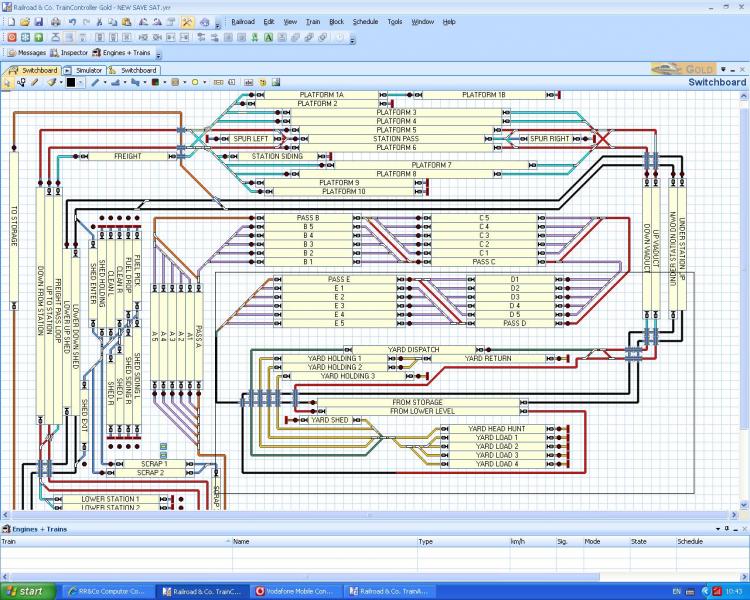
i have re vamped my plan, i designed a new freight yard in anyrail as the old one did not look right, i have tidied up the plan and added this to TC. i have deleted all schedules as some blocks needed to be deleted. so rather than go through each one finding problems i deleted the lot. as they say practice makes perfect.
Posted
Full Member
[user=13]Matt[/user] wrote:
thanks john
can you give me a kick in the right direction:roll: how do you bring up the train groups?
In the properties of any element (Schedules/Blocks) there is train tab………..bottom right is a train groups button. I will post a tutorial later on today.
Like the new switchboard……putting the contact indicators just ahead of the related block is really neat I wish I had done that on my layout but I think it is too late to change now because I created the indicators from within the block
Kind Regards
Posted
Full Member
There is some homework…………..one question is very easy the other less so:hmm
This is a good opportunity for the lurkers to show their logic skills:lol:
Kind Regards from Vancouver
Posted

Inactive Member
Max
Port Elderley
Port Elderley
Posted
Full Member
I hope the tutorial will help…………..I think you will find it helpful to create the tutorial layout and then apply the lessons learned to your own layout
The best advice I ever received with TC is to apply the KISS principle……….very slowly
Or from skiing dont attempt black runs too soon:lol:
I am not sure how far you have got so its difficult to advise about the simulator………assuming the basics are in place…..no schedules but 2 blocks set up with contact indicators and stop markers and connected together and a loco set up………you need to assign, and correctly orientate, the train to one of the blocks…..bring up the throttle for the loco and start the loco……you must be in operations mode and you have to start the simulator…….you can tell when it is working the chimney smokes
Hope this helps
Kind Regards
Posted
Inactive Member
Max
Port Elderley
Port Elderley
Posted
Full Member
Still persevering with Silver. I have made the required modifications and set up the shuttle train to Denton using any Weston Platform and have my return from Eastham also able to use either Weston P1 or P2.
If I am on the same wavelength, then I think the outstanding issue is that the Denton Shuttle always has the Weston Home block reserved, so nothing can get out to Eastham or return?
I have tried various things with both schedules including delays at start and finish - I tried a very long delay for the shuttle, but it didn't seem to slow it down - still just moved off back the way it came almost as soon as it arrived in Denton. Can't find anything to solve this problem this way.
On my own, I would probably try to add another block on the Denton line, so allowing the Weston Home block to be released by the Denton Shuttle schedule long enough to let the Eastham train go (and return)
I will try and look at it again later.
Posted
Guest user
Geoff
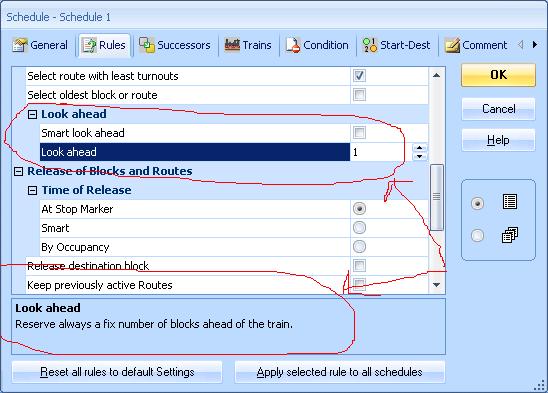
going from what you have said you can set up in the schedule rules to only reserve 1 block ahead. this would solve the problem. i had this problem when playing about with two shuttles on my switchboard. they would reserve the up line block and then reserve the main pointwork entering the terminus if crossing left to right and right to left. so a train waiting to depart the terminus would have to wait until onother train runs halfway round the layout. i never got to do this as i deleted all the schedules but i think this is it.
Posted
Full Member
However, I have discovered what I was doing wrong with delays. I think that a delay in a list of operations for the end of a shuttle schedule, must only apply when the programmed number of shuttles have occured - and not at each end of the shuttle as I had presumed. But, instead, I have learnt that I can add schedule specific "wait" time to a block. So doing this for Denton and each of the Weston platforms, means that the Denton shuttle waits while its passengers leave and others join, and during this time, the Weston Home block is not reserved by it, so other schedules can use it.
Posted
Full Member
No worries Max…………….just take it a step at a time and shout when you get stuckThanks John. I've got as far as putting the little track marks in the graph - and a couple of turnouts. :oops:
Posted
Full Member
I still wish that I could do this for real. I will make a rash decision soon, and get myself a controller that I can hook up to my PC!!!
Posted
Full Member
Today's homework.
Still persevering with Silver. I have made the required modifications and set up the shuttle train to Denton using any Weston Platform and have my return from Eastham also able to use either Weston P1 or P2.
If I am on the same wavelength, then I think the outstanding issue is that the Denton Shuttle always has the Weston Home block reserved, so nothing can get out to Eastham or return?
I have tried various things with both schedules including delays at start and finish - I tried a very long delay for the shuttle, but it didn't seem to slow it down - still just moved off back the way it came almost as soon as it arrived in Denton. Can't find anything to solve this problem this way.
Hi Geoff I was replying when your second post came in and I see you have solved the block problem with a shuttle
I should have mentioned I changed the Denton Shuttle to normal and controlled the start through the timetable so I didnt see your delay issue:oops::oops:
The problem is slightly different………by inserting a condition that only the autotrain can use the Denton shuttle we have prevented the BSet from inadvertently starting on it when in one of the three platforms
We also have to stop the autotrain going off on the Weston to Eastham schedule when it is in one of the three platforms and I omitted to mention that in the tutorial………..that can be done, of course by adding a train condition to the schedule again
With the next problem I am a bit ahead of myself. The plan for the loco exchange is for the arriving train from Eastham to go to any one of the three platforms in Weston and uncouple and then a second schedule will move the loco in the loco spur to couple up with the B Set. This all works both on my layout and on the tutorial…………I have captured it on video and if I can get the code right (I hope Gordon is reading this) I will post it later……….and then follow up with how its done at the weekend……………..the problem that I am wrestling with is how do I make sure the replacement loco goes to the correct platform :question
Posted
Full Member
The Denton shuttle schedule seems to work fine now alongside the Weston to Eastham and return that we did earlier. The only strange thing is that on the return to Weston from Eastham, the Weston Home block is often left as occupied even when the simulator has moved the train into one of the Weston platforms. Yet Dr Railroad suggests that it has been released. Maybe a simulator quirk?
I still wish that I could do this for real. I will make a rash decision soon, and get myself a controller that I can hook up to my PC!!!
Is the block occupied (ie the contact indicator is on) or reserved? Does it eventually cease to be occupied/reserved?
If you have the end of schedule operations that are used at Eastham without any conditions I wonder if that could cause a delay in releasing the block while TC tries non valid successor schedules.
To avoid this I now have two separate schedules…..one out and one back…..duplication I know but it meant I didnt get hung up with conditions and successor schedules
Regards
1 guest and 0 members have just viewed this.