
RR&Co Computor Control: Discussion
Posted

Inactive Member
Post any questions arising from "First Steps with RR&Co"
Just checked dccconcepts.com website - LS 150 does six, so that's OK. Can't find the S88, Matt. Is it a Lenz product?
Max
Port Elderley
Port Elderley


Posted
Guest user
you could use the same command system and run 4 wires round to your shelf layout 2x track 2x expressnet for feedback, i am not 100% sure on this but someone will confirm. you could even put a lenz faceplate into the shelf layout. this would be an easier option. this way you only need the one control point and in the future you could work both layouts from the smae switchboard with TC (have two track plans within the same window) TC would operate as one without it being joined.
Posted
Guest user

Posted
Inactive Member
So the brand is LDT and the part number is RS8B. Now we're cookin!
Matt, I have reasons I won't bore you with for wanting to keep the two layouts separate. I have spare components, so it's not a problem. I only need three extra units. The Lenz L1 and the LS150 are cheaper in the US as well.
I have to start getting the materials together for the baseboards now, so I'll be a little while before I start in earnest. In the meantime, I'll be reading all posts that come up and having a bit of a play as I go.
I might start another thread on the layout build when I get going, so you can see I haven't lost interest.
Cheers. :thumbs
Max
Port Elderley
Port Elderley
Posted

Full Member
Congratulations! Its a perfect layout to start the learning curve with TC
Matt has done a great job and covered all the essentials. I would just add the following:
[1] Unload the demo version and set up the layout……you will quickly determine if you have enough blocks etc. From everything I have read I would not bother with Bronze…..it is essentially entry level. Matt and I use Gold and the tutorial is based on Gold but Geoff is flirting with Silver and pointing out the obvious differences
[2] Occupancy Detection I use the Lenz products and am very satisfied with them. I think they cost a little more than the S88s but I have found them to be very reliable
[3] Blocks I have learned that generally you need more blocks rather than less. You cannot move a train from one place to another without a separate start block and destination block. Secondly unless you are joining a loco to another train you can only have one loco in a block.
On your layout for instance without blocks between the double slip and the sidings at the top to get a loco from one siding to another would mean you would have to go beyond the double slip and enter one of the long blocks. I think you need at least 11 blocks and I woul probably split the two long ones
[4] Points …. the double slips will have two motors and therefore two connections so I am afraid you may have to axe one of the top sidings
Hope this helps………believe me….you are going to have lots of fun
Do let us know how you get on
Kind Regards
Posted
Full Member
i have included my file for my layout (if the zip works)
i have my freight schedules (start by clicking on ballast drop 1)
this will take the ballast train round the layout, uncouple, head back to the fiddle yard, then another train will come out to collect it. this will loop round.
also 2 dmu schedules that will run out and back again.
one schedule will not work as a side schedule ballast pick 1.5 (i am still working on this one) but it should not stop the loop working. ballast pick 1.5 will take the engine that dropped of the freight wagons around the layout as a light engine.
let me know if this works and i have uploaded it right.
Hi Matt
It uploaded fine…..you must have put a ton of work setting that layout up………..how do you find time for everything else?
Am I missing something or do I need to assign trains/locos to the blocks before I can test run the schedule……in which case which train should I use
Kind Regards
Posted
Inactive Member
Max
Port Elderley
Port Elderley
Posted
Full Member
Hi John. Thanks for your input. Which Lenz product are you using for occupancy detection?
The occupation detectors are LB 101s each one handles two blocks and they are linked to LR 101s which each handle 4 LB 101s…………….so for 8 blocks you have 1 LR101 and 4 LB 101s
.
I think the ones Matt and Geoff use have the detectors and decoder linked………….I am not argueing for one or the other just posting an alternative:lol:
Kind Regards
Posted
Inactive Member
Silly question, but what happens to the system if the loco encounters dirty track?
Max
Port Elderley
Port Elderley
Posted
Inactive Member
Max
Port Elderley
Port Elderley
Posted
Full Member
Thanks, John. I understand. I was thinking that keeping it all Lenz may have some price advantage as I can source them from the US and also get a bit of a bulk discount. FYI that picture failed my end.
Silly question, but what happens to the system if the loco encounters dirty track?
I just like the idea of keeping it all Lenz plus on RMWeb there were some guys had problems with S88s but they are now used by a lot of people so I guss they have been overcome
Dirty Track ……. just like normal the train stops! Howver it doesnt affect the schedules…just like normal you give the loco a nudge and life continues.
Tortoises are fine and you can use TC to set the pulse time..
Regards
Posted
Inactive Member
Also, I'm guessing that all joiners will need to be insulated?
Max
Port Elderley
Port Elderley
Posted
Full Member
Simplistic because I havent addressed the issue of long trains that overlap blocks but you can safely leave that for now
Each block has to be electrically insulated but only the "power" line…..the common can stay
One final comment, as a generality, points should not be within blocks.
Kind Regards
Posted
Inactive Member
Max
Port Elderley
Port Elderley
Posted
Guest user
i was a bit quick with the upload, i have been playing with the schedule and ironed out a few problems. i am still having problems with the simulator. trains just move off willy nilly. nothing in the messages and not attached to a schedule. i terminate all schedules and trains before starting the sequence but still this happens. i think this a glitch with the simulator and i hope this does not happen in reality:twisted: i also find the trains will stop within a schedule and you need to un occupy that specific block or occupy the block the train is travelling to. does anyone else have this problem? it is not the PC as i use 4 different ones. i can live with this at the moment.
i will upload the new plan in a bit, all trains will be allocated to start blocks. all you should have to do is start sim and click the freight button. what SHOULD HAPPEN:mrgreen:
class 56 freight leaves the storage for scrap 1\2
15 seconds later class 37 leaves storage and does a complete run around the layout (light engine) back to storage to await the next schedule.
56 freight arrives scrap 1\2 and uncouples freight wagons and returns to storage
37 leaves storage to collect freight and then returns to storage
we are now back at the start point but the locos have now changed, 37 leaves storage with the freight and the process is repeated.
a question (once the new file is uploaded)
the two ON OFF switches which tell the pick up loco which block the freight is an can sometimes be left on, schedule not finishing or something along those lines. this is fine except if the schedule is re started the on\off switch for scrap1\2 may be on, now if the freight is dropped in the other block scrap1\2 then both on\off switches will be on. when the loco turns up to pick up the freight wagons it will use scrap1 or scrap 2.
how do i switch both switches to off at the start of schedule ballast drop 1?
i tried adding this as an operation within the schedule properties but adding both switches just starts the schedule. basically when schedule ballast pick 1 starts i want to ensure both switches are set to off.
Posted
Guest user
Posted
Full Member
John
i was a bit quick with the upload, i have been playing with the schedule and ironed out a few problems. i am still having problems with the simulator. trains just move off willy nilly. nothing in the messages and not attached to a schedule. i terminate all schedules and trains before starting the sequence but still this happens. i think this a glitch with the simulator and i hope this does not happen in reality:twisted:
Do you have this problem with the tutorial layout?
Is the problem of a random nature or doest it only occur with certain schedules? Can you give a specific example of trains "moving off willy nilly"
Does each schedule work perfectly on its own and the problem only occurs when you are running a number of schedules?
I am a great believer in the building block approach…………you should ensure each schedule works perfectly on its own. If you still have an unidentifiable problem with a schedule then break each schedule into smaller component schedules and test them in turn
One final question…………..have you adjusted schedule rules or are you using the default?
i also find the trains will stop within a schedule and you need to un occupy that specific block or occupy the block the train is travelling to. does anyone else have this problem?
This may be the source of your problems:
If a train stops on a schedule and you have to reposition it in another block then you do have to clear that block ie "remove the train" (and de activate the contact indicator) and "assign" it to another block (and activate the contact indicator)
That was why on the tutorial layout I made sure that the contact indicators were clear of the associated blocks and always visible.
If you were live the contact indicators would work automatically but you would still have to remove and assign……..if you dont TC will not find a loco to start a schedule and/or will stop a train prior to the old block because it thinks it is occupied/reserved
a question (once the new file is uploaded)
the two ON OFF switches which tell the pick up loco which block the freight is an can sometimes be left on, schedule not finishing or something along those lines. this is fine except if the schedule is re started the onoff switch for scrap12 may be on, now if the freight is dropped in the other block scrap12 then both onoff switches will be on. when the loco turns up to pick up the freight wagons it will use scrap1 or scrap 2.
how do i switch both switches to off at the start of schedule ballast drop 1?
i tried adding this as an operation within the schedule properties but adding both switches just starts the schedule. basically when schedule ballast pick 1 starts i want to ensure both switches are set to off.
As an operation at the start of the schedule should work ……do you mean the schedule starts as normal and the operation doesnt take place? Are there any conditions attached to the switch
I will try and download again later and let you know how I get on
Regards
Posted
Guest user
Is the problem of a random nature or doest it only occur with certain schedules? Can you give a specific example of trains "moving off willy nilly"
no problems with the tutorial, but only one train is operating at the moment. this is all ramdom, any train in any direction.
Does each schedule work perfectly on its own and the problem only occurs when you are running a number of schedules?
it is when you are in simulator mode a schedule does not have to be running. also when trains are sat in a block and you try to click the occupancy indicator the block will flash and then stay un occupied. so the train will be in the block but showing un occupied. if this happens to a train that is to start on a schedule the train will still start.
I am a great believer in the building block approach…………you should ensure each schedule works perfectly on its own. If you still have an unidentifiable problem with a schedule then break each schedule into smaller component schedules and test them in turn
i done this also and they work fine and as i stated earlier it happens when a schedule is not working so i believe it is a glitch with the simulator. i cancelled all the sequences i had as i now run the next schedule from the general tab\list from the previous schedule.
One final question…………..have you adjusted schedule rules or are you using the default?
all the schedule rules are default.
This may be the source of your problems:
If a train stops on a schedule and you have to reposition it in another block then you do have to clear that block ie "remove the train" (and de activate the contact indicator) and "assign" it to another block (and activate the contact indicator)
That was why on the tutorial layout I made sure that the contact indicators were clear of the associated blocks and always visible.
If you were live the contact indicators would work automatically but you would still have to remove and assign……..if you dont TC will not find a loco to start a schedule and/or will stop a train prior to the old block because it thinks it is occupied/reserved
the train stopping is happening in the middle of schedules, it will enter the block, occupy the block and then nothing happens. no conditions or stop times involved. it will also happen when a train leaves a block and is on a route to the next block, the train never arrives.
in the first instance clicking on the OCC detector is enout to carry on the schedule.
in the second instance clicking on the occ detector of the next block is suficient to carry on the schedule.
worst case scenario is you have to mimic the train by occupying and un occupying the block until the schedule is complete.
this is probably the 4th fresh start i have made with the software and it happened with all of them so i don't think it is an input error ( i bet it is) hope that once i go live and a train is on the track this will not happen.
it is very frustrating just using the software as i believe this will not happen on the layout. i hope (thanks to Greece) that the euro crashes and the £ goes back to 2 euro. it is a bit selfish of me to wish a country into financial turmoil just so i can purchase TC.:roll:
Posted
Full Member
I have opened your latest download and sent you a PM
Regards
Posted
Full Member
To get rid of the surplus block diagrams open each in turn then close it using the [X] ……when you have one left or if you open a new one……………… select options…..the inverted arrow to the left of the minimise icon..[-]
then select [tabbed document]
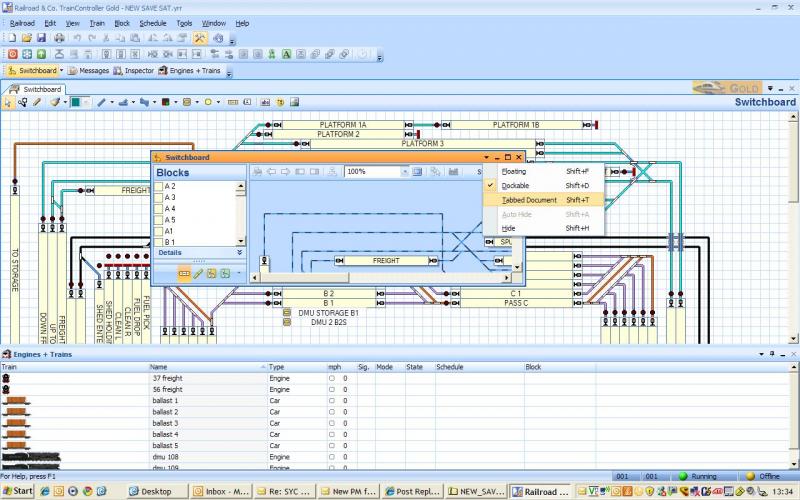
et Voila!
1 guest and 0 members have just viewed this.