
RR&Co Computor Control: Discussion
Posted
Full Member
Post any questions arising from "First Steps with RR&Co"
Had another play this morning and discovered the problem. It is all there in front of us, if you know precisely how TC handles succession. I say in my post that all the schedules work fine if I run them manually, but Uncouple fails peculiarly if it is initiated as a successor to the first schedule, whereas all the following schedules work fine as successors beyond Uncouple.Still no lightbulb???
I increased the speed to 80mph and that exaggerated the problem. What is happening is that the Successor to the first Schedule is set in motion immediately the first Schedule completes. This is in parallel, and at the same time, as the LIST of operations to happen after the first Schedule has finished. So TC is trying to set the train off towards the loco shunt block at the same time as reversing it, and goodness knows what else!!! Logically, I had thought that the LIST at finish would complete before the succession.
The solution is simple. Remove the Schedule Successor from the first Schedule, and instead, place the Uncouple Schedule at the end of the LIST of operations happening when the first Schedule finishes. Works just fine.
Presumably this must be exactly the same for Gold? Therefore I suppose I was the only one to try to be clever and connect the schedules together as successors??
So my conclusion is that if I had a connection to my layout, these group of schedules would work just fine in Silver, except that the Switchboard and Despatcher windows would have the wrong train icons in them during the run around.
 Last edit: by Geoff R


Posted
Guest user
i managed it all but i am left with a problem
when i done my schedule from block E HOME to re join the cariegesi keep getting a message
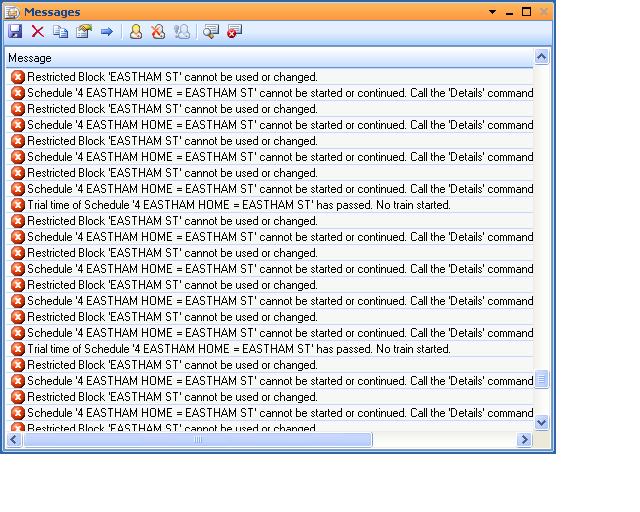
and now when i run the first schedule it will not let me enter the block
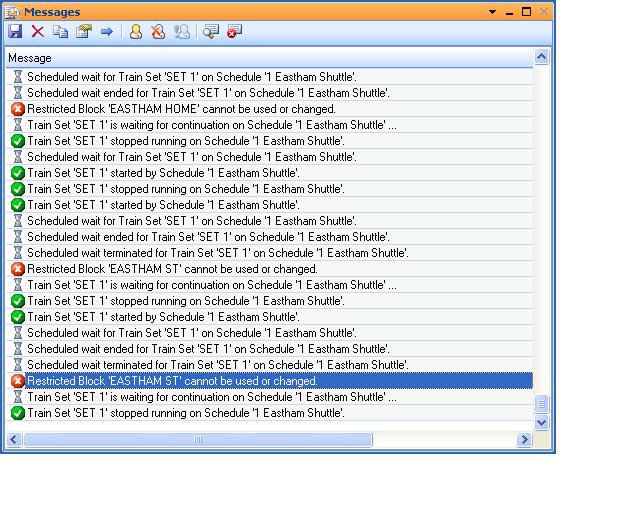
i have deleted everything for eastham home and still it won't enter

Posted
Guest user
i played about with successors and sequence to get the schedules to work in order then changed the uncouple sequence to work at the start of the 2nd schedule. none of this worked. then it hit me….
i opened up the finish list in the general tab for the sequence. added a delay of 3 seconds then added the 2nd schedule
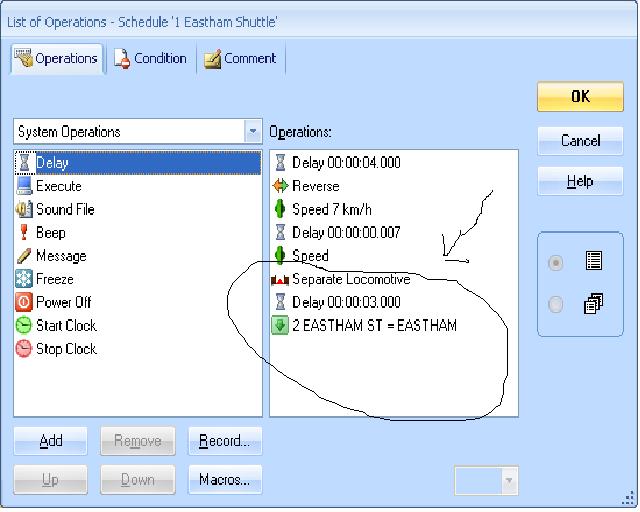
and to prove it all works
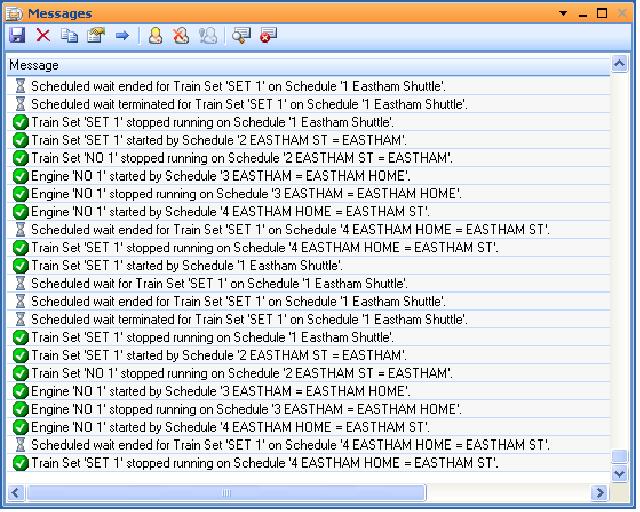
Posted

Full Member
I replied along these lines yesterday immediately before my email about the crash but it obviously got lost in cyberspace
You are absolutely correct with both the analysis and the solution………and of course once you have done that you can link the others as successor schedules so that the originating Weston-Eastham schedule can be used in a push button to start the entire sequence as per the video
I was going to address this in the tutorial but decided it would make the post too long and intended to do it next time
The problem that I think you will have will be at the other end where we want to do a loco exchange and you have to be able to move the loco separately
A couple of questions:
[1] After the train has arrived in the block can you drive just the loco off manually using the train window for that loco (not the train)
[2] Have you tried running the uncouple schedule with a condition that it is the loco only
[3] Could you post a screen shot of the Silver Train Menu
Kind Regards
Posted
Full Member
Our emails crossed………………….congratulations so now it all works as planned…….Excellent
I should have mentioned the reboot earlier……if you are trying something and it just will not work and you get "unexpected" results shutting both TC and the DCC system will at the very least give you a clean slate
So now we have to do the loco exchange at the terminus and your lads can press a button and watch the trains go back and forth:doublethumb
Kind Regards
Posted
Full Member

As you can perhaps see from the Loco73 Train Window, I can apparently drive just the loco. When the train is driven both windows show movement.
Setting the condition in the Uncouple Schedule for just Loco73 does not work - see the visible lines in Dr Railroad
I have opened the Train Menu in this picture - does it show you what you were looking for.
Posted
Full Member
As you can perhaps see from the Loco73 Train Window, I can apparently drive just the loco. When the train is driven both windows show movement.
But when the loco leaves the station block and enters Eastham Shunt does just the loco icon appear with the carriage icon remaining in the station block or does the entire train icon move?
Thats pretty unequvocalSetting the condition in the Uncouple Schedule for just Loco73 does not work - see the visible lines in Dr Railroad

I have opened the Train Menu in this picture - does it show you what you were looking for
Well yes and no and I am afraid more sad icons
This is the gold equivalent (ignore the fact some options are greyed out)
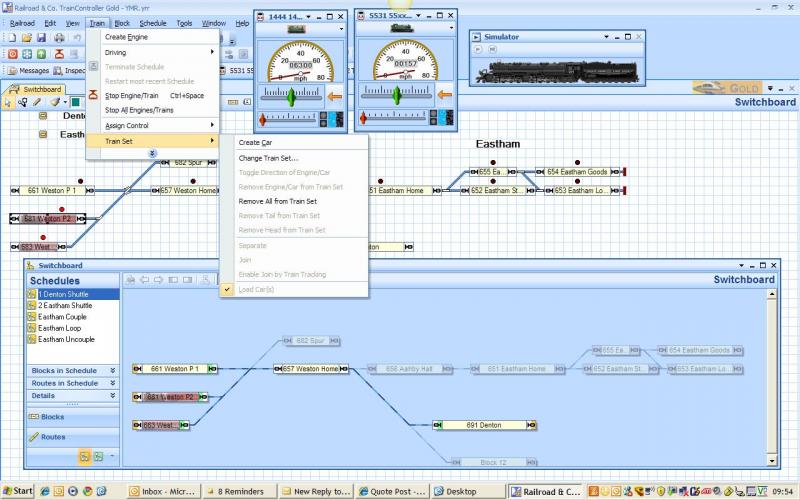
I am surprised at how restrictive Silver is here or alternatively what a big breakthrough the options were when they were included in Gold. As I think I wrote earlier it explains why the guys who I learned a lot from, like TTG, but who started in 5.0, or earlier, didnt do much uncoupling
It may be worth posting again on the RRForum or even RMWeb…………I am afraid I am running out of ideas
Regards
Posted
Full Member
Posted
Guest user
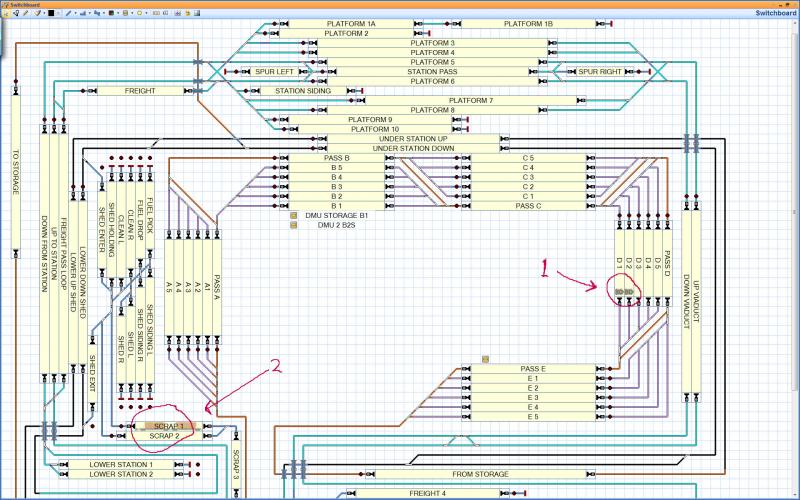
i have the schedules running fine apart from one thing, the wagons can be left in one of two blocks at point 2. when the light wagon moves round to collect the wagons it needs to collect them from the block the wagons are in. 50 50 choice, the schedules work fine but if the loco reverses into the empty block an error message comes up (unable to join train) then the loco continues.
how do i tell the loco to reverse SCRAP 3 into the block occupied by the freight wagons?
Posted
Full Member
I havent done this yet but I think when the first loco activates the contact indicator in whichever of the two blocks it enters it activates a switch or a flagman that is specific to the block (scrap 1 scrap2) then when the schedule for the second loco starts there is a condition that switch scrap 1 or scrap 2 must be on before it can enter the block……….when loco 2 leaves the block it tuurns the switch off
First untested thoughts:lol: . Eventually we should have a go on the tutorial layout and write it up…………..do you and Geoff want
me to try this out before the loco exchange?…………your call
Kind Regards
Posted
Full Member
Try this…………it works
Set up an on off switch Scrap1_ S
Set up a flagman Scrap1_F. The trigger for the flagman is the indicator for scrap2
…….the condition for the flagman is schedule A (when the first loco arrives in the block)
….. the operation, when the flagman is triggered, is to turn on the switch Scrap1_S
Do the same for for Scrap2
In the schedule specific properties for Schedule B (?….when the new loco arrives) for the blocks Scrap 2 and 3 have a condition that the associated switch must be turned on
As an operation at the start of Schedule C (when the second loco goes back to the fiddle yard), or as an action in the schedule specific properties of one of the blocks,……….. have both switches turned off
There is bound to be a more elegant solution and the above may prove to be somewhat restrictive……but it does work
Its actually a neat illustration of how a flagman can be used
Let us know how you get on
Kind Regards
Last edit: by John Dew
Posted
Guest user
i now have tumbleweed rattling about in my head, i have never used flagmen so i will have a play today and see what i can do. i will report back. it is not urgent as i have no track down yet but something like this would be great on the test layout:thumbs
Posted
Guest user
Thanks john
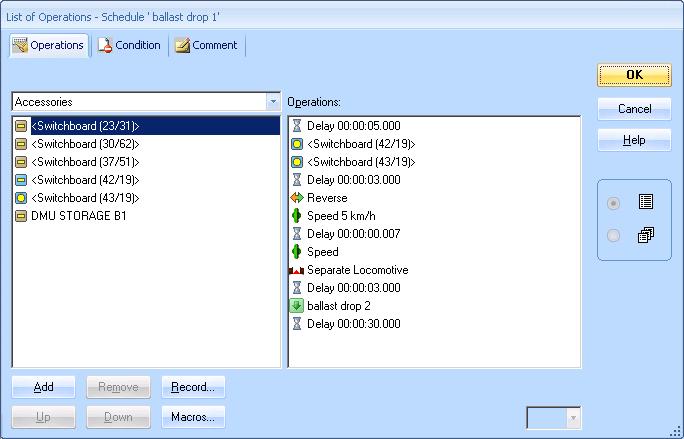
I didn’t use a flagman; I set up an on\off switch for each block (scrap 1 scrap 2) at the end of the first schedule, in the operations list before the uncouple takes place I added the two switches so when the schedule ends both are activated. I then put in the switch 1 properties as a condition to only operate when the contact indicator is active, and the same for switch 2. Which means only the switch associated with the occupied block will be activated. I then set up as a condition in the pick up schedule to only use the block with the active switch. On the last schedule I set up in the operations list to switch off both switches so the cycle can be repeated. So more than one way to skin a cat. If you hadn’t given me the advice I wouldn’t have sorted it so cheers john.
Posted
Full Member
Well done and you are right ……. with RR&Co there is usually more than one solution to a problem.
I used the flagman to ensure that the switch remained on after the block was left.
….your solution would appear to do the same thing and is more elegant.
A question……….although the switch has a condition that it cannot be turned on unless the indicator is activated the switch remains on after the loco (1) has left the block?
Kind Regards
Posted
Guest user
the switched is turned off when the last schedule finished, i assume that an action is needed to turn the switch on and it will remain on until an action turns it off. so when the loco leaves the block the switch is still on.
Posted
Full Member
Posted
Guest user
i have my freight schedules (start by clicking on ballast drop 1)
this will take the ballast train round the layout, uncouple, head back to the fiddle yard, then another train will come out to collect it. this will loop round.
also 2 dmu schedules that will run out and back again.
one schedule will not work as a side schedule ballast pick 1.5 (i am still working on this one) but it should not stop the loop working. ballast pick 1.5 will take the engine that dropped of the freight wagons around the layout as a light engine.
let me know if this works and i have uploaded it right.
Posted

Inactive Member
I thought that it might be a possibility to have a go at Rr&Co. It could be a tramway, as I have already made a model of a tram and installed DCC sound in it.
It might look something like this:-
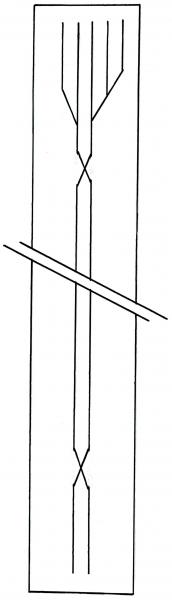
. . . say three turnouts at one end and a couple of double slips?
Would that be too simple for the system?
I have a spare laptop, plenty of spare Tortiose motors and a spare Lenz LZV100 which I could use, but what other electronic hardware would I need?
Cheers
Max
Max
Port Elderley
Port Elderley
Posted
Guest user
nothing is to simple for the system, if you have been following the thread you will understand about the blocks and occupancy and how it works. starting with a layout this size would be ideal to wet the feet. looking at your plan you would need 9 blocks, one for each spur and one for each centre running line.
hardware
you would need first a L1 USB INTERFACE
usb
this is the link between the command station and the PC, not cheap but if you then wanted to extend to your large layout this could be done without any hassle. (you will extend once the bug bites)
Occupancy
i done a lot of research into this without having a clue what i am looking for. i found the most cost effective way was the S88. now these are current drawing occupancy detectors that tell the command stationPC a train is on the track. they come in different flavours and you will need this one for the lenz system
s88
click on products then for lenz digital-plus then RS-8-B
not the easiest site to navigate but this is the one for the lenz system. the only problem i see is that you have 9 blocks and the s88 can handle 8. on the downside you will have to purchase two, on the upside this will leave you 7 spare to hook up to your main layout:thumbs
points
i can't remember if your points are DC or DCC controlled. if they are DCC then this is great as no extra wiring is needed just add the adress of the point in the TC software. if however they are DC controlled then something like the ls150 is needed.
ls150
i wanted to be able to play with trains and flip a switch to change a points, i posted a question "could i have dc controlled point and also have DCC controlled points (switchprobe)" i couldn't find an awns-er for months then i purchased an LS150 and the diagram is in the manual page 10. not relevant to your question but if you want to drive trains using a switch and also have PC controlled trains this is possible.
software
TC, all the links are in the thread, go for the system you can afford. what i mean is go for the best one you can. if you go for bronzesilver then you will be restricted to what you can achieve as we are finding out now in the tutorial. if you enjoy sound then the software is ideal for this as you can tell the software what sound you want and when, the same with lights. it is a big hole in the pocket but if you enjoy the hobby then the expense is justified. i have been playing with the software for a year and i am learning with every post john makes.
i would recommend downloading the software, draw up your plan and go through the tutorial adapting what john has put to what you want to achieve on your plan. this will soon grow and grow.
most things are possible with TC, sit down and put down EVERYTHING you want to achieve (operating wise) on the finished layout. i have posted questions that john has said he will include within the tutorial.
Posted
Inactive Member
I already have an L1 USB interface on my main layout. Well, it doesn't have any numbers on it, but it connects my Lenz to the laptop, so I'm pretty sure that's what it is. I just need to get another one as I'm going to build this layout as a stand alone, with its own laptop.
The S88 could be OK. The plan's not set in concrete, so I could drop one of the blocks easily enough.
I'm pretty sure Iansa has LS150's on his layout. If so, I have seen one. I think they will do six turnouts, so if I drop one block, that will leave six turnout motors - ideal.
I'll have a look at the specs on Tony's Trains website to make sure.
Well, looks like I've got a shopping list.
Thanks again. Max
Max
Port Elderley
Port Elderley
1 guest and 0 members have just viewed this.