
RR&Co Computor Control: Discussion
Posted
Guest user
Post any questions arising from "First Steps with RR&Co"
geoff john thanksgeoff you hit the nail on the head, i had the dispatch window up but i did not select the schedule tab before trying to create a schedule.
geoff to answer your question, once you hook it up to your layout for the first time your 30 days start from that date. within that 30 days you can run for 15 minutes then you will need to close. you can then re open and run again for 15 minutes straight after. you can do this as many times as you wish within the 30 days.

Posted
Guest user
Posted
Guest user
button installed
up to date and everything working as it should.
now for the question you asked, this is a nifty trick that i didn't know about
select the halt block and the schedule specific block route settings
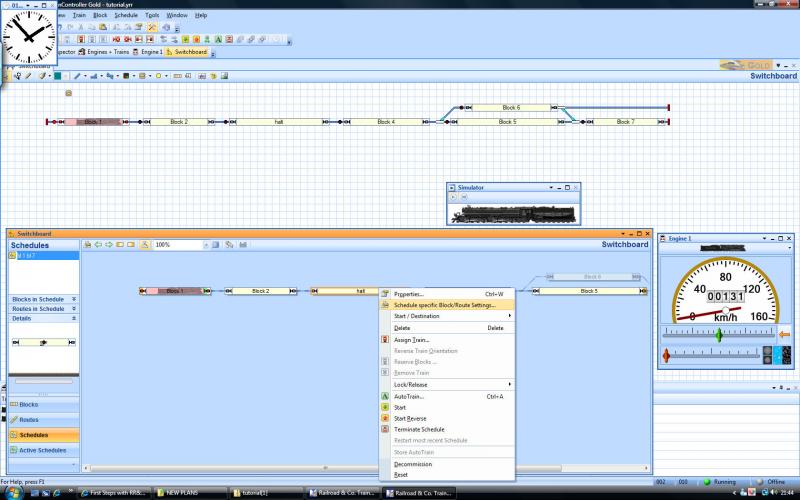
then in the general tab select wait time 3 minutes
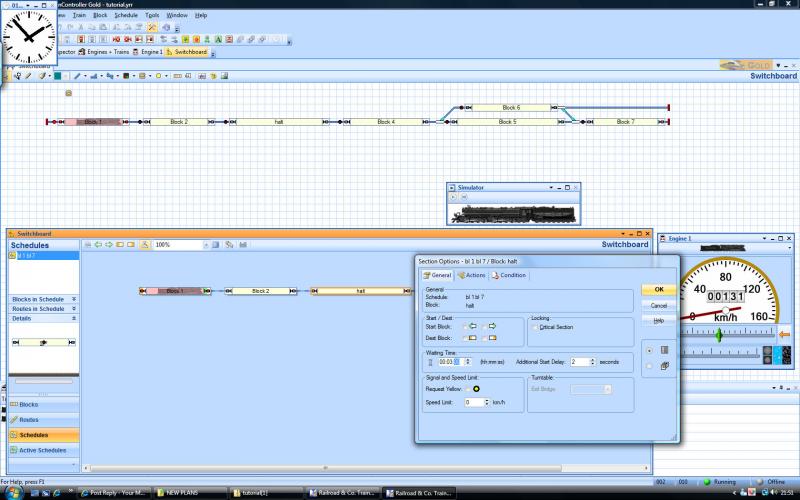
hey presto
see i have been listening:thumbs
Posted
Full Member
Have you purchased yet, or are you still on the demo?

Posted

Full Member
I think Geoff really hit the nail on the head….one keeps discovering new goodies
I had better get cracking on the next bit
Posted
Guest user
Posted
Guest user
:hmm
Posted
Guest user
Posted
Full Member
Sorry I didnt get back to you about interlocking……I was hoping that someone more qualified than I would reply……I will have a go tonight.
I am assumimg that by routes you mean the links (straight line or points) that connect blocks on a schedule and similarly when you talk about deleting blocks you mean deleting them just from a schedule……not from the switchboard? Sorry to be picky but thats the way TC is I am afraid

I have had similar problems………here is one potential scenario leading from block 1 is a 3 way point with routes to blocks 2,3 and 4 and you want to go from block 1 to block 2. If having selected block 1 you then select the 3 way as a route TC will assume you want blocks 2,3 and 4 and automatically select them for you…………it is better to select block 2 and only then go back and select the route…….typically only the route to block 2 will then be highlighted and show on the schedule.
If that doesnt work and the other blocks become part of the schedule after selecting the route it is possible that TC hasnt got a connection between block 1 and block2……a little bit of line from the point perhaps?
The mouse pointer is very precise and TC is apt to come to conclusions too quickly some times. The best advice I can give is take it very slowly and methodically and keep toggling from the main block diagram back to the schedule you are working on…..its a very quick way of giving you a headsup
If all else fails post a screen shot or if the worst comes to the worst your files and we can see if there is something more fundamental
ps If there is one route that fails to connect …….. click on routes in the block diagram and check if the symbol alongside is the same as that alongside the others…….I managed to decommission a route once and then spent days working out why it wouldnt connect when creating a schedule
Kind Regards
Posted
Guest user
Posted
Guest user
all the track is connected and all seems to be working fine when moving trains about using the drop and drag auto feature. i do get it to work after playing about for a while but it is very time consuming. maybe when trains are running this will not be as frustrating as i will see movement at the end rather than icon moving on a screen.
SIMULATOR
when using the simulator i have noticed a couple of things, now my blocks are set up with no conditions it is just a block with occupancy.
1. with 1 schedule running (train 1) train 2 will move from block A to B then back again. no route selected nothing, it will jump from one to the next.
2.my 37 freight will set off around the switchboard when another schedule is started, it is not linked to any other schedule it is not a successor to anything. i only have 3 schedules set up and the 37 freight schedule is not shuttle or anything it is set to normal. when moving out of edit mode i click no when it asks to continue with old schedules. i also terminate all schedules.
i can live with this as i know this will not happen on the real layout (i hope)
has anyone else had this problem?
Sol
thanks for the link i had a read through, i think TC may of taken this and used it in a different way. someone may correct me if i am wrong but i believe that if you have 10 locos on the layout and you hit run with interlocking all 10 trains will start to move around the layout. i think it will be cool to hook this up to a manual button on the layout to a feedback module. the lads could then hit the button and watch the trains:cool:
Posted
Full Member
When the loco moves from A to B and back again…..is that loco correctly set up in the block ie the block is pink and the occupancy detector is on?
Similarly does the Freight Schedule start every time you start another schedule?
The fact that you mention turning all schedules off and answering no to the "do you want to continue with previous schedules?" means that some schedules have not been completed ……for whatever reason. Are you satisfied that every time you start a schedule all your locos/trains shown on the switchboard are in the correct blocks, correctly orientated and no other blocks are shown as occupied?
Have you checked Dr Railroad and Detail messages…..if so is there any reference to the freight?
Sorry I still havent dealt with the interlocking….there was a hockey game last night
Kind Regards
Posted
Full Member


Posted
Full Member
Thanks for doing the Silver summary……the differences are a bit more fundamental than I thought…..it will be interesting to see what happens when we start uncoupling
I dont want to give the complete answer to the homework right now because hopefully Matt and somebody else will file. You are on the right track (sorry!) but I am not sure about your math and secondly I believe the distance and braking ramp measurements should total up to the stop measurement ie if you want the head of the train to stop 40" from entering the block and your typical braking ramp is 18" then the distance (from the entry point) before the ramp becomes active should be 22"
I see on your Block Editor screen you have a Train Detection tab which I havent seen before is that a product of your detection system or the use of Silver
PS I dont know where I got Ashby from I intended to use the halt in our layout but I now see I called that Midby!!
Kind Regards
Posted
Full Member
As for braking, according to the Help file:-
"The ramp describes, within which distance after reaching the brake marker a passing train slows down to threshold speed, if it has to stop in this block."
So I set the brake marker as being the point at which the train starts to slow down, and took the comment above to mean that by the end of the ramp the train would be just moving at threshold speed, which it would continue doing until it reached the stop marker where it would stop.
The Train Detection tab is to assign a train identifier detector to the block. The help file gives the Digitrax Transponder as an example. So it is to do with actual engine identification in addition to block occupancy.
I have just turned on the Gold version on my laptop, and that has the Train Detection tab in the Block Properties window as well!
As an aside, I have discovered that if I have my laptop connected to the layout - the occupancy detectors is all I have - and shut it down in that condition, then start up RR&Co with the laptop no longer connected to the layout, it takes several minutes to boot up the application, presumably because it is trying to find the device it thinks is connected to COM1? Eventually it starts, and then I have to put it offline, however, I also notice that just ticking offline in the File menu, does not take the Digital Systems offline in the Digital Systems menu. I have to do that by hand, removing COM1 and replacing it with OFFLINE.
Posted
Full Member
As for braking, according to the Help file:-
"The ramp describes, within which distance after reaching the brake marker a passing train slows down to threshold speed, if it has to stop in this block."
So I set the brake marker as being the point at which the train starts to slow down, and took the comment above to mean that by the end of the ramp the train would be just moving at threshold speed, which it would continue doing until it reached the stop marker where it would stop.
There are 2 measurements the braking ramp which is the distance the train travels before it reaches threshold speed and the distance between the contact indicator and the point where the braking ramp starts.
So to quote your example travelling right to left you have stop marker that is activated 40" after entering the block and a brake marker that is activated 10" after entering the block……the train will then progressively slow down for 20" (the length of your ramp) and then continue at threshold speed for a further 10" until it reaches the stop marker
On the return journey (Left to Right) it starts braking 2" after entering the block……brakes again for 20" and then continues at threshold speed for 8" when it will stop at the stop mark which is 30" from the entry point
I am pretty confident that is what will happen and I think you will find 10" at threshold will take quite a while
Having said that, on reflection, I dont think the combined ramp and distance have to exactly equal the stop distance……but the difference is the distance the train will crawl before it comest to standstill…….I suspect a couple of inches is enough
Train Detection: That is interesting…..I wonder if my Lenz set up prcludes it appearing
Boot Up: Again I dont have this problem…..it just says "cant find Com 1" or similar
I must say I do enjoy sharing experiences with you in this way
Kind Regards
Posted
Full Member
I will be interested to see how TC handles the speed characteristics already set in the decoder. For example, take the 3 sound equipped Bachmanns that I had for Christmas. If you run them with sound off, they set off straight away with acceleration as set in the usual CV and when you drop the throttle to zero, they come to a halt again as per the deceleration CV. However, when you turn the sound on, they behave quite differently. You can set the throttle to fully open while the loco is at a standstill, and nothing will happen until the sound of the engine rises in pitch, the brakes come off, and then the loco eases itself forward and starts to accelerate. Similarly when you close the throttle, the loco slows down more slowly, the brakes squeal and eventually the loco stops.
I wonder if this means that the loco has to be set up in TC twice, once for sound off, and once for sound on?
Posted
Guest user
Posted
Full Member
Here are my thoughts for the next stage:-

Posted
Guest user
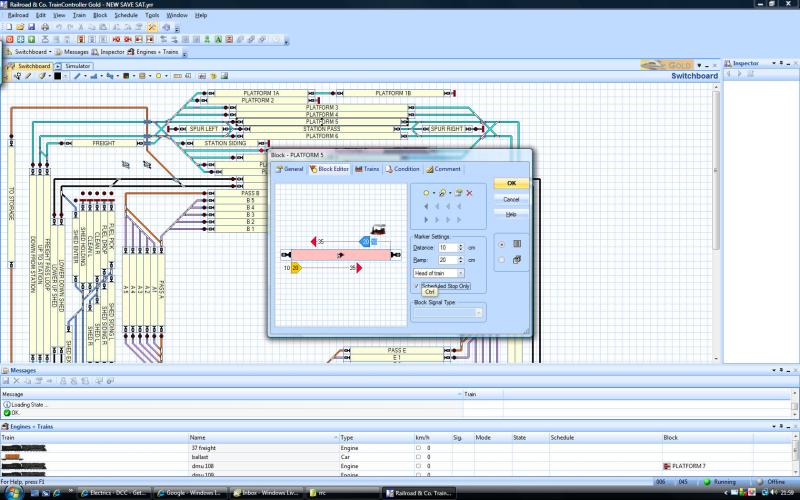
i think the simulator thing may be because i am stopping and starting the schedules all the time, this would not happen on the physical layout as trains would have to be moved.
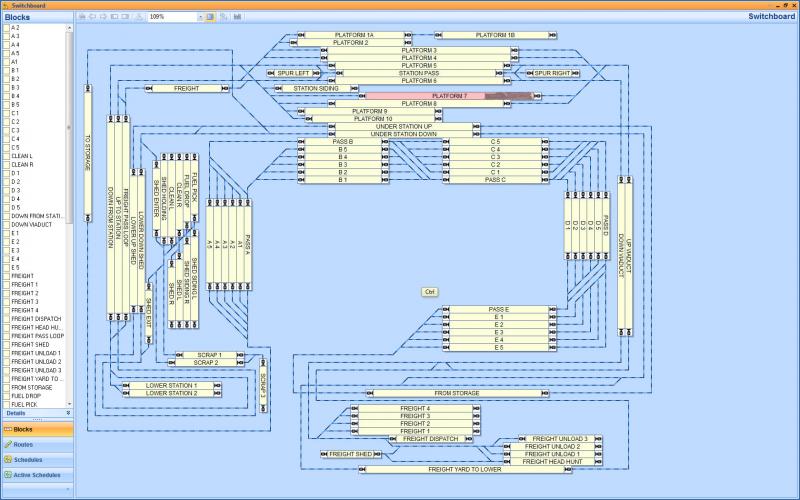
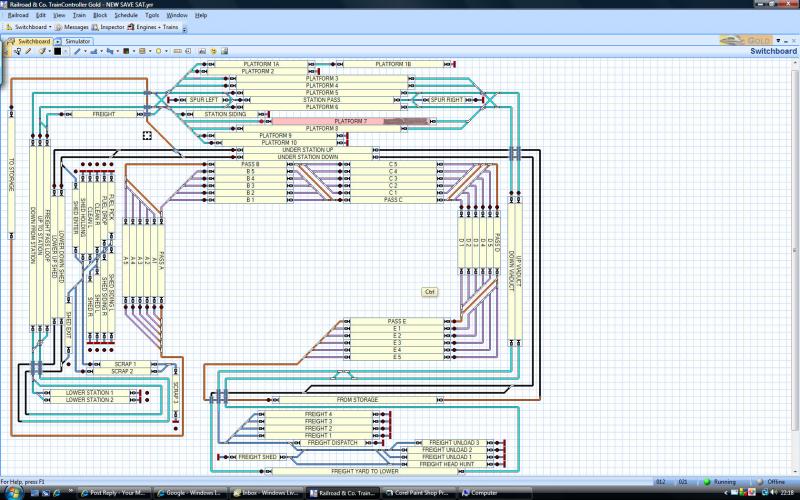
looking at my plan above between blocks pass a and pass b the route is orange, this also happens in the dispatch window. why is this?
with thoughts about your plan i think a roundy roundy with a fiddle yard at the bottom and a yard on the left or right.
here is my new plan in both windows
1 guest and 0 members have just viewed this.