
RR&Co Computor Control: Discussion
Posted

Full Member
Post any questions arising from "First Steps with RR&Co"
[user=2]Robert[/user] wrote:When you say 'see what is happening' John what do you mean exactly?
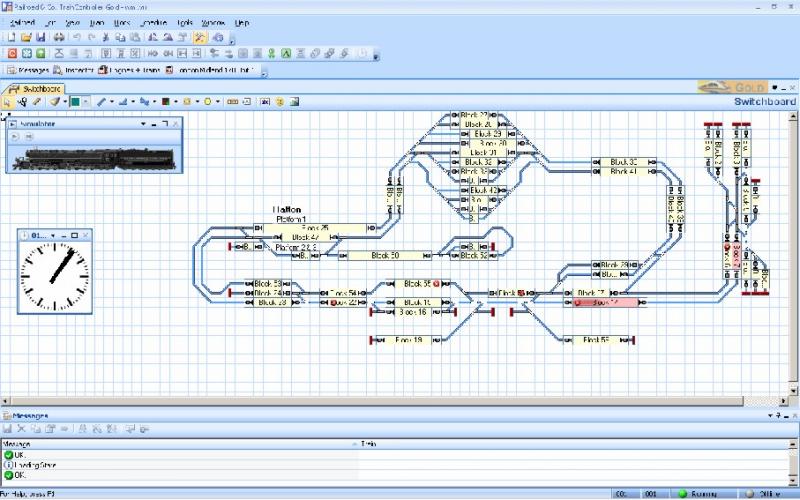
I guess I didnt phrase it very well. I wanted to make it clear that to open the files you didnt need to purchase the software…..in that sense its a free download……….you only have to pay if you hook it up to a live layout……it is incidentally quite a handy layout planning tool…..not to scale like Xtracad etc…….. but good for general design.
We have a single branch set up now on which we can run, using the simulator a simple shuttle service and the plan is to progressively develop it over the net adding through stations and a terminus with multiple trains and introducing signalling……anyone who can open the files can see what we are doing and, if they wish, contribuite to the discussion on for example the layout or signalling without getting involved in the nitty gritty.
Regards
Edited to add………….. and Geoffs response above was quicker, shorter and more to the point than mine
 Last edit: by John Dew


Posted

Legacy Member
Posted
Guest user
John, just a quick post to say thank you for your tutorial.
I've had RR&Co demo software installed on my computer for years but other than proving that I could get it to run a loco along a piece of track have never got around to investigating it properly.
Inspired by your posts I drew up a schematic for the proposed West Midlands Lines and got a shuttle service working. I doubt that I would have had the patience to debug it without your excellent thread.
Many thanks, and keep up the good work.:doublethumb
Posted
Guest user

no matter what i do i cannot get the create schedule to come up in the tree. it is greyed out:roll: i am sure it is the software and no me………………………………………………………………………………
can run a train by drag drop and throttle, i have tried edit un edit mode and removing trains from the track. i can get the dispatch window up with no schedules.
help blond moment
Posted
Full Member
- Select the White page icon top left
- In the Switchboard window draw a straight track across the screen.
- Add just three or four blocks to the track.
- Go to the Dispatcher Window - it should already have a tab.
- You should see the four blocks, select SCHEDULE at bottom left.
- Back on the main menu toolbar, select "schedule", and you should find "create schedule" highlighted ready to be selected.
I have just downloaded the software onto the computer I am using just now - not the one connected to my layout - and carried out the above steps, and all worked just fine.
Let us know how you get on.
Posted
Legacy Member
Posted
Full Member
Posted
Full Member
Go for the top one, Bob. Traincontroller Gold.
Beat me to it again Geoff and again you are correct…….thats the one Bob……..go for Gold!!!
You guys get up too early over there.
Posted
Full Member
John, just a quick post to say thank you for your tutorial.
I've had RR&Co demo software installed on my computer for years but other than proving that I could get it to run a loco along a piece of track have never got around to investigating it properly.
Inspired by your posts I drew up a schematic for the proposed West Midlands Lines and got a shuttle service working. I doubt that I would have had the patience to debug it without your excellent thread.
Many thanks, and keep up the good work.:doublethumb
Ian bearing in mind that it was your book that got me going in DCC that is praise indeed……many thanks
Kind Regards
Posted
Full Member
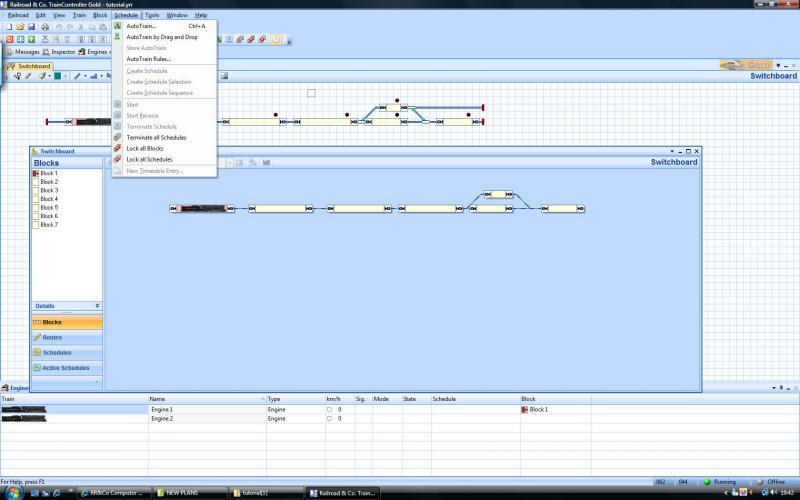
Did Geoff's suggestion work? It can be tricky getting to "Create Shedule" …………..you must be in Edit Mode and the schedule tab in the Block Diagram (Dispatcher Window) must be highlighted…….sometimes you need to go back and forth a few times…..it may be one of RR&Co's few quirks
Are you trying this with your own layout or the tutorial?
If the worst comes to the worst use Geoff's new tool and download the file and I will have a go here
Regards
Posted
Guest user
it works ok with my station but on the tutorial it still does not show:hmm
Posted
Legacy Member
Posted
Guest user
Cheers
PhilC
Posted
Full Member
Posted
Full Member
Geoff I have downloaded and installed the Gold edition and I have carried out steps 1,2 and 3 in your post but I don't see a Dispatcher tab anywhere.
Bob, try going to WINDOW on the top menu, and then selecting NEW DISPATCHER WINDOW.
I am currently trying out the Silver version to see if I really need to invest in the Gold level, and it does a few things differently.
Posted
Full Member
Posted
Full Member
Hi John, If you read my reply to Bob above, you will see that I have spent a couple of days looking at the Silver version. It approaches several things differently, like having all relevant windows already on tabs without the need to select new windows from the drop down menu. Also, it calls the Dispatcher Window, Dispatcher right from the get go, and not Switchboard like the Gold does!!!
Hi Geoff
Thanks for holding the fort……hopefully both Bob and Matt got sorted out
I guess the ability to have multiple windows up, in gold, is deemed to be an advantage and for that reason they have to have menus…..ie you can only have one dispatcher window in Silver.
I get really confused by the name on the Header of the Block Diagram Window……on the tutorial layout it comes up as "Switchboard" which is confusing whereas when I bring my own layout, Granby, up it is labelled "Block Diagram" In both cases I am in demo mode………..it has no impact on operation just irritating…..may be I will post a question on the RR& Co Forum
When working out whether to buy Silver or Gold I would be inclined to focus on the key differences and ask yourself how important are they to your operation. I think you can still download a summary of the differences……the key ones for me were the ability to separate and join components of a train and the use of Schedule Sequences……You may want to look at the differences with Turntable operation
I wish you luck
There is a hockey match tonight so during the interminable commercials and intermissions I will try and do a bit more on the tutorial
Regards
Posted
Full Member
Are you ok now with a schedule on the tutorial layout?
Posted
Full Member

I used a picture, rather than the file because I am working through the tutorial using silver to see if there is anything you do that I then cannot do. In some ways it is easier to use, especially as you say in regard to window menus as there are less options. I have managed to get my entire layout in one switchboard, so that has removed the need for gold to handle several switchboards.
I am happy to leave the turntable for now, as it is not DCC controlled at this stage anyway. I think I could build a DCC interface for it, but even then, not sure how I could interface RR&Co to that - as I said, leave that to much later.
Not sure what the limits are about being able to separate and join components of a train. If this includes not being able to detach a loco for a run around, then that is a blow. Although, ever since you first said that you do that with TC, I have been wondering how you handle uncoupling?
I have Kadees for the loco to train connection, with under track magnets - but none of the electrical variety. My run around operations all include the "Kadee shuffle" to get the position over the magnet just right, and then to perform a disengagement of the loco from its first coach or wagon.
Will be interested to hear how you handle that.
Incidentally, a difference which I can live with on the silver, is that the block names dissappear during operating mode - no option to keep them that I have found.
One final thing. You told Bob that you only have to pay for RR&Co if you hook it up to a live layout, but what about this 30day limit. I haven't got there yet, but I am worried about opening up the application just for 5 minutes in a day, in case that counts as a day, and then I suddenly can't do anything with it any more, until I but the licence.
Thanks again for your work on the tutorial. You make it very easy to follow. Glad to hear your team won:cheers
Posted
Full Member
Here is my homework, John.
I used a picture, rather than the file because I am working through the tutorial using silver to see if there is anything you do that I then cannot do. In some ways it is easier to use, especially as you say in regard to window menus as there are less options. I have managed to get my entire layout in one switchboard, so that has removed the need for gold to handle several switchboards.
Perfect:Happy Next time when we have created a train, rather than the light engine we have now, we will get it to stop by the platform which ( I have just decided) is placed off centre in the block
Actually I think a picture is the best way and use Files if there is an insoluble problem
Not sure what the limits are about being able to separate and join components of a train. If this includes not being able to detach a loco for a run around, then that is a blow.
Section 11 Page 225 in the Manual explains the differences. I think doubleheading and banking are more cumbersome (but I havent done this). I am sure we will be able to run around I am less certain about a loco entering an occupied block to join….we will be doing both shortly so we can find out.
Although, ever since you first said that you do that with TC, I have been wondering how you handle uncoupling?
I have Kadees for the loco to train connection, with under track magnets - but none of the electrical variety. My run around operations all include the "Kadee shuffle" to get the position over the magnet just right, and then to perform a disengagement of the loco from its first coach or wagon.
Will be interested to hear how you handle that.
I have Kaydees as well (with ugly surface magnets I am afraid!) and I do indeed do the "Kaydee Shuffle"……….thats next week!
One final thing. You told Bob that you only have to pay for RR&Co if you hook it up to a live layout, but what about this 30day limit. I haven't got there yet, but I am worried about opening up the application just for 5 minutes in a day, in case that counts as a day, and then I suddenly can't do anything with it any more, until I but the licence.
Sorry, I should have mentioned the 30 day limit……I am not absolutely certain how it works…….there was thread on RR&Co which explained the limitations and I think Matt has done some research
Kind Regards
1 guest and 0 members have just viewed this.