
RR&Co Computor Control: Discussion
Posted
Full Member
Post any questions arising from "First Steps with RR&Co"
[user=434]John Dew[/user] wrote:RR&Co will cover a number of different DCC systems at the same time. I am sure you can use NCE to drive the trains and Lenz to provide occupancy detection and even another for points……..quite how they all connect I am not sure…..I assume if you had NCE and you couldnt connect the Lenz LR101s to it……you would run a Lenz Feedback Bus to the Lenz Controller and need 2 USB connections.
I currently have RR&Co set up with two DCC systems. The LDT interface HSI 88 for the occupancy detection, and ZTC for train control. (Okay, I don't have a physical interface for the ZTC yet, but the software doesn' mind that). I am able to set up block detectors specifying connection addresses on the LDT, and at the same time, am able to set up engines and turnout addresses using the ZTC connection. It all seems to go together nicely.
As both Lenz and NCE are listed by RR&Co as fully supported, there really shouldn't be a problem, Gordon. In fact, as you have the detectors there, why not download the software under its demo licence and connect the Lenz and NCE to your PC and see what happens. I think you could be detecting and driving trains in no time!
 Last edit: by Geoff R


Posted
Full Member
I guess it depends what you mean by computor control. While connected to the computor you can certainly manually operate parts of the layout without blocks or even automatic control of points while other trains are on schedules but I think you may have to use the computor throttle…………I do this all the time I find it easier than using the handheld……..I am away from the layout right now…..I will try and see if I can operate the Lenz Controller while connected to RR&Co.
Certainly you could move a train automatically on a schedule to a destination block and then move it manually (using the computor throttle) to another area. The problem is without occupancy detection TC would lose sight of the train so when you moved it back to the RR&Co area you would have to manually "assign and orientate " each train to the block before TC could take over…….similarly as you move a train off the traverser you would have to assign it to the block
I guess your traverser isnt hooked up to DCC? The turntable options in RR&Co can be used with Traversers.
The best halfway house would probably be a self contained section where trains didnt move out of sight of TC. In this connection there is a super thread on the RR&Co Forum called "Locos adnd Depots" or similar……where a guy wanted to manually move locos after they had automatically arrived into a storage siding without detectors……a guy from Sweden came up with a very elegant solution which I am itching to try out.
John, my current layout has one main controller and then two handhelds connected through to the main controller using xpressnet (or at least ZTCs version of it). This allows three operators to be controlling a selection of different locos each - can be fun sometimes!! I imagine that RR&Co must do the same thing. Having no direct access to the track, it presumably can only get DCC signals generated by "asking" the main controller to send them out to the track for it. Therefore it is the master controller which really remains in control. If I had the PC interface now, I think I could tell TC to run one train - yes around a specific loop that would not interfere with others controlling trains - have each hand held control another train each, and yet another train controlled by the main controller.
The interesting part would come in the handling of turnouts, but I think that is where signalling could come in.
Of course, you also mention that the TC would lose track of where locos had gone if they were taken away manually. As far as I understand it, that is where Railcom could come in, as it could be used to find out what engine is in a block, not just that it was occupied by something?
Last edit: by Geoff R
Posted

Legacy Member
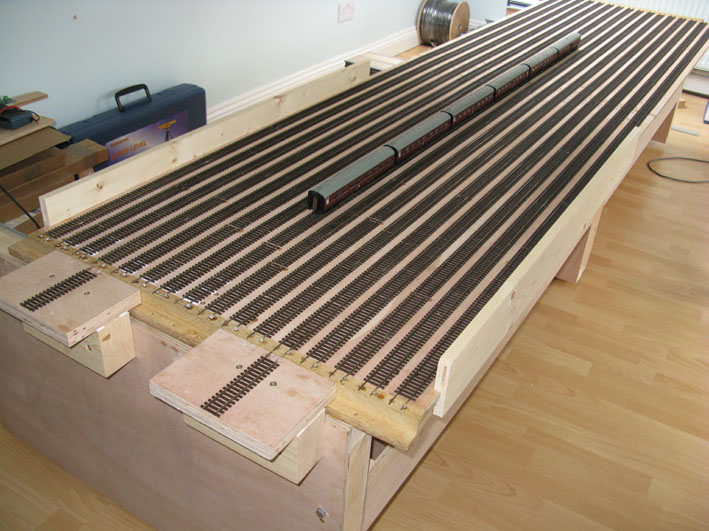
As you can see it is home built and a little larger than most. There are two in roads and sixteen storage roads. It is manually operated and I'm still working on some alignment issues which I hope to overcome shortly. It works fine, but as always things can be done better and I don't want to install something that may prove troublesome. As it sits 500mm below the terminus and the main operating position, it is easy to see which roads are full and which empty, so automation would be an overkill. It will have DCC power to every road, permanently on.
My original thoughts were to drive trains manually up to a holding point just before the visible part of the layout. The train would stop and control pass to the computer software which would then take it up into the continuous loops until such time it would leave to go to the terminus. Once again there would be a transition point, where the train would come off computer control and revert to manual to carry on up to the terminus.
Since my original thoughts I have thought about the hidden return loop which can also be used when you wish trains to go out and back. So a train can leave the terminus, travel around the loops and then into the hidden spiral. This eventually leads to the traverser, but the reverse loop can also be chosen. This would take trains from the down line and send them back on the up line. The run is several hundred feet there and back, so it can be many minutes before a train returns depending on the speed set. On an earlier version a slow freight could take over 15 minutes before returning. This is where it could get interesting, with a comprehensive schedule of passenger traffic on an out and back schedule from the terminus.
I have no problem with manual control on the operator controlled sections and TC on the computer side. The bit I don't quite understand as yet is the transition between the two. Where you have say main lines on TC and shunting manouevres on manual, which system takes priority when tracks are common to both systems? Are manually controlled trains dodging computer controlled ones or are there no common sections? If an unscheduled train appears on the computer display, does TC compensate for an unknown train or does it simply not recognise one is there?
The genie is out of the bottle as they say…..:cheers
Posted

Full Member
Okay - got it. I really should pay more attention in class. Going back to 2nd January when we set up our first detector, we should have set up an "operation" for it to set the turnout at the exit of the loop to straight through. Making that change to my hastily constructed tutorial layout, shows the point duely change as the engine enters block 651.
Had to be prompted, but got there in the end!
Well done that man :doublethumb
Next time you are in Vancouver there is a bottle of wine waiting for you
I put that in to show how extensive operations could be. It was a workaround that I put in on my own layout because I put the xover point too close to the end of platform. To get the carriages to stop in a sensible position in relation to the station building the loco had to stop with its head about two inches beyond the block…..its quite easy to do this just by measuring the distance from the start of the block…..TC doesnt know the stop marker is beyond the block and provided part of the loco is still registering in the block all is well…….except the loco could be fouling the point.
I think I will feed this into the tutorial where it can be seen in context because we should start introducing conditions because right now its a little too sipmlistic
Well spotted……………how about you Matt?
Regards
Posted
Full Member
This thread is becoming quite hectic…………….. I will try and answer in sequence
Sorry, John, I described what I had done wrongly. I have created a separate layout, and called the files Tutorial. So I am ready to share when the time comes. I like your idea of continuing to work this together, especially in regard to signalling.
I think it would be great to experiment together with signalling. I started out with RR&Co and Beasts signalling tutorial….I think you can still access it on the Wirral Finescale site. However we were using 5.8 and we werent running trains.In regard to signalling, I think that I would initially like to act as signalman and therefore still "control" the computer by the setting and clearing of signals in the path of the RR&Co schedules. I think this would mean more detectors associated with the signal arms, but these look as if they are cheaper than the occupancy detectors, and are certainly available in s88 format.
I cant quite get my head around calculated block signals which TC uses for automatic running and signals we create. I think for non auto areas you would place the signals on the computor switchboard and link their status to conditions involving points and block occupancy…..you would do this regardless of whether the real signals were operational then having created a proper signalling system you would use stationary decoders as for points to throw the real signals from the computor just like you throw points…..and I guess just like in real life where the signal man determines the road……..should be interesting
Bronze is generally reckoned to be very very basic entry level. Some people have argued that it is better to start with Silver and then upgrade to Gold because it is a smoother learning curve……Herr Freiwald suggested this in one thread.I took my laptop with me and had a look at Bronze
He has very cleverly inserted some key improvements in gold which I would not want to do without. I decided that if I was going to invest all this money in hardware…..decoders and the like…..it was worth going straight for gold……dont regret it for one moment……..mind you I have only bought one loco since I went down this route
If you decide to go for Silver Geoff we should remember that and ensure we indentify alternate solutions
My advice…..go for gold……from Vancouver home of the 2010 Winter Olympics!
.
Last edit: by John Dew
Posted
Full Member
John, my current layout has one main controller and then two handhelds connected through to the main controller using xpressnet (or at least ZTCs version of it). This allows three operators to be controlling a selection of different locos each - can be fun sometimes!! I imagine that RR&Co must do the same thing. Having no direct access to the track, it presumably can only get DCC signals generated by "asking" the main controller to send them out to the track for it. Therefore it is the master controller which really remains in control. If I had the PC interface now, I think I could tell TC to run one train - yes around a specific loop that would not interfere with others controlling trains - have each hand held control another train each, and yet another train controlled by the main controller.
The interesting part would come in the handling of turnouts, but I think that is where signalling could come in.
Of course, you also mention that the TC would lose track of where locos had gone if they were taken away manually. As far as I understand it, that is where Railcom could come in, as it could be used to find out what engine is in a block, not just that it was occupied by something?
The turnouts would be linked to the signals for sure and then you can select different driving modes…..full automated to fully manual but in the middle there are dfferent shades of grey like manual but computor takes over at red (stops the train I guess!)
TC wont lose track of the train if you manually drive it from block A to block D and all the intervening blocks are detected……..it may get excited if there is a long undetected stretch………..it will certainly get excited (well not so much excited…more forgetful) if you drive it into a block that is already occupied or was previously occupied and you forgot to clear it. The days of gaily picking up a train and plonking it down somewhere else are gone with RR&Co if you want to preserve the integrity of train detection (as opposed to occupancy)
Incidentally TC will still move a train even though you have it in the wrong block…..as I found out to my cost…..trying to move 5565 from block A…….nothing happened….why because 5531 was there…….meantime on the other end of the room 5565 was creating mayhem in Block Z:twisted:
I dont know where we are with Railcom….it seems awfully slow to develop and would involve me rechipping almost all my locos…..to buy RR&Co Gold I have Lenz Silver!!! I dont think it will happen on my layout. I think eventually there will be some form of wireless detection
Posted
Full Member
I love the understatement "a little larger than most"It is huge!!! I think you are right about the Genie and the bottle Gordon so I would certainly be thinking about the probability of installing occupancy detectors in the Traverser even though you will be manually driving trains in and out…..that way TC would definitely be able to automatically takeover once you got to the transition pointAs you can see it is home built and a little larger than most. There are two in roads and sixteen storage roads. It is manually operated and I'm still working on some alignment issues which I hope to overcome shortly. It works fine, but as always things can be done better and I don't want to install something that may prove troublesome. As it sits 500mm below the terminus and the main operating position, it is easy to see which roads are full and which empty, so automation would be an overkill. It will have DCC power to every road, permanently on.
My original thoughts were to drive trains manually up to a holding point just before the visible part of the layout. The train would stop and control pass to the computer software which would then take it up into the continuous loops until such time it would leave to go to the terminus. Once again there would be a transition point, where the train would come off computer control and revert to manual to carry on up to the terminus.
This is the same issue I am discussing with Geoff……I am sure it can do all this provided it knows the identity of the loco in the transition point……it can only know this if it has been tracked there or manually entered (which will inevitably become a cumbersome operation) Hence my suggestion about indicators in the transverser………the downside is you can only have one loco per block and I would guess you are planning to have more than one train per line?
I have 8 roads in a 12' long storage yard and 18 blocks (ie 18 detectors)
The solution in RR&Co might work but would be very complex……. it involved a train being automatically brought to the transit point and then moved into a storage yard divided into blocks……but without detectors……the system kept track of the trains by a series of conditions.
I think I have to do some more research as I said in my earlier post you can select different driving modesI have no problem with manual control on the operator controlled sections and TC on the computer side. The bit I don't quite understand as yet is the transition between the two. Where you have say main lines on TC and shunting manouevres on manual, which system takes priority when tracks are common to both systems? Are manually controlled trains dodging computer controlled ones or are there no common sections? If an unscheduled train appears on the computer display, does TC compensate for an unknown train or does it simply not recognise one is there?
I know you can have a universal mode…..totally automated or for example manual but computor takes over if train tries to run a red light
I know you can select different modes for specific shedules …..I am not sure how universal mode and schedule specific mode interact
If you had a schedule operating (manual or automatic) it would reserve blocks ahead (you can fine tune this) so if you then tried to run another schedule that conflicted it would have to wait until the block cleared. The same would apply if you were running manually in the mode where at the red the computor takes over…..the train would stop until the signal changed to green and the train would resume its journey at the same speed. Pure Manual……Pure Chaos because the computor would have no control
The more I think about it the more I would put some occupancy detectors in the transverser you could then either drive locos manually to the transit block….or I suspect create simple schedules operated by a push button
Line 1 to Transit, Line 2 to Transit and so on…………….TC doesnt care (unless you specify a condition) what train is in the start block…..if you press a button and if a train is in the block the schedule will start
You can set up sequences so that if one schedule fails another will go instead. There must be some way of detecting which track of the transverser is connected to the main once you have manually pushed it into place
Once you got the loco to transit you could then determine whether to drive it manually away or have it start an automatic schedule
Posted
Guest user
i would put occupancy on the traversa for each track, set up TC to have two sidings and a dummy point. put micro switches on each track so when it passes the exit tracks the micro switcher's kick in going via the occupancy detectors telling TC occupied or vacant. have two switches on the TC switchboard, one to move trains out to the holding block and one to drive trains into the traversa. TC will fire the dummy point but all it will see is blocks occupied and then un occupied when you start the schedule. you could also set up a macro on the entrance block to the traversa with a sound file (bell,whistle) to remind you a train is waiting to enter the traversa.
another way is to set up above without the micro switches, instead have a switch on the TC switchboard for each track\block on the traversa. set conditions for that block via the switch, switch off trains cannot exit\enter the block, switch on trains can exit\enter the block. this way TC will know what train is in each block all the time. once you have aliened the traversa click the switch on the TC switchboard for that track and away you go. i think you would need to set this up as a fan of points within TC.
John
i like the idea about learn as we go, if i have a problem in the future i can relate that to the tutorial layout so we can all bang our heads against the wall. can i ask that once you have completed the tutorial you add a through station. i think then we will cover all possibilities.
reference the schedule post
i wanted schedule to use a specific route through my storage level, so no schedules would start or stop in specific blocks. i could not get this to work but the way you showed on the tutorial works. another thumbs up.
Posted
Legacy Member
Damn, just as I thought the decision had been made…:chicken
Last edit: by gordons19
Posted

Full Member
Gordon, is it ratcheted in some way to provide alignment?
The 500mm you mention is an awesome lift and drop.
Good job you have those big locos to cope with it.
Fine work as always.
Fascinating thread, John.
Posted
Legacy Member
Posted
Full Member
Posted
Full Member
Posted
Full Member
It opened fine for me………So I guess if you change your layout and then upload it again when I download it my copy will be updated. Should Matt and I post our files as well (with different names)
PS We havent covered Dr Railroad yet……..you can find it under Railroad in the main TC Menu Bar :shock:
I am rethinking the quality of the wine I awarded you :lol:
Regards
Posted

Legacy Member
Posted
Full Member
Its a brilliant idea……. I should have thought of it:oops:……………thanks Geoff
Posted
Legacy Member
Posted
Full Member
Great idea Geoff
It opened fine for me………So I guess if you change your layout and then upload it again when I download it my copy will be updated. Should Matt and I post our files as well (with different names)
PS We havent covered Dr Railroad yet……..you can find it under Railroad in the main TC Menu Bar :shock:
I am rethinking the quality of the wine I awarded you :lol:
Regards
John, I am not sure what happens on the forum's server if we upload files with the same name. In any case, for tracking purposes it may be better to always use a different file name. I guess that I should have given the name a bit more thought, but I wanted to check that it worked.
A possible file name format might be:- anytitle+originator initials+reverse 6 digit date.
For example, I could have named my first file:- tutorialGR100119
Hopefully we wouldn't need more than one per day!! The file name cannot be changed while making the attachment to the post. It has to be set that way in the home computer directory.
I have had a go at attaching the current state of my own layout for your interest.
Posted
Full Member
When you say 'see what is happening' John what do you mean exactly?
Bob, John means that if you have RR&Co running on your computer, and you open up the tutorial files and then run them as per the "operate" part of John's tutorial post, you will see simulated trains moving around a block diagram of a train layout on your computer screen, and thrill at the marvel of it, just like we are.
We are easily amused:lol:
Posted
Legacy Member
1 guest and 0 members have just viewed this.