
DCC Numbers and Bits
Posted
#112022
(In Topic #5850)
Guest user
A conversion guide
Our normal way of writing values is based on the decimal system using the numbers 0 to 9 (10 different digits in all)In digital systems the decimal system numbers are converted into the Binary System which uses just two values (0 and 1 or ON and OFF) to represent data and codes.
To represent a number in the Binary System requires more digits than the decimal system, but the greater simplicity in only having two states offsets any disadvantage when used in computer systems.
In the Binary System the digits are known as BITS which comes from BInary digiT.
Each position within a sequence of bits represents a specific power of 2
As with the decimal system the left hand side bit is of a greater value then the one to its right.
Table showing the bit numbers as per the NMRA convention in red
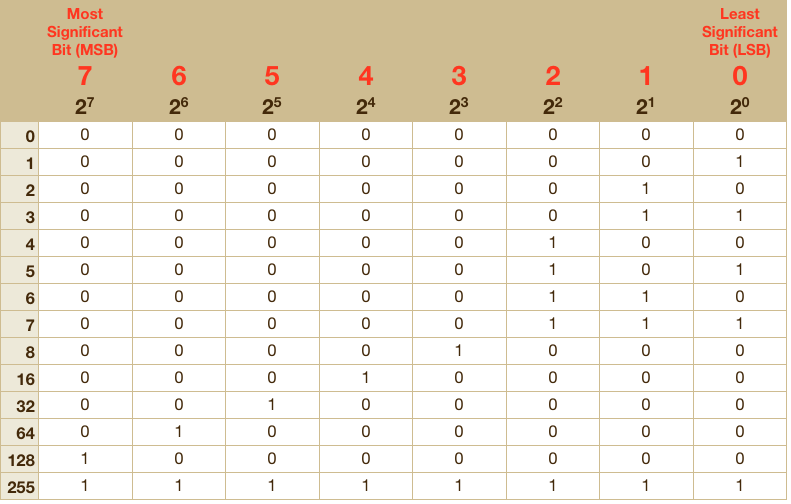
From the above table the binary representation of the decimal number in the left column can be read.
Decimal 6 is represented by 00000110b (the b suffix indicates it is a binary number)
(1 x 2²) + (1 x 2¹) + (0 x 2ᴼ) = 4 + 2 + 0 = 6
To find the decimal value of a bit
1> look down the relevant column (7 - 0) to the first occurrence of a 1
2> from the left column read the decimal number
Example:
To activate bit 3 on a system that does not have bit activation but number input only
Read the existing value of the relevant CV
Add 8 (from the table) to the existing value
Write the new number into the CV
To de-activate bit 3
Read the existing value
Subtract 8 from the existing value
Write the new number into the CV
If it was bit 5 then add or subtract 32
NB: Some systems like the Lenz LH100 handset number the bits 8 to 1

1 guest and 0 members have just viewed this.