
CVs
Posted
#118044
(In Topic #6168)

Inactive Member
The beauty of the decoder is that it can be tailored to suit your taste. The software is set up or configured by you and therefore varying of these configurations will be the means to do that. Hence, Configuration Variables; or CVs. I like to think of CVs as being like the knobs on your stereo. You choose volume, tone, balance and the like to suit yourself.
Individual manufacturers set up their decoders to be configured in many ways and choose CVs from the list and give the CVs a range of behaviours relative to the value you put in. However there are a few CVs which are common for most decoders. They are:-
CV 1 The short address. By selecting CV1, you can enter any address up to 127
CV 2 The start voltage. While the term voltage isn't exactly correct, it suffices to explain that the model can be set to start moving at the lowest throttle setting you require.
CV 3 Acceleration Time. The higher the value you enter into CV 3, the longer the model will take to reach maximum speed.
CV 4 Deceleration Time. The higher the value you enter into CV 4, the longer the model will take to slow down and stop.
CV 5 Maximum speed. The higher the value you put in, the faster the model wil go on full throttle.
CV 6 Mid speed. This CV is designed to give you a rough speed curve. Set it halfway between CV 2 and CV 5 and then play with it from there. It often depends on the characterisitcs of your model, as to where you like it to be.
CV 29 This is the one that worries most people at the start. For reasons I don't really understand myself, CV 29 has been chopped up into 8 parts, or Bits. Bits are more like switches than knobs; that is they are either ON or OFF. The commonly used Bits are the first 6, the other two being left for individual manufacturers to use.
Here is a digram showing how to manage CV 29
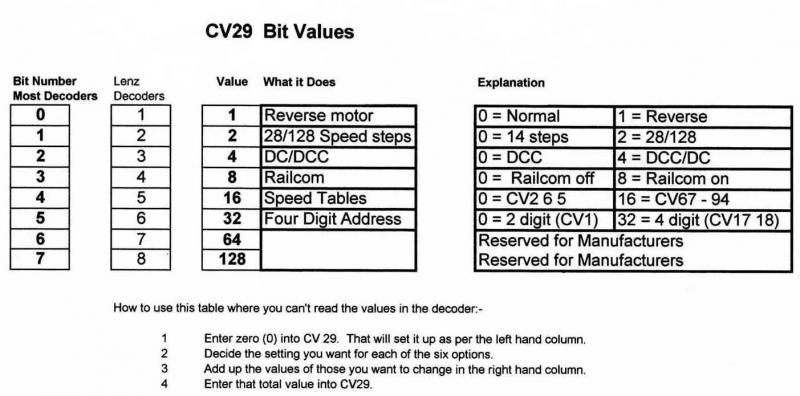
You can see that Lenz have numbered their Bits differently, also TCS use letters; but the result is the same. If you look at the "What it does" column, you can see the "Change" value for what ever you are trying to do.
I know that some DCC systems allow you to read the Bit values and change them individually on the screen, but I felt that it you understand the way it works, you can manage CV 29 if your system doesn't have that facility.
This thread may be of help if you are trying to decide if a cheap decoder is good value or not. If the decoder manual shows that it doesn't at least support all of these CVs and bits, (Plus a reset CV), you may find frustration when you come to start tweaking.
Reset CV. I've left this to last as it's important, but isn't always the same CV number. It's usually CV 8 = 8. That means if you call up CV 8 and put in 8, the decoder will reset itself to where the manufacturer put it. In Lenz decoders it's CV 8 = 33, in NCE, Soundtraxx (other than Tsunami), DSD and TCS, it's CV 30 = 2.
If the decoder doesn't have a reset CV, avoid it like the plague.
I hope that this has been helpful. My thanks to my co-collaborators, Ian Wade and Ron Solly.
Max
Port Elderley
Port Elderley


Posted

Inactive Member
Max, you explained it in simple language. Well done!
Craig SR
Posted

Legacy Member
Posted
Inactive Member
Max
Port Elderley
Port Elderley
Posted
Legacy Member
Posted

Full Member
Posted

Full Member
Are you going to continue with more episodes along these lines in the future such as explaining in layman's terms exactly how DCC works etc. etc. ?
I always thought they were something to do with job interviews …………….:roll::roll::roll:
'Petermac
Posted
Inactive Member

Max
Port Elderley
Port Elderley
Posted
Legacy Member
1 guest and 0 members have just viewed this.