
Points of Perspective
Posted
#104569
(In Topic #5530)
Guest user
How do we get the view "right"?
When we look at a scene with our eyes we benefit (in most cases) from stereoscopic vision which gives our brain information on depth of field.Looking at a photograph, painting or other similar static image of a scene we can get the same effect.
When it comes to creating our backscenes we are often in the situation of having to create a long thin panel which will not be viewed from one point but from many, and will not be viewed by one person from the same spot all the time.
We are attempting to re-create a dynamic environment in still-life format.
There is the generic "sky board" with nothing but blue and puffs of white. That is one way to solve the problem but doesn't add background which we often need to include.
If I add trees, buildings and signs - however I choose to represent them - to a backscene then I need to create a sense of depth.
I can choose to say "Everything reduces towards and disappears at Point X" which may be fine if I only view the layout from one spot but as soon as I move it looks wrong. And I can only have one "Vanishing Point" on the layout - or at least only one per side - without things looking horribly wrong.
I have read through numerous topics, come across some part-solutions, but return here to the massed experience and skill of our membership to ask the question "How have you resolved this conundrum?"

Posted
Guest user
The only solution I can come up with is to paint buildings flat-on to the viewer, with no real linear perspective. The only exception would be where, because of buildings and/or trees obscuring it, you know for a fact that the scene can be viewed from only the ideal vantage point.
For this old Swanhurst backscene I avoided linear perspective, except for pic 3 which was visible from only one place.
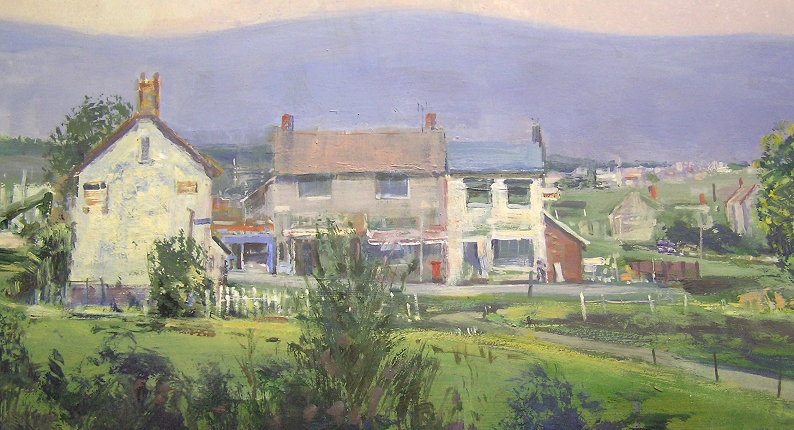
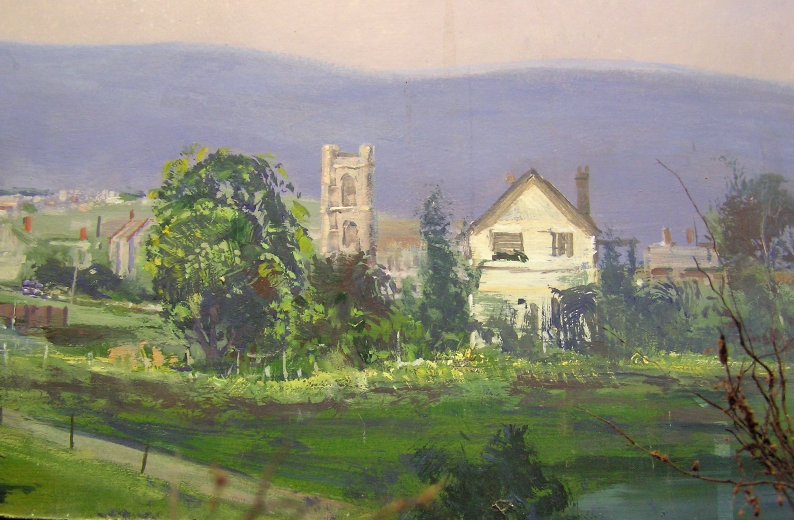
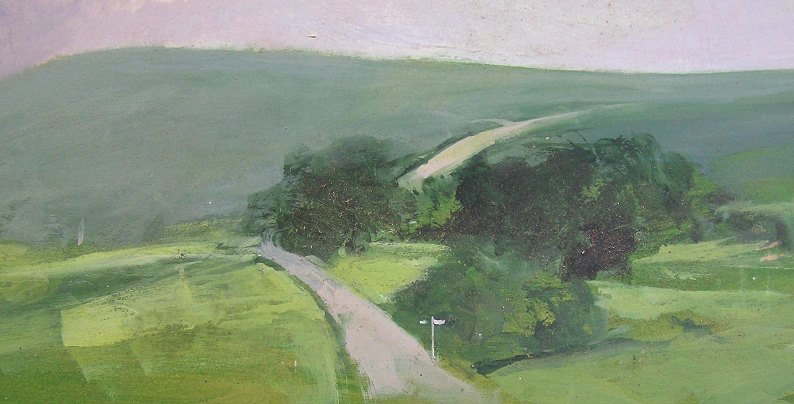
From extreme angles there would still be some distortion, but from most viewing angles it was kept to a minimum.
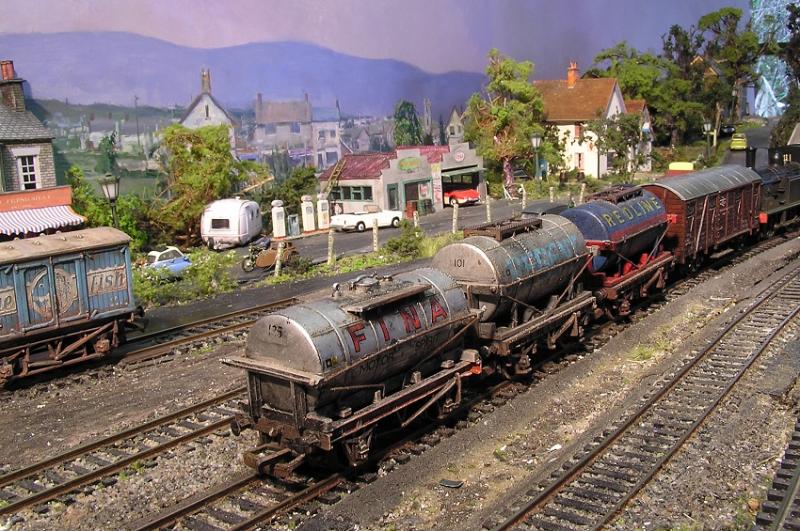
I also think that to accommodate different camera heights, the backscene should be able to be raised or lowered as required.
Mike
Posted

Full Member
Stubby47's Bespoke Model Buildings
All photos I post are ©Stu Hilton, but are free for use by anyone.

Posted

Full Member
Mike is a long way towards doing the impossible.
Unless you have a very deep layout, the viewer will be looking down on it anyway.
The simple rule of 'eyeline' (looking up at things above eye level and down at things below) just doesn't work in our situation as our eyeline is akin to viewing from an aircraft - or a tall mountain.
As Rick says, the vanishing point we use in 2D work is almost irrelevant because we are in a different dimension.
I did some Production Design work for some Theatres years ago and the Director was obsessed about this idea of 'creating depth'.
Of course, this is possible with the use of colour and cheating on horizontal lines to an extent (and many stages slope towards the audience for this reason) but I ended up telling him to get the actors to enter on their knees and slowly stand up as they reached the front.
Posted
Legacy Member
reg
Posted
Full Member
Another important aspect, which IMHO is often overlooked, is arial perspective where the further away the object the more muted and more blue/purple the colours. I was going to cite a Scottish layout, Lochinver, as a fine example until I saw Mike's photos above which show this superbly.
 Last edit: by Bod
Posted

Legacy Member
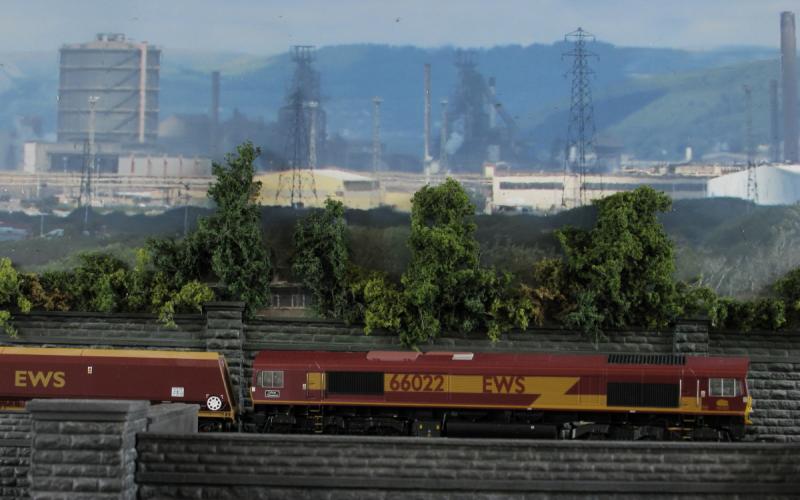
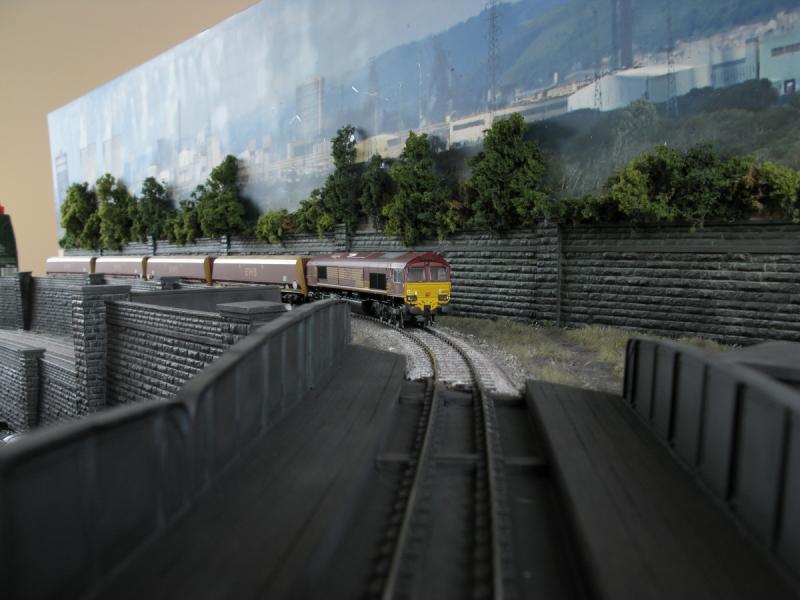
I've been playing around with a backscene on Eastwood and the whole issue of the angle of view is very much on my mind. I now realise that much more work needs to be done to try and come up with something that works. From the front, the trees and shrubs look reasonable against the muted distant backscene, but move slightly to one side and the illusion is shattered. Not only do shadows on the backscene kill it completely, but you are immediately aware of the lack of depth. I guess on top class layouts your eyes are drawn away from the backscene by interesting scenes in the foreground.
From the front…
…..but from the side…
Posted
Guest user
that are wrong, you appear to have an industrial back scene with waste ground at the front,
some shrubbery, grass yes, but an avenue of trees ???
just my opinion of course.
 lol::cool:
Posted
Legacy Member
I'm going to dwell on it for a day or so, because attacking it now may ruin the backscene. I've sealed it with artist fixative and a couple of coats of matt varnish, so warm water may allow the pva to give.
Posted
Guest user
I actually think we are to blame ourselves for creating this because we have a space to build a layout in and naturally we try and maximise the space for the layout. As the backscene is a late thought in development.
For example in Gordons photo if his back retaining wall was say 6-8 inches forward from the backscene that would become a transition area between 3d scenery and 2d backscene.
If you look on RJR`s ho layout thread an idea he has used could in places be used in a backscene area using mirrors
He has used it to good effect whether you could use that with a backscene i am unsure.
Brian
Posted
Guest user
Personally I think the trees look fine. Not so much an avenue as natural growth being stemmed by the railway boundary.
Cheers
Dave
Posted
Guest user
Posted

Legacy Member
I'm sorry to say that this is a plain and simple hijack but I couldn't resist it as that second picture is a cracker. Sorry folks.


Posted
Guest user
Interesting discussion. It is great to see such concern with the backscene - I guess we have all been to exhibitions where the backscene really spoils a layout. A friend of mine recently returned from an exhibition where he felt the backscene on one layout looked worse than a childs artwork! It's a pity that some are very much a rushed afterthought and they can really spoil the overall effect.
I don't claim to have got it right at all but I did get some nice comments at an exhibition a year ago. I think the height of the material on the backscene needs to be realistic - helps to get down to eye level and think - how tall would the buildings etc be relative to what is in the foreground e.g. a church spire, houses, an office block etc? Perspective needs to be taken into consideration too.
This photo shows part of Beeches TMD before the backscene was painted.

I totally agree with the idea of a bit of a buffer - an area where you can put say small shrubs, a fence maybe, possibly low relief buidings - so that this then blends into the backscene. You can see how I attempted to start this in the photo above. The building in the background (below) is supposed to be the back of a large supermarket - unloading bays etc. An area of shrubs, small trees separates this from the track / yard.
Below is a more recent photo of this area from a different angle - also one at night and one more at the other end showing backscene either side of a low relief building (backscene not quite finished here). Does it work?


You can spot the same building (above) here in a wider shot (below) of the right end of the layout (taken by Richard Wilson - British Railway Modelling). Again a bit of work still to do behind the shed!

One further point - I personally don't think the backscene should be too distracting - I tried to paint a slightly muted shade for the sky - same applies to the clouds. This is an old photo of the layout (below) pre weathering / detailing - I still need to complete this backscene so that there are some buildings etc beyond the models in the foreground - looks a bit ghastly like this but then has to start somewhere! Any suggestions for backscene here gratefully received!

Last edit: by unknown
Posted
Legacy Member
Posted
Guest user
The text copied below refers to three photos that follow in the original entry …
Below is a more recent photo of this area from a different angle - also one at night and one more at the other end either side of a low relief building (backscene not quite finished here). Does it work?
Posted
Guest user
Perhaps you could do a "how to" in a seperate thread? Or alternatively, just send me 20 of them!
Posted
Guest user

Posted
Guest user
Did you take the pictures yourself - so that they were deliberately slightly out of focus?
Posted
Guest user
1 guest and 0 members have just viewed this.