
Pictures for Streetscapes
Posted
#180554
(In Topic #10197)

Inactive Member
Request for material from Members
G`day Folks,I am working on a suggestion put forward by Matt in regard to pictures of High Street buildings, shops, shop fronts, houses, pubs etc..
I was wondering if anyone has or was willing to post pictures of the above, so that they may be freely used by members to create back scenes for model railways. It may even be better to email material between members??
I recently posted in my topic, Great Chesterford Junction, an idea gained from Railway Modeller
http://yourmodelrailway.net/view_topic.php?id=11121&forum_id=21&jump_to=223614#p223428
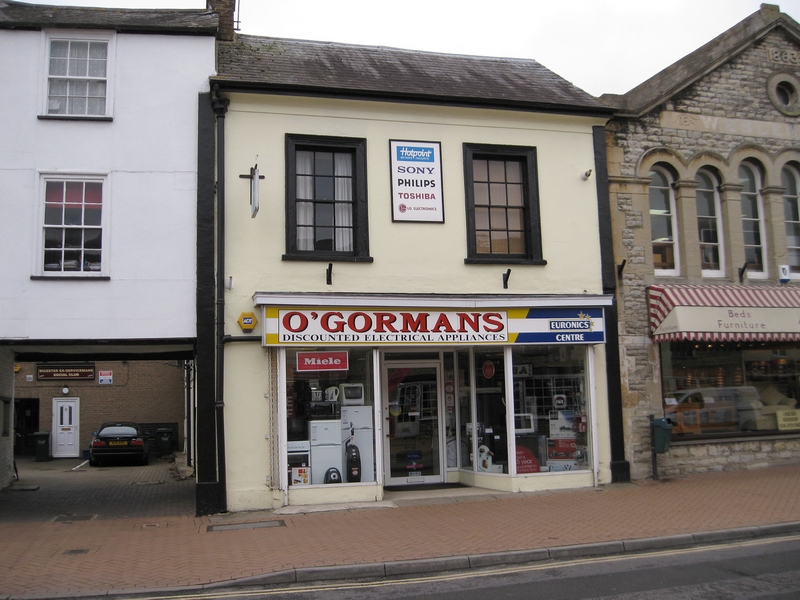
To explain……the idea is to photograph a building / s front on and square and horizontal as possible. Then by using photo manipulation software you can add it to a project to create a streetscape. You can also add free textures to further individualize the project.
This is the sort of shot I am talking about……..minus the cars would be good??

Now this being on an angle makes it quite difficult to work with, so unfortunately this is one of my rejects
]
This is a scene I have created with my own images and also free texture images. Parts of it may look familiar. That`s Gormo coming out of the Laundrette. There has been quite a lot of modification and manipulation done here but I like the way it`s shaping up. This image below prints out on plain A4 paper in the Lanscape orientation, however it has been resized for this topic and the quality will not be as good.
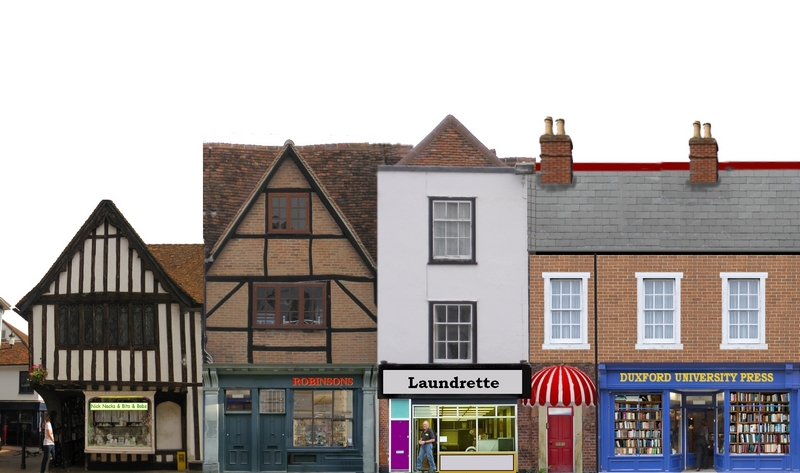
I have been in touch with CG Textures and they are quite happy for their textures to be used in this way.
So I am putting out the feelers and any feed back would be appreciated.
:cheers Gormo
"Anyone who claims to have never made a mistake, never made anything!!"
https://sites.google.com/site/greatchesterfordmodelrailway/home
https://sites.google.com/site/greatchesterfordmodelrailway/home


Posted
Guest user
It's a great idea and looks good. I think it could work. The only problem in potentially trying to mix and match images from different sources may be one of compression due to different focal lengths of lenses being used but it may not be a big issue.
It would certainly give the potential for greatly improved reality in back scenes. Sounds good " Gormscapes "
Cheers
Toto
Posted
Inactive Member
I agree Toto re different sources……however I think it would be a suck it and see exercise. The compilation I showed above was put together with a free program called " Photofiltre " and there was a lot of trimming and fudging and resizing going on, but it gave a reasonable result.
So I think that if we assume most photos of High Street shops etc will be taken from somewhere between say 40 and 60 feet, then the software will be able to deal with it. What doesn`t work can be altered or indeed parts of photos can be used.
The secret to this stuff is a good knowledge of the capabilities of the software. I have been experimenting with Photofiltre for about 6 or 7 years now and that`s a good way to learn…….just try stuff.
We`ll see what comes of this topic???
:cheers Gormo
"Anyone who claims to have never made a mistake, never made anything!!"
https://sites.google.com/site/greatchesterfordmodelrailway/home
https://sites.google.com/site/greatchesterfordmodelrailway/home
Posted
Guest user

Posted
Full Member
Posted
Inactive Member
 Last edit: by 60019Bittern
Posted
Inactive Member
Thanks so much for your offer.
I guess at this stage email is the best option because we don`t want to bog down the forum with too many megabytes.
I could then put them up on my website for download as an interim solution, however I don`t have a massive capacity on there.
I am open to suggestions in respect of having a pool of free material for members.
I will PM you my email address.
Thank you
Gormo
"Anyone who claims to have never made a mistake, never made anything!!"
https://sites.google.com/site/greatchesterfordmodelrailway/home
https://sites.google.com/site/greatchesterfordmodelrailway/home
Posted
Full Member
Whilst I understand that pictures should be [preferably] square-on for 'Gormscapes'.
'mynnyddog' * i.e. member Dave Maeden has contributed literally hundreds of structure photographs, as have others.
Slightly skewed pictures can be straightened using a free program called 'Gimp', too.
Doug
* If you are looking for a prototype for ideas, just click on his galleries, but be sure you have a good I'net connection, there are 'millyuns' there!
D
Last edit: by Chubber
'You may share the labours of the great, but you will not share the spoil…' Aesop's Fables
"Beer is proof that God loves us and wants us to be happy" - Benjamin Franklin
In the land of the slap-dash and implausible, mediocrity is king
"Beer is proof that God loves us and wants us to be happy" - Benjamin Franklin
In the land of the slap-dash and implausible, mediocrity is king
Posted

Full Member
Index of /ptlens
The trial version allows you to manipulate up to 10 images Ideally it needs the original image file with EXIF data, it needs to know which lens in order to work best, without that it can do some basic corrections.
I've used it before to square up some fancy window and door surrounds, but it will do complete buildings just as well
Cheers MIKE
I'm like my avatar - a local ruin!
I'm like my avatar - a local ruin!
Posted
Guest user
Hi Gormo,Now this being on an angle makes it quite difficult to work with, so unfortunately this is one of my rejects
It doesn't have to be. 3D areas (the recessed doorway) are difficult to correct, but a flat frontage can be corrected in most graphics programs:
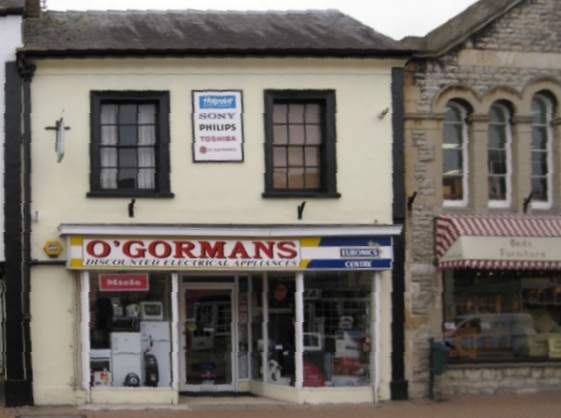
The result here is of poor quality because of starting from a low-res original, but given the original hi-res version, a reasonable result should be possible from an angled original. Good enough for some cropping and pasting at least.
Posted
Inactive Member
Thanks for the input…..I`ll have to check out some of the ideas proposed here. ie…software , pictures already available on the forum etc.
I`ll be back
:cheers Gormo
"Anyone who claims to have never made a mistake, never made anything!!"
https://sites.google.com/site/greatchesterfordmodelrailway/home
https://sites.google.com/site/greatchesterfordmodelrailway/home
Posted
Inactive Member
I have checked my software and I can do corrections as suggested. It`s a bit of a pain but it works.
The Prototype buildings section has quite a lot of material within and is a good source of material. The resolution is low of course, but I don`t think it matters that much for a background. I will have to print out some examples and see how they look.
The prototypes could also just be used as reference material and backgrounds could be made up by copying them and adding textures and parts etc.
I am considering drawing up a basic template with guide lines..eg..door heights, roof heights, window sizes etc which could be copied into the image manipulation software and then overlayed with textures, photographs or whatever. The fundamentals have to look to be the right size…..especially doors.
:cheers Gormo
"Anyone who claims to have never made a mistake, never made anything!!"
https://sites.google.com/site/greatchesterfordmodelrailway/home
https://sites.google.com/site/greatchesterfordmodelrailway/home
Posted
Full Member
Try searching for images of "Terraced houses", "Shop fronts", or even types of building, example
https://www.google.co.uk/?gws_rd=ssl#q=images+flint+and+brick+houses
from this pic :
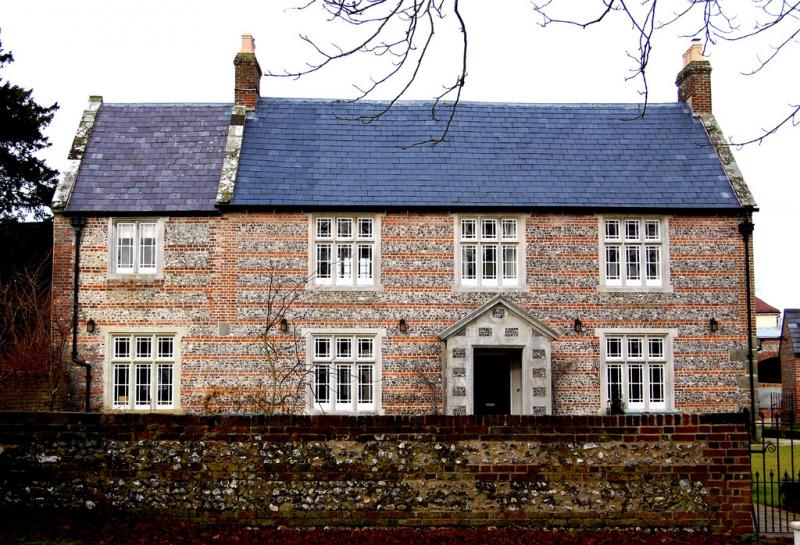
I produced this with a certain amount of work in photo editing software, and the addition of etched doors, windows, gate and fence with cast resin wall and gate pillars

Some of the images on Google may be copyright, you will usually see marks or text indicating this.
I've used shop front images from Google to alter some old printed back scenes from this
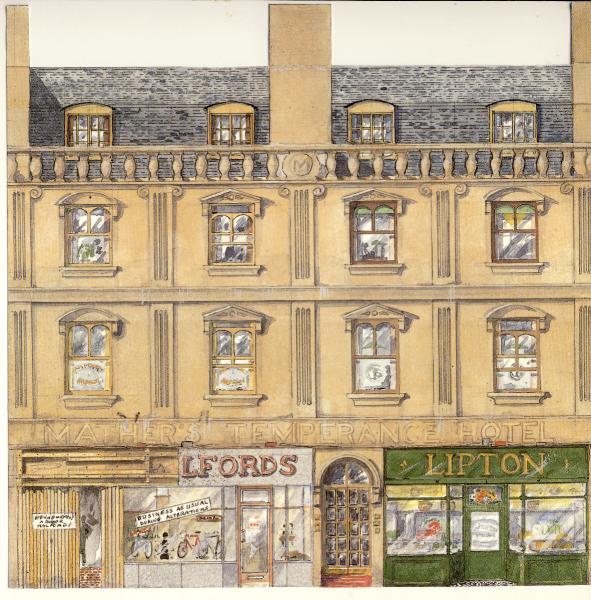
To this
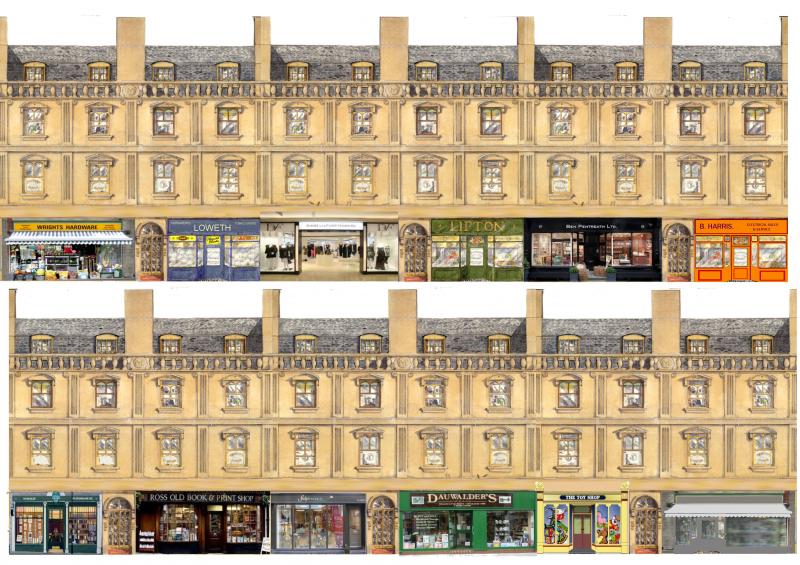
It's also easy to edit names on shop fronts, change colours, or add window adverts, compare the "Lipton's" with the orange B.Harris and grey/blue Loweth
You could also change the colour of the yellowish stonework to further disguise from the original.
As Gormo suggests templates for doors and windows are very useful to get dimensions correct, on buildings and low relief I tend to use etched doors and windows where possible so use them to determine sizes, can also hold them against backscenes to check.
Cheers MIKE
I'm like my avatar - a local ruin!
I'm like my avatar - a local ruin!
Posted
Inactive Member
Posted
Inactive Member
Dorsetmike…..good tips indeed mate….I`ve actually done some of what you suggest and it works a treat. I was not sure about the copyright though in as far as posting the backgrounds on this forum.
The little green shop on the far left in your last image….I`ve used that as well….found it on google images.
Obviously it does not matter what I do at home, but I was just concerned that if they are displayed on here in backgrounds, some one may put their hand up and say " Hey that`s my image, why are you doing that without permission"…..??????
The creative juices are starting to bubble…..I find this a very interesting topic
Bittern….I have received the pics……one word…..perfect !!!….I`ve sent you an email reply.
Thanks for taking the trouble to do that……it`s very much appreciated.
:cheers Gormo
"Anyone who claims to have never made a mistake, never made anything!!"
https://sites.google.com/site/greatchesterfordmodelrailway/home
https://sites.google.com/site/greatchesterfordmodelrailway/home
Posted
Inactive Member
Posted
Inactive Member
That sounds good…..I am looking forward to those pics.
I have cropped the first pic you sent me and dropped it into a scene.
I have not taken any care with this street scene example……I just wanted to see how it shaped up…..in effect … a test run only.
For those who don`t know which building Bittern sent me…..it`s the beauty on the far right. You can see I didn`t drop it in very well because I`ve cropped the right hand side. Not to worry….the original is intact and ready to go.
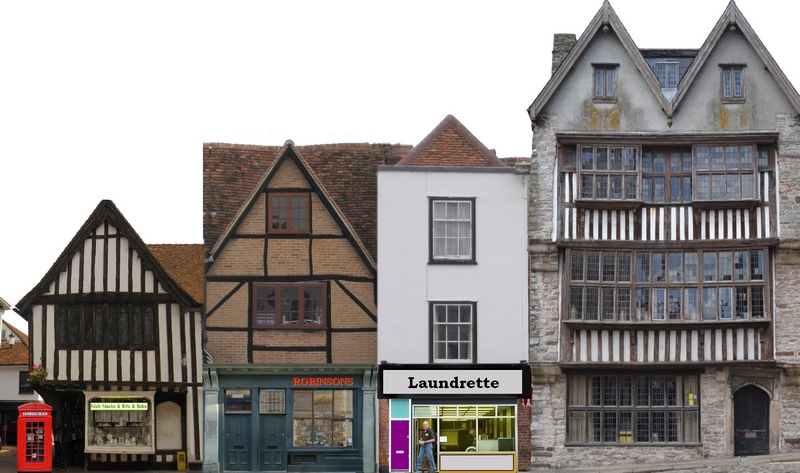
I`ve drawn up a simple template this afternoon to help me get the fundamental sizes correct. Really the most obvious things are the doors. In the scene above the Laundrette and Robinsons shop doors are just a tad too small. But these things can be fixed quite easily with the template.
So there you go….a bit more fudging and shaping and cropping to be done…..but basically…it`s going to work.
I think initially, once a scene is ready to be printed, I will print it onto an A4 label. Trim around all the roof tops and chimneys etc and then peel the back off and stick it to the wall.
I`m not sure how well it will stick, so probably a test run on something would be the best way to go instead of making a mess on the wall….we`ll see.
:cheers Gormo
PS…The distillery and warehouse sounds promising.
Last edit: by gormo
"Anyone who claims to have never made a mistake, never made anything!!"
https://sites.google.com/site/greatchesterfordmodelrailway/home
https://sites.google.com/site/greatchesterfordmodelrailway/home
Posted
Full Member
I`m not sure how well it will stick, so probably a test run on something would be the best way to go instead of making a mess on the wall….we`ll see.
I've been using A4 labels for a few years now, the main thing to watch is beware wrinkles, work carefully from one end, just peel back an inch or so of the backing, align carefully with the edge you're starting from then gradually peel the backing a bit at a time smoothing as you go.
For backscenes I usually start by sticking a sky scene at the top of the back board, then add the cut buildings or landscape to the bottom.
I have sky scenes about 3' long by 8.5" which is the biggest my printer will cope with.
Cheers MIKE
I'm like my avatar - a local ruin!
I'm like my avatar - a local ruin!
Posted
Inactive Member
Thanks for the info.
Have you ever had any problems with the A4 label lifting. In other words is the glue good enough for long term adhesion.??
:cheers Gormo
"Anyone who claims to have never made a mistake, never made anything!!"
https://sites.google.com/site/greatchesterfordmodelrailway/home
https://sites.google.com/site/greatchesterfordmodelrailway/home
Posted
Full Member
Vinyl is a bit better for following a profile than paper as it should stretch slightly.
Cheers MIKE
I'm like my avatar - a local ruin!
I'm like my avatar - a local ruin!
1 guest and 0 members have just viewed this.