
Free downloadable backdrop availability?
Posted

Full Member
Can anyone help?

This part of a backscene I did for one of the club layouts. the white rectangle are where low relief build are going.
view large image here http://i148.photobucket.com/albums/s16/hastran/Havantacloo%20Central/backscenesmall_zpsc57326bb.jpg
 Last edit: by hastran
Brian Taylor
info@smartdesign-u-need.com
www.smartmodels.co.uk
info@smartdesign-u-need.com
www.smartmodels.co.uk


Posted

Full Member

and did a copy paste with these
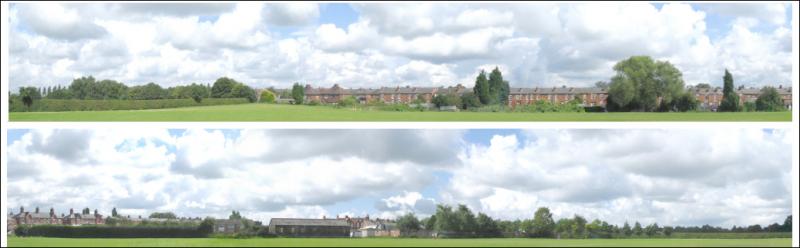
then played about with cut and paste, chroma masks, changing colours and clone tools to finish up with this, I still need to work on the sky so that it will match up with a sky sheet. The print out will be 900mm x 210mm on banner paper, a sky sheet of the same size will be mounted immediately above after chopping off the margins.

The trees on the hill at the right were copied with the clone tool from the trees among the houses, they help to disguise the join between the new sky and the original hill; for part of the level top of the hill I masked then copied the sloping bit of hill, pasted it in tilted so that it was level.
This was another treatment of the number 3 with bits of number 4 substituted
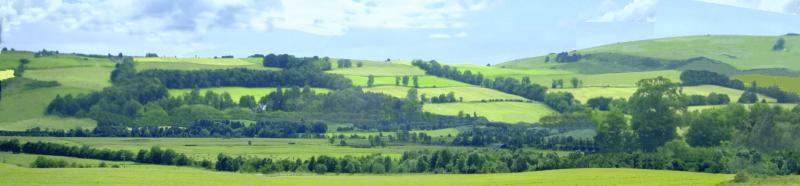
Cheers MIKE
I'm like my avatar - a local ruin!
I'm like my avatar - a local ruin!
Posted
Full Member
I mentioned chroma masks in the above post, I'm using a fairly old photo processing app called Micrografx Picture Publisher, I started using it in 1991 when I got my first scanner, that was v2, I'm now using the last version v10, Corel bought Micrografx and more or less buried it a few years back, it does all I need and the learning curve has been mastered; if that has a chroma mask then most other apps should have something similar.
Basically it allows me to select a colour or range of colours, say sky colours, blues, greys and white, it then masks all the colours selected, you can then copy the area so masked, or alter the colour balance, brightness, contrast, or cut it out, if you copy it you can then paste it elsewhere on the image or on another image, when pasting you can usually stretch, shrink or rotate it. if you paste it as a "new image" you can flip it horizontally, vertically or diagonally, then copy/paste it elsewhere. I use it mainly to alter colours, typically the sky on the Windward images, doesn't match the images of sky that I have, so I put both images on screen then I chroma mask the sky on the Windward image and then tweak the colour balance until I have a reasonable match. You can also invert the mask so that everthing except the selected colours is masked, so for example select the sky colours, invert the mask and copy everything except the sky; you have an image that has poor colours, selct the ones yu want to change in a chroma mask, then change the colur balance, contrast brightnes etc until you have the result you want.
I make a habit of copying doors and windows of kits, I'll make a number of copies of each and alter colours on some so I have a range of doors, windows etc ready for the next scratch build or kit bash.
There used to be some sky images linked from Scalescenes in a section about the South Oak Road layout, but links to it no longer work.
Cheers MIKE
I'm like my avatar - a local ruin!
I'm like my avatar - a local ruin!
Posted
Full Member

Windward backscene 4 as downloaded
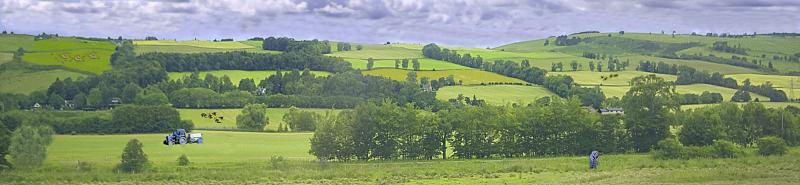
Modified colours, different sky, 2 lots of cows, 1 of sheep (towards top left), a tractor and a farmworker, an extra cottage (above farmworker). Some changes at the left to match onto another sheet. I think the tractor is a bit overscale, so will probably erase it and replace with a smaller version.
Changing the basic colour balance to get better greens screwed up the original sky so I masked out the original and pasted the hills onto part of a sky sheet.
I'm the same with locos and rolling stock, hardly anything is left as it comes out of the box - even if it's only renumbering!
I don't use Photoshop (refuse to pay Adobe's extortionate prices), the app I use is Picture Publisher, getting a bit ancient now but does what I want, I've been using it since version 2 in 1991, now on the last version, V10 issued after Corel bought out Micrografx in 2001 then they dropped it, incorporated some bits in their own apps. Now a few sites offer a free download of V10!
Cheers MIKE
I'm like my avatar - a local ruin!
I'm like my avatar - a local ruin!
Posted
Full Member
I think this is what Post 57 was inferring…
Doug
Last edit: by Chubber
'You may share the labours of the great, but you will not share the spoil…' Aesop's Fables
"Beer is proof that God loves us and wants us to be happy" - Benjamin Franklin
In the land of the slap-dash and implausible, mediocrity is king
"Beer is proof that God loves us and wants us to be happy" - Benjamin Franklin
In the land of the slap-dash and implausible, mediocrity is king
Posted
Full Member
I did have an Epson printer (it died) that you could load a roll into but it would only be 210mm or 8 and a quarter inches wide or high
 .
.To get a 297mm or roughly 11 and a half inches high you would need an A3 printer and they are serious money
. It would be cheaper to get the backscene printed at a specialist printers.Simon
Posted
Full Member
Cheers MIKE
I'm like my avatar - a local ruin!
I'm like my avatar - a local ruin!
Posted
Full Member
Thanks,
Doug
'You may share the labours of the great, but you will not share the spoil…' Aesop's Fables
"Beer is proof that God loves us and wants us to be happy" - Benjamin Franklin
In the land of the slap-dash and implausible, mediocrity is king
"Beer is proof that God loves us and wants us to be happy" - Benjamin Franklin
In the land of the slap-dash and implausible, mediocrity is king
Posted
Full Member
Cheers MIKE
I'm like my avatar - a local ruin!
I'm like my avatar - a local ruin!
Posted
Full Member
Posted
Full Member
I just checked the files that Ken sent me and I posted as a group of over twenty of them back in May 2012. The average size seems to be about 12-15Kb.
The problem is that at that size, they will not take much enlargement if at all because of their low size and other Internet versions are generally speaking not going to be large either
When I started the thread, I guess I was thinking that we could get some "panoramic views" that could be strung together so we could all share them.
Gormo has another thread related to buildings which could be applied to scenes and when I get time, I will sit down and play around with pix I have taken and merge them perhaps with other areas… at the moment I really need to be asleep between the hours of 3 and 5 in the morning!
Cheers
Trevor ( the one in Oz)
Last edit: by xdford
Posted

Inactive Member
If you google " british countryside panoramas " and click on images, there are quite a few images with very large resolutions. For example….one of the bigger ones….12537 x 3035 and below a typical panorama
:cheers Gormo
"Anyone who claims to have never made a mistake, never made anything!!"
https://sites.google.com/site/greatchesterfordmodelrailway/home
https://sites.google.com/site/greatchesterfordmodelrailway/home
Posted
Full Member
http://windward.f1p.co.uk/download/pages/Backscenes.html.
Last edit: by Dorsetmike
Cheers MIKE
I'm like my avatar - a local ruin!
I'm like my avatar - a local ruin!
Posted
Inactive Member
Thanks for the info and have a nice day!!!
:cheers Gormo
"Anyone who claims to have never made a mistake, never made anything!!"
https://sites.google.com/site/greatchesterfordmodelrailway/home
https://sites.google.com/site/greatchesterfordmodelrailway/home
1 guest and 0 members have just viewed this.